



This guide explains how to make HTTP GET requests using the
HttpClient
module in Angular. The Angular introduced the
HttpClient
Module in Angular 4.3. It is part of the package
@angular/common/http
. In this tutorial, let us build an HTTP GET example app, which sends the HTTP Get request to GitHub repository using the
GitHub API
.
Table of Contents
HTTP Get Example
Create a new Angular App.
|
1
2
3
|
ng
new
httpGet
|
Import HttpClientModule
To make HTTP Get request, we need to make use of the
HttpClientModule
, which is part of the package
@angular/common/http
. Open the
app.module.ts
and import it. Also, import the
FormsModule
You must also include it in the the
imports
array as shown below.
|
1
2
3
4
5
6
7
8
9
10
11
12
13
14
15
16
17
18
19
20
21
22
23
24
25
|
import
{
BrowserModule
}
from
'@angular/platform-browser'
;
import
{
NgModule
}
from
'@angular/core'
;
import
{
HttpClientModule
}
from
'@angular/common/http'
;
import
{
FormsModule
}
from
'@angular/forms'
import
{
AppRoutingModule
}
from
'./app-routing.module'
;
import
{
AppComponent
}
from
'./app.component'
;
import
{
GitHubService
}
from
'./github.service'
;
@
NgModule
(
{
declarations
:
[
AppComponent
]
,
imports
:
[
BrowserModule
,
AppRoutingModule
,
HttpClientModule
,
FormsModule
]
,
providers
:
[
GitHubService
]
,
bootstrap
:
[
AppComponent
]
}
)
export
class
AppModule
{
}
|
Model
Create
repos.ts
file and add the following code. This is a simplified model for the GitHub repository.
|
1
2
3
4
5
6
7
8
|
export
class
repos
{
id
:
string
;
name
:
string
;
html_url
:
string
;
description
:
string
;
}
|
HTTP GET Service
Let us create a service to handle the HTTP Request. Create a new file
github.service.ts
and copy the following code.
|
1
2
3
4
5
6
7
8
9
10
11
12
13
14
15
16
17
18
19
20
21
22
23
|
import
{
Injectable
}
from
'@angular/core'
;
import
{
HttpClient
,
HttpParams
,
HttpHeaders
}
from
'@angular/common/http'
;
import
{
Observable
,
throwError
}
from
'rxjs'
;
import
{
map
,
catchError
}
from
'rxjs/operators'
;
import
{
repos
}
from
'./repos'
;
@
Injectable
(
)
export
class
GitHubService
{
baseURL
:
string
=
"https://api.github.com/"
;
constructor
(
private
http
:
HttpClient
)
{
}
getRepos
(
userName
:
string
)
:
Observable
<
any
>
{
return
this
.
http
.
get
(
this
.
baseURL
+
'users/'
+
userName
+
'/repos'
)
}
}
|
First, we import the required libraries. The
HttpClient
is the main service, which Performs the HTTP requests like
GET
,
PUT
,
POST
, etc. We need to inject this into our
GitHubService
. Also, import
HttpParams
which helps us to
add Query Parameters in an HTTP Request
. Import HTTP Headers using the
HttpHeaders
which allows us to add HTTP Headers to the request.
|
1
2
3
|
import
{
HttpClient
,
HttpParams
,
HttpHeaders
}
from
'@angular/common/http'
;
|
The
HttpClient
service makes use of
RxJs observable
, Hene we import
Observable
,
throwError
& RxJs Operators like
map
&
catchError
|
1
2
3
4
|
import
{
Observable
,
throwError
}
from
'rxjs'
;
import
{
map
,
catchError
}
from
'rxjs/operators'
;
|
The URL endpoint is hardcoded in our example, But you can make use of a config file to store the value and read it using the APP_INITIALIZER token
|
1
2
3
|
baseURL
:
string
=
"https://api.github.com/"
;
|
We inject the
HttpClient
using the
Dependency Injection
|
1
2
3
4
|
constructor
(
private
http
:
HttpClient
)
{
}
|
Finally, we use the
get
method of the
httpclient
to make an HTTP Get request to GitHub.
The
https://api.github.com/users/<username>?repos
endpoint returns the list of Repositories belonging to the user
<userName>
|
1
2
3
4
5
6
|
//Any Data Type
getRepos
(
userName
:
string
)
:
Observable
<
any
>
{
return
this
.
http
.
get
(
this
.
baseURL
+
'users/'
+
userName
+
'/repos'
)
}
|
Note that
httpclient.get
method returns the
observable
. Hence we need to
subscribe
to it to get the data.
Component
The following is the code from
app.component.ts
|
1
2
3
4
5
6
7
8
9
10
11
12
13
14
15
16
17
18
19
20
21
22
23
24
25
26
27
28
29
30
31
32
33
34
35
36
37
38
39
40
41
|
import
{
Component
}
from
'@angular/core'
;
import
{
GitHubService
}
from
'./github.service'
;
import
{
repos
}
from
'./repos'
;
@
Component
(
{
selector
:
'app-root'
,
templateUrl
:
'./app.component.html'
,
}
)
export
class
AppComponent
{
userName
:
string
=
"tektutorialshub"
repos
:
repos
[
]
;
loading
:
boolean
=
false
;
errorMessage
;
constructor
(
private
githubService
:
GitHubService
)
{
}
public
getRepos
(
)
{
this
.
loading
=
true
;
this
.
errorMessage
=
""
;
this
.
githubService
.
getRepos
(
this
.
userName
)
.
subscribe
(
(
response
)
=
>
{
//next() callback
console
.
log
(
'response received'
)
this
.
repos
=
response
;
}
,
(
error
)
=
>
{
//error() callback
console
.
error
(
'Request failed with error'
)
this
.
errorMessage
=
error
;
this
.
loading
=
false
;
}
,
(
)
=
>
{
//complete() callback
console
.
error
(
'Request completed'
)
//This is actually not needed
this
.
loading
=
false
;
}
)
}
}
|
We subscribe to the
getRepos()
method in our component class. Only when we subscribe to the observable, the
HTTP GET
request is sent to the back end server.
|
1
2
3
4
|
this
.
githubService
.
getRepos
(
this
.
userName
)
.
subscribe
(
)
;
|
When we subscribe to any observable, we optionally pass the three callbacks.
next()
,
error()
&
complete()
.
Next()
callback is where we get the result of the
observable
. In this example the list of repositories for the given user.
|
1
2
3
4
5
6
|
(
response
)
=
>
{
//next() callback
console
.
log
(
'response received'
)
this
.
repos
=
response
;
}
|
The
observable
can also result in an error. It will invoke the
error()
callback and pass the error object. The
observables
stop after emitting the error signal.
|
1
2
3
4
5
6
7
|
(
error
)
=
>
{
//error() callback
console
.
error
(
'Request failed with error'
)
this
.
errorMessage
=
error
;
this
.
loading
=
false
;
}
,
|
When the observable completes, it will call the
complete()
callback.
There is no need for this call back as the subscription completes when the data is received.
|
1
2
3
4
5
6
|
(
)
=
>
{
//complete() callback
console
.
log
(
'Request completed'
)
this
.
loading
=
false
;
}
)
|
Best Angular Books
The Top 8
Best Angular Books
, which helps you to get started with Angular
Loading Indicator
We create a variable
loading=true
just before subscribing to the
GET
request. When the
observable
completes or an error occurs, we make it
false
. This helps us to show some kind of loading indicator to users, while we wait for the response.
Template
|
1
2
3
4
5
6
7
8
9
10
11
12
13
14
15
16
17
18
19
20
21
22
23
24
25
26
27
28
29
30
31
32
33
34
35
36
37
38
39
40
|
<
h1
class
=
"heading"
>
<
strong
>
HTTP
<
/
strong
>
Demo
<
/
h1
>
<
div
class
=
"form-group"
>
<
label
for
=
"userName"
>
GitHub
User
Name
<
/
label
>
<
input
type
=
"text"
class
=
"form-control"
name
=
"userName"
[
(
ngModel
)
]
=
"userName"
>
<
/
div
>
<
div
class
=
"form-group"
>
<
button
type
=
"button"
(
click
)
=
"getRepos()"
>
Get
Repos
<
/
button
>
<
/
div
>
<
div
*
ngIf
=
"loading"
>
loading
.
.
.
<
/
div
>
<
div
*
ngIf
=
"errorMessage"
class
=
"alert alert-warning"
>
<
strong
>
Warning
!
<
/
strong
>
{
{
errorMessage
|
json
}
}
<
/
div
>
<
table
class
=
'table'
>
<
thead
>
<
tr
>
<
th
>
ID
<
/
th
>
<
th
>
Name
<
/
th
>
<
th
>
HTML
Url
<
/
th
>
<
th
>
description
<
/
th
>
<
/
tr
>
<
/
thead
>
<
tbody
>
<
tr
*
ngFor
=
"let repo of repos;"
>
<
td
>
{
{
repo
.
id
}
}
<
/
td
>
<
td
>
{
{
repo
.
name
}
}
<
/
td
>
<
td
>
{
{
repo
.
html_url
}
}
<
/
td
>
<
td
>
{
{
repo
.
description
}
}
<
/
td
>
<
/
tr
>
<
/
tbody
>
<
/
table
>
<
pre
>
{
{
repos
|
json
}
}
<
/
pre
>
|
The template is very simple
We first ask for the
userName
. We use the two-way data binding to sync userName
[(ngModel)]="userName"
with the
userName
property in the component class.
|
1
2
3
4
5
6
|
<
div
class
=
"form-group"
>
<
label
for
=
"userName"
>
GitHub
User
Name
<
/
label
>
<
input
type
=
"text"
class
=
"form-control"
name
=
"userName"
[
(
ngModel
)
]
=
"userName"
>
<
/
div
>
|
getRepos()
method subscribes to the HTTP get method.
|
1
2
3
4
5
|
<
div
class
=
"form-group"
>
<
button
type
=
"button"
(
click
)
=
"getRepos()"
>
Get
Repos
<
/
button
>
<
/
div
>
|
We show a loading message until the observable returns response or an error.
|
1
2
3
|
<
div
*
ngIf
=
"loading"
>
loading
.
.
.
<
/
div
>
|
Show the error message.
|
1
2
3
4
5
|
<
div
*
ngIf
=
"errorMessage"
class
=
"alert alert-warning"
>
<
strong
>
Warning
!
<
/
strong
>
{
{
errorMessage
|
json
}
}
<
/
div
>
|
The last line shows the response as it is received.
|
1
2
3
|
<
pre
>
{
{
repos
|
json
}
}
<
/
pre
>
|
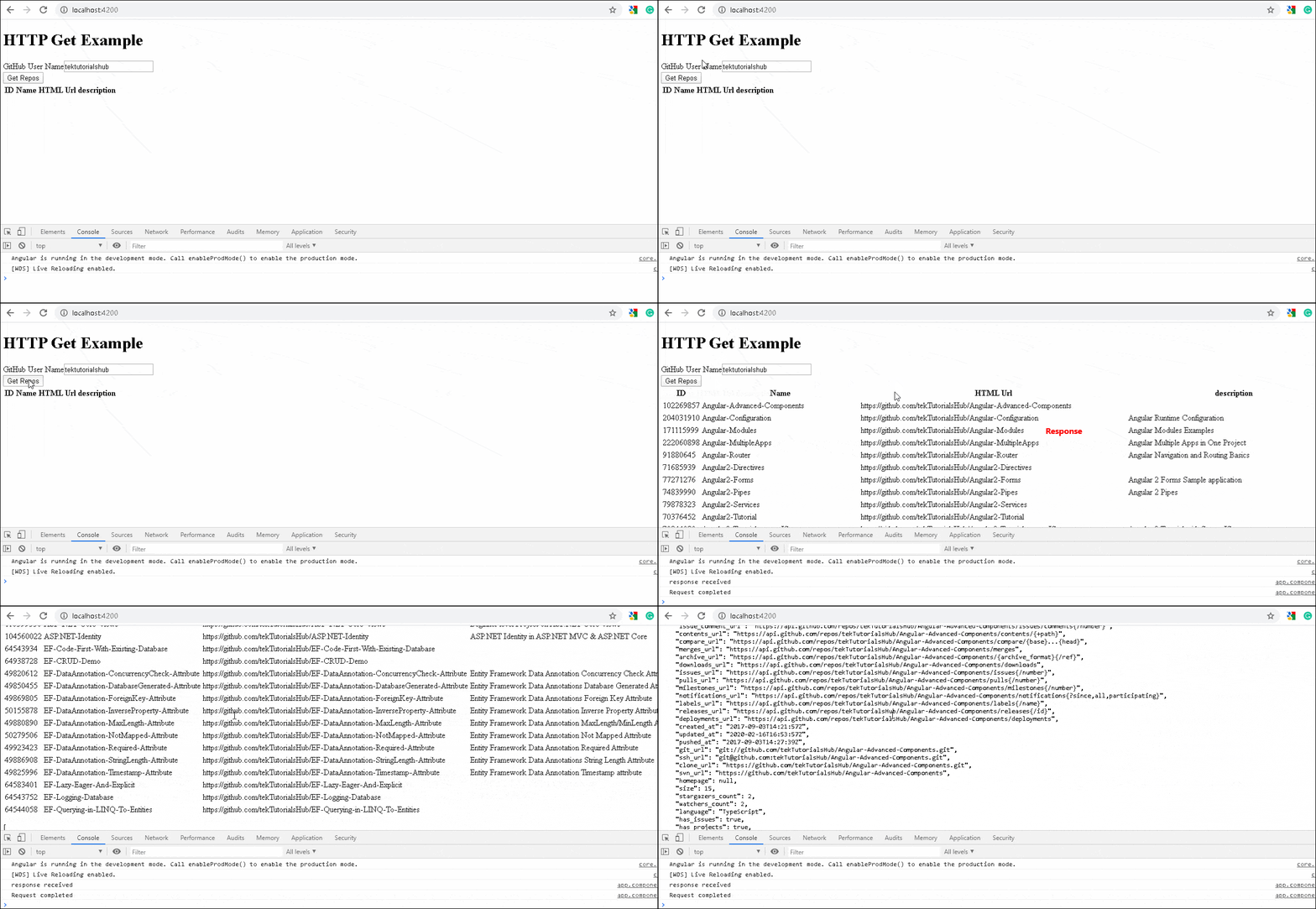
HTTP Get in Action
Now, run the app, you should able to make a successful GET Request.
Get Syntax
The above code is a very simple example of the HTTP
get()
method. The complete syntax of the
get()
method is as shown below. It has second argument
options
, where we can pass the HTTP headers, parameters, and other options to control how the
get()
method behaves.
|
1
2
3
4
5
6
7
8
9
10
11
|
get
(
url
:
string
,
options
:
{
headers
?
:
HttpHeaders
|
{
[
header
:
string
]
:
string
|
string
[
]
;
}
;
params
?
:
HttpParams
|
{
[
param
:
string
]
:
string
|
string
[
]
;
}
;
observe
?
:
"body|events|response|"
;
responseType
:
"arraybuffer|json|blob|text"
;
reportProgress
?
:
boolean
;
withCredentials
?
:
boolean
;
}
)
:
Observable
<
>
|
-
headers :use this to send the HTTP Headers along with the request -
params:set query strings / URL parameters -
observe:This option determines the return type. -
responseType:The value of responseType determines how the response is parsed. -
reportProgress:Whether this request should be made in a way that exposes progress events . -
withCredentials:Whether this request should be sent with outgoing credentials (cookies).
observe
The GET method returns one of the following
-
Complete
response -
bodyof the response -
events.
By default, it returns the
body
as shown in our example app.
Complete Response
The following code will return the complete
response
and not just the
body
|
1
2
3
4
5
|
getReposRawResponse
(
userName
:
string
)
:
Observable
<
any
>
{
return
this
.
http
.
get
(
this
.
baseURL
+
'users/'
+
userName
+
'/repos'
,
{
observe
:
'response'
}
)
}
|
The complete response is as follows.
|
1
2
3
4
5
6
7
8
9
10
11
12
13
14
15
16
17
18
19
20
|
{
"headers"
:
{
"normalizedNames"
:
{
}
,
"lazyUpdate"
:
null
}
,
"status"
:
200
,
"statusText"
:
"OK"
,
"url"
:
"https://api.github.com/users/tektutorialshub/repos"
,
"ok"
:
true
,
"type"
:
4
,
"body"
:
[
{
"id"
:
102269857
,
******************
Removed
for
clarity
*****
}
]
}
|
events
You can also listen to progress events by using the
{ observe: 'events', reportProgress: true }
. You can read about
observe the response
|
1
2
3
4
5
|
getReposRawResponse
(
userName
:
string
)
:
Observable
<
any
>
{
return
this
.
http
.
get
(
this
.
baseURL
+
'users/'
+
userName
+
'/repos'
,
{
observe
:
'events'
,
reportProgress
:
true
}
)
}
|
Response Type
The
responseType
determines how the response is parsed. it can be one of the
arraybuffer
,
json
blob
or
text
. The default behavior is to parse the response as JSON.
Strongly typed response
Instead of
any
, we can also use a
type
as shown below
|
1
2
3
4
5
|
getReposTypedResponse
(
userName
:
string
)
:
Observable
<
repos
[
]
>
{
return
this
.
http
.
get
<
repos
[
]
>
(
this
.
baseURL
+
'users/'
+
userName
+
'/repos'
)
}
|
String as Response Type
The API may return a simple text rather than a JSON. Use
responsetype: 'text'
to ensure that the response is parsed as a string.
|
1
2
3
4
5
|
getReposTypedResponse
(
userName
:
string
)
:
Observable
<
repos
[
]
>
{
return
this
.
http
.
get
<
repos
[
]
>
(
this
.
baseURL
+
'users/'
+
userName
+
'/repos'
,
{
responsetype
:
'text'
}
)
}
|
Catching Errors
The API might fail with an error. You can catch those errors using
catchError
. You either handle the error or throw it back to the component using the
throw err
|
1
2
3
4
5
6
7
8
9
10
11
12
|
getReposCatchError
(
userName
:
string
)
:
Observable
<
repos
[
]
>
{
return
this
.
http
.
get
<
repos
[
]
>
(
this
.
baseURL
+
'usersY/'
+
userName
+
'/repos'
)
.
pipe
(
catchError
(
(
err
)
=
>
{
console
.
error
(
err
)
;
throw
err
;
}
)
)
}
|
Read more about error handling from Angular HTTP interceptor error handling
Transform the Response
You can make use of the
map
,
filter
RxJs Operators to manipulate or transform the response before sending it to the component.
|
1
2
3
4
5
6
7
8
9
10
11
12
13
14
15
16
17
|
getReposMap
(
userName
:
string
)
:
Observable
<
repos
[
]
>
{
return
this
.
http
.
get
<
repos
[
]
>
(
this
.
baseURL
+
'users/'
+
userName
+
'/repos'
)
.
pipe
(
map
(
(
data
)
=
>
{
//You can perform some transformation here
return
data
;
}
)
,
catchError
(
(
err
,
caught
)
=
>
{
console
.
error
(
err
)
;
throw
err
;
}
)
)
}
|
URL Parameters
The
URL Parameters or Query strings
can be added to the request easily using the
HttpParams
option. All you need to do is to create a new
HttpParams
class and add the parameters as shown below.
|
1
2
3
4
5
6
7
8
9
10
11
12
13
14
15
16
17
18
19
20
21
|
//URL Parameter
getReposUrlParameter
(
userName
:
string
)
:
Observable
<
repos
[
]
>
{
const
params
=
new
HttpParams
(
)
.
set
(
'sort'
,
"description"
)
.
set
(
'page'
,
"2"
)
;
return
this
.
http
.
get
<
repos
[
]
>
(
this
.
baseURL
+
'users/'
+
userName
+
'/repos'
,
{
'params'
:
params
}
)
.
pipe
(
map
(
(
response
)
=
>
{
return
response
;
}
)
,
catchError
(
(
err
,
caught
)
=
>
{
console
.
error
(
err
)
;
throw
err
;
}
)
)
}
|
The above code sends the GET request to the URL
https://api.github.com/users/tektutorialshub/repos?sort=description&page=2
The following code also works.
|
1
2
3
4
5
6
7
8
9
10
11
12
13
14
15
|
getReposUrlParameter
(
userName
:
string
)
:
Observable
<
repos
[
]
>
{
return
this
.
http
.
get
<
repos
[
]
>
(
this
.
baseURL
+
'users/'
+
userName
+
'/repos?sort=description&page=2'
)
.
pipe
(
map
(
(
response
)
=
>
{
return
response
;
}
)
,
catchError
(
(
err
,
caught
)
=
>
{
console
.
error
(
err
)
;
throw
err
;
}
)
)
}
|
HTTP Headers
You can also add HTTP Headers using the
HttpHeaders
option as shown below. You can make use of the
Http Interceptor to set the common headers
.
|
1
2
3
4
5
6
7
8
9
10
11
12
13
14
15
16
17
18
19
20
21
22
23
24
25
|
//HTTP Headers
getReposHeaders
(
userName
:
string
)
:
Observable
<
repos
[
]
>
{
const
params
=
new
HttpParams
(
)
.
set
(
'sort'
,
"description"
)
.
set
(
'page'
,
"2"
)
;
const
headers
=
new
HttpHeaders
(
)
.
set
(
'Content-Type'
,
'application/json'
)
return
this
.
http
.
get
<
repos
[
]
>
(
this
.
baseURL
+
'users/'
+
userName
+
'/repos'
,
{
'params'
:
params
,
'headers'
:
headers
}
)
.
pipe
(
map
(
(
response
)
=
>
{
return
response
;
}
)
,
catchError
(
(
err
,
caught
)
=
>
{
console
.
error
(
err
)
;
throw
err
;
}
)
)
}
|
You can send cookies with every request using the
withCredentials=true
as shown below. You can make use of the
Http Interceptor
to set the
withCredentials=true
for all requests.
|
1
2
3
4
5
6
7
8
9
10
11
12
13
14
15
16
17
18
19
20
21
22
23
24
25
|
//With Credentials
getReposWithCookies
(
userName
:
string
)
:
Observable
<
repos
[
]
>
{
const
params
=
new
HttpParams
(
)
.
set
(
'sort'
,
"description"
)
.
set
(
'page'
,
"2"
)
;
const
headers
=
new
HttpHeaders
(
)
.
set
(
'Content-Type'
,
'application/json'
)
return
this
.
http
.
get
<
repos
[
]
>
(
this
.
baseURL
+
'users/'
+
userName
+
'/repos'
,
{
'params'
:
params
,
'headers'
:
headers
,
withCredentials
:
true
}
)
.
pipe
(
map
(
(
response
)
=
>
{
return
response
;
}
)
,
catchError
(
(
err
,
caught
)
=
>
{
console
.
error
(
err
)
;
throw
err
;
}
)
)
}
|
Summary
This guide explains how to make use of HTTP get in Angular using an example app. In the next tutorial, we will look at the HTTP post method.
Great explanation … thanks
Great job , thank you so much fram France.
I’m facing issues in downloading files as Zip using angular 13.
It downloads as zip but looks like zip file gets corrupted.
But the zip file has size. Any help is much appreciated.
explained well in every part of angular
This tutorial is nothing but excellent. Thanks for the good work!
For those who have not gone through the introduction to HttpModule your application might throw an error because the missing providers [] declaration in either the component or the ngModule class
Great use case. Well working example. This saved me. Thanks a lot.
Great use case example. Thks
very well explained