Error response from daemon: Dockerfile parse error line xxx: unknown instruction: xxx
這是在將環境建構的腳本改寫成Dockerfile時所出現的錯誤。
經查詢的結果發現,原本在Linux環境裡可以運行的多行指令,到了Dockerfile,必須用\相連才可以運行。
Sending build context to Docker daemon 154.2MB
Error response from daemon: Dockerfile parse error line 11: unknown instruction: WGET
以下是造成這個錯誤的Dockerfile:
FROM ubuntu:16.04
RUN apt-get -y update
RUN apt-get install -y wget bzip2
RUN apt-get install -y wget && if [[ "$TRAVIS_PYTHON_VERSION" == "2.7" ]]; then
wget https://repo.continuum.io/miniconda/Miniconda2-latest-Linux-x86_64.sh -O miniconda.sh;
wget https://repo.continuum.io/miniconda/Miniconda3-latest-Linux-x86_64.sh -O miniconda.sh;
看到了Error response from daemon: Dockerfile parse error line 1: unknown instruction: #中jbrahy的回答,才發現在Dockerfile解析的過程中,wget xxx似乎被視為一條獨立的指令,也難怪錯誤訊息會說unknown instruction: WGET。
Best practices for writing Dockerfiles - RUN中說明如果需要在RUN後面使用多行的命令時,需要在結尾加上\,這樣他們才會被視為一道指令。
以下是修改過後的Dockerfile:
FROM ubuntu:16.04
RUN apt-get -y update
RUN apt-get install -y wget bzip2
RUN apt-get install -y wget && if [[ "$TRAVIS_PYTHON_VERSION" == "2.7" ]]; then \
wget https://repo.continuum.io/miniconda/Miniconda2-latest-Linux-x86_64.sh -O miniconda.sh; \
else \
wget https://repo.continuum.io/miniconda/Miniconda3-latest-Linux-x86_64.sh -O miniconda.sh; \
使用docker build . -t xxx的執行結果:
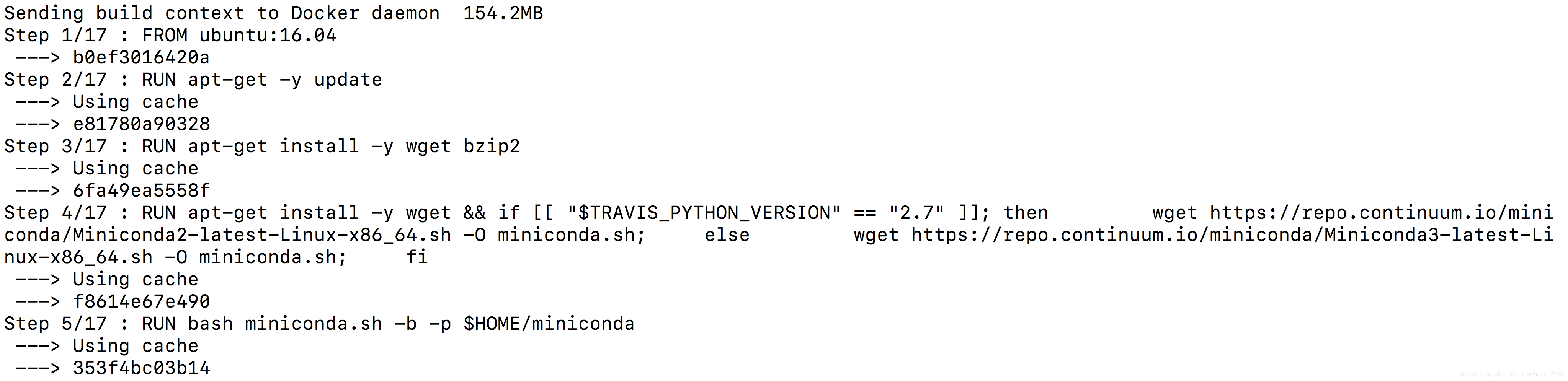
可以看到RUN apt-get install -y wget ...原來分散在多行的指令到了這裡(Step 4/17)這壓縮成一行來執行。
Error response from daemon: Dockerfile parse error line 1: unknown instruction: #
Best practices for writing Dockerfiles - RUN
Error response from daemon:…latest not found解决办法
使用docker pull fmcalcagno/maskrcnn-benchmark时,总是得到以下提示,在更换其他image后同样还是出现这个问题,目前已解决这个问题,在此分享给各位需要的人士。
具体的错误如下,笔者pull的image是fmcalcagno/maskrcnn-benchmark。...
删除docker swarm下的节点报错:
Error response from daemon: rpc error: code = FailedPrecondition desc = node y2qsyjdbfmm4tjwh4p9wqlmq1 is not down and can’t be removed
解决(需要把active状态的节点的docker服务关闭;同时在manager节点中修改掉该节点的AVAILABILITY状态):
[vagrant@centos-node2 ~]$ sudo service docker stop
Redirecting to /bin/syste
Sending build context to
Docker daemon 2.56kB
Error response from
daemon:
dockerfile parse error line 1:
unknown instruction: M
dockerfile第一行有问题,看下是不是只复制到了m
问题描述:我在外边编写好了docekerFile文件以后,然后复制到 linux里边并保存出来。
然后再使用镜像构建命令构建镜像,就报错Error response from daemon: Unknown instruction: FROM CENTOS
仔细看看,里边的内容也没错呀。
# #问题原因
可能是因为编码格式的原因
# #解决方案
在stackov...
运行Dockerfile报错:ERROR: failed to solve: process “/bin/sh -c sed -ri ‘s#archive.ubuntu.com...exit code
build context to Docker daemon 3.314GB
意思是:正在将生成上下文发送到Docker守护程序。如果dockerfile的同级目录文件过多过大,docker build的时候会向上下文环境发送,导致很慢,这个时候的解决办法有:
1.使用.dockerignore文件,设置黑名单,该文件包含的目录不会被发送到Docker daemon中
2.将Dockerfile迁移后其他目录中执行。
3.将不需要的文件删除
这里以第一种方法为例,给出解决demo
如果build命令.
有个项目是公司那边做的,我们这边需要部署一下。具体是用docker swarm部署在虚拟机的centos7上的,部署完没有发现啥问题,然后打了个镜像。但是过了几天发现一些问题:
1. 恢复镜像后,启动系统显示登录已过期
原因: 每次快照恢复后虚拟机里的时间是打快照时的时间,没有更新。
解决方法: 公司那边提供的方法时开启vmware tools的自动更新时间功能。
但是虚拟机没有安装vmware tools,搞了一会子没装好,所以进行了手动更新:
# 1、清理本地yum缓存
yum clean all
Cannot connect to the Docker daemon at unix:///var/run/docker.sock. Is the docker daemon running?錯誤
10760


