QLineEdit通用属性如下:
-
border
-
border-radius
-
margin
-
padding
-
background
-
color
-
font
-
border-image
QLineEdit特有属性如下:
QLabel常用伪状态如下:
简单定义QLabel在Normal、有输入掩码、ReadOnly、Disabled和有ClearButton下的样式。
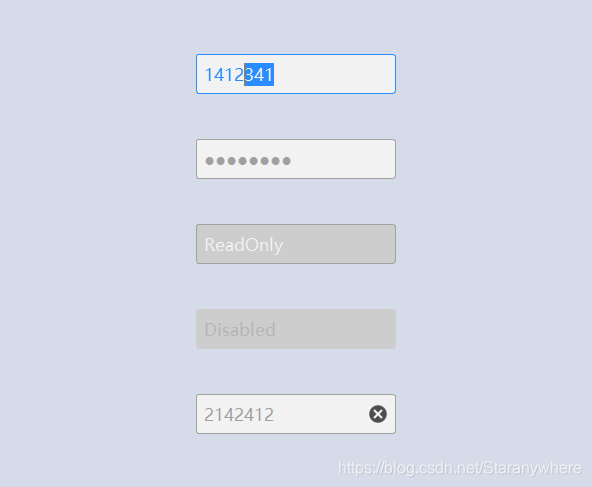
如何使用样式表,请参考
QSS系列:设置样式表
outline
:
none
;
QDialog
{
background
:
#D6DBE9
;
QLineEdit
{
border
:
1px solid #A0A0A0
;
border-radius
:
3px
;
padding-left
:
5px
;
background-color
:
#F2F2F2
;
color
:
#A0A0A0
;
selection-background-color
:
#A0A0A0
;
selection-color
:
#F2F2F2
;
font-family
:
"Microsoft YaHei"
;
font-size
:
10pt
;
QLineEdit:hover
{
border
:
1px solid #298DFF
;
border-radius
:
3px
;
background-color
:
#F2F2F2
;
color
:
#298DFF
;
selection-background-color
:
#298DFF
;
selection-color
:
#F2F2F2
;
QLineEdit[echoMode="2"]
{
lineedit-password-character
:
9679
;
lineedit-password-mask-delay
:
2000
;
QLineEdit:disabled
{
border
:
1px solid #CDCDCD
;
background-color
:
#CDCDCD
;
color
:
#B4B4B4
;
QLineEdit:read-only
{
background-color
:
#CDCDCD
;
color
:
#F2F2F2
;
#include "MainWindow.h"
#include <QtWidgets/QApplication>
#include <QFile>
int main(int argc, char *argv[])
QApplication a(argc, argv);
QFile styleFile(":/Resource/DefaultTheme");
if (styleFile.open(QIODevice::ReadOnly))
QString string = styleFile.readAll();
qApp->setStyleSheet(string);
MainWindow w;
w.show();
return a.exec();
- MainWindow.h、MainWindow.cpp
#ifndef MainWindow_H
#define MainWindow_H
#include <QDialog>
#include <QLineEdit>
#define FIXED_WIDTH 200
#define FIXED_HEIGHT 40
class MainWindow : public QDialog
Q_OBJECT
public:
MainWindow(QWidget *parent = Q_NULLPTR);
private:
void Init();
private:
QLineEdit *m_pNormalEdit;
QLineEdit *m_pEchoEdit;
QLineEdit *m_pReadOnlyEdit;
QLineEdit *m_pDisabledEdit;
QLineEdit *m_pClearEdit;
#endif
#include "MainWindow.h"
#include <QBoxLayout>
MainWindow::MainWindow(QWidget *parent)
: QDialog(parent)
Init();
void MainWindow::Init()
m_pNormalEdit = new QLineEdit(this);
m_pNormalEdit->setFixedSize(FIXED_WIDTH, FIXED_HEIGHT);
m_pEchoEdit = new QLineEdit(this);
m_pEchoEdit->setFixedSize(FIXED_WIDTH, FIXED_HEIGHT);
m_pEchoEdit->setEchoMode(QLineEdit::Password);
m_pReadOnlyEdit = new QLineEdit(this);
m_pReadOnlyEdit->setFixedSize(FIXED_WIDTH, FIXED_HEIGHT);
m_pReadOnlyEdit->setReadOnly(true);
m_pReadOnlyEdit->setText("ReadOnly");
m_pDisabledEdit = new QLineEdit(this);
m_pDisabledEdit->setFixedSize(FIXED_WIDTH, FIXED_HEIGHT);
m_pDisabledEdit->setEnabled(false);
m_pDisabledEdit->setText("Disabled");
m_pClearEdit = new QLineEdit(this);
m_pClearEdit->setFixedSize(FIXED_WIDTH, FIXED_HEIGHT);
m_pClearEdit->setClearButtonEnabled(true);
QVBoxLayout *pLayout = new QVBoxLayout;
pLayout->addWidget(m_pNormalEdit, 1, Qt::AlignHCenter);
pLayout->addWidget(m_pEchoEdit, 1, Qt::AlignHCenter);
pLayout->addWidget(m_pReadOnlyEdit, 1, Qt::AlignHCenter);
pLayout->addWidget(m_pDisabledEdit, 1, Qt::AlignHCenter);
pLayout->addWidget(m_pClearEdit, 1, Qt::AlignHCenter);
pLayout->setSpacing(10);
pLayout->setContentsMargins(10, 10, 10, 10);
this->setLayout(pLayout);
this->setMinimumSize(600, 500);
参考Qt助手,如有错误,请指正,谢谢!
QSS系列:自定义QLineEdit简述常用属性和伪状态效果图QSS源码参考简述本文将通过简单示例介绍QLineEdit样式如何自定义。常用属性和伪状态QLineEdit通用属性如下:borderborder-radiusmarginpaddingbackgroundcolorfontborder-imageQLineEdit特有属性如下:lineedit-password-characterThe QLineEdit password character as a Un
QLineEdit其实是支持动态显示删除按钮的,现代UI也都是采用这种方式的。通过函数
filterLineEdit->setClearButtonEnabled(true);
但是这个自带的按钮是黑白的,我们想改掉它的icon图片,那么就需要得到这个内置的删除按钮,而这个删除按钮不对外开放,我们需要通过
findChild 函数把这个控件找出来,对它进行setIcon操作,就可以了。
此外,还可以给QLineEdit在前后增加action,用addAction函数就可以。示例代码如下:
QLineEdit,QTextEdit {/*控件初始化的设置*/
border: 1px solid #32435E;
border-radius: 5px; /*控件边框的弧度,数值越大,则弯曲得越厉害*/
/* padding: 0 8px; */
background: qlineargradient(x1: 0, y1: 0, x2: 0, y2: 1, /*背景*/
stop: 0 #113845,
stop: 1.0 #15A8FF);
selection-background-color: #0A246A;
QLineEdit::hover{/*当鼠标经过控件上方时,控件要发生的变化*/
border-color:#5D8B9E; /*外边框的颜色*/
[4]输入自动补全
其中,重点是QLineEdit的指定格式输入。比如可以限定用户只能输入数字、限制用户只能输入字母、限制用户只能输入IP地址、限制用户只能输入MAC地址等等。
至于QLin...
一、QLineEdit
QLineEdit是一个单行文本编辑控件。使用者可以通过很多函数,输入和编辑单行文本,比如撤销、恢复、剪切、粘贴以及拖放等。
通过改变QLineEdit的 echoMode() ,可以设置其属性,比如以密码的形式输入。
二、qss样式
QLineEdit
border: 1px solid gray;//边框
border-radius: 4px;//边框圆角
padding:
QLineEdit 类代表编程框,它可以让用户输入一个单行文本。类似于登录窗口中的账号和密码的输入框(行编辑)
1,构造函数:
QLineEdit (QWidget *parent = 0);
QLineEdit(const QString &contents, QWidget *parent = 0);
其中 contents 表示编辑框中显示的内容。
(1)alignment 属性表示显示文本的对齐方式,相关成员函数如下:
int maxLength() const; //
QLineEdit::Password : 输入时用指定字符显示用户输入 默认实心圆点
QLineEdit::PasswordEchoOnEdit :输入完成失去焦点/回车后用指定字符显示用户输入 默认实心圆点
二、样式修改
QLineEdit 密码样式使用 Unicode 字符表示,
密码样式修改在QLineEdit::Password 、QLineEdit::Pas
Qt样式表支持各种属性、伪状态和子控件,可以自定义小部件的外观。QSS示例,如何为全局添加QSS样式(全局加载QSS的方法)
selector { attribute: value }
selector:选择器,如 QWidget、QPushButton、QGroupBox等
attribute:属性,如color、background-color、border、padding等
value:值,与属性对应
通过stylesheet美化 基本的BoxModel都是可以通用的。也就是其他的控件大部分也可以,比如combobox也行。
下面很多属性都可以设置,不同的控件状态配置了不同的,免得重复
//普通的状态
QLineEdit
//边界1像素 实线 颜色rgb 或者border:none 没有边界
border:1px solid rgb(180, 180, 180);
//背景的
```python
# -*- coding: utf-8 -*-
from PyQt5.QtWidgets import QApplication, QWidget, QSlider
from PyQt5.QtGui import QPainter
from PyQt5.QtCore import Qt
class MySlider(QSlider):
def __init__(self, parent=None):
super().__init__(parent)
self.setStyleSheet('''
QSlider::groove:horizontal {
border: none;
height: 4px;
background-color: rgba(255, 255, 255, 150);
border-radius: 2px;
QSlider::sub-page:horizontal {
background-color: qlineargradient(x1: 0, y1: 0, x2: 1, y2: 0,
stop: 0 rgba(255, 255, 255, 200),
stop: 1 rgba(255, 255, 255, 0));
border-radius: 2px;
QSlider::handle:horizontal {
width: 10px;
margin-top: -3px;
margin-bottom: -3px;
border-radius: 5px;
background-color: qlineargradient(x1:0, y1:0, x2:1, y2:1,
stop:0 #f6f7fa, stop:1 #dadbde);
box-shadow: 0 1px 2px rgba(0, 0, 0, 0.35);
QSlider::handle:horizontal:hover {
background-color: qlineargradient(x1:0, y1:0, x2:1, y2:1,
stop:0 #dadbde, stop:1 #f6f7fa);
QSlider::handle:horizontal:pressed {
background-color: qlineargradient(x1:0, y1:0, x2:1, y2:1,
stop:0 #dadbde, stop:1 #f6f7fa);
box-shadow: inset 0 1px 2px rgba(0, 0, 0, 0.5),
0 1px 2px rgba(0, 0, 0, 0.35);
def paintEvent(self, event):
painter = QPainter(self)
painter.setRenderHint(QPainter.Antialiasing)
painter.translate(0, self.height() / 2)
painter.setPen(Qt.NoPen)
# Draw border
shadow = QtGui.QRadialGradient(0, 0, 60, 0, 0)
shadow.setColorAt(0, QtGui.QColor(0, 0, 0, 50))
shadow.setColorAt(1, QtGui.QColor(0, 0, 0, 0))
painter.setBrush(QtGui.QBrush(shadow))
painter.drawEllipse(-32, -32, self.width() + 64, self.width() + 64)
# Draw circle
painter.setBrush(QtGui.QColor(255, 255, 255))
painter.drawEllipse(self.rect().adjusted(20, 20, -20, -20))
# Draw slider handle
self.drawSliderHandle
QSS 自定义QMessageBox
kllo__:
QSS 自定义QLineEdit
有何不为:
[code=css]
qproperty-placeholderText: "HelloWorld";
[/code]
QSS 自定义QLineEdit
绝地武士007:


