
|
|


重要
-
本文档未Android WebView场景下接入HTTPDNS的参考方案,提供的相关代码也为参考代码,非线上生产环境正式代码,建议您仔细阅读本文档,进行合理评估后再进行接入。
-
由于Android生态碎片化严重,各厂商也进行了不同程度的定制,建议您灰度接入,并监控线上异常,有问题欢迎您随时通过 技术支持 向我们反馈,方便我们及时优化。
-
当前最佳实践文档只针对结合使用时,如何使用HTTPDNS解析出的IP,关于HTTPDNS本身的解析服务,请先查看 Android SDK接入 。
背景说明
阿里云HTTPDNS是避免DNS劫持的一种有效手段,在许多特殊场景如 Android端HTTPS(含SNI)业务场景:IP直连方案 、 Android端HTTPDNS+OkHttp接入指南 等都有最佳实践,但在webview场景下却一直没完美的解决方案。
但这并不代表在
WebView
场景下我们完全无法使用
HTTPDNS
,事实上很多场景依然可以通过
HTTPDNS
进行IP直连,本文旨在给出
Android
端
HTTPDNS+WebView
最佳实践供用户参考。
代码示例
HTTPDNS+WebView
最佳实践完整代码请参考
WebView+HTTPDNS Android Demo
。
拦截接口说明
void setWebViewClient (WebViewClient client);
WebView
提供了
setWebViewClient
接口对网络请求进行拦截,通过重载
WebViewClient
中的
shouldInterceptRequest
方法,我们可以拦截到所有的网络请求:
public class WebViewClient{
    // API < 21
    public WebResourceResponse shouldInterceptRequest(WebView view,
            String url) {
   // API >= 21
    public WebResourceResponse shouldInterceptRequest(WebView view,
            WebResourceRequest request) {
  ......
}
shouldInterceptRequest
有两个版本:
-
当
API < 21时,shouldInterceptRequest方法的版本为:public WebResourceResponse shouldInterceptRequest(WebView view, String url)此时仅能获取到请求URL,请求方法、头部信息以及body等均无法获取,强行拦截该请求可能无法能到正确响应。所以当
API < 21时,不对请求进行拦截:public WebResourceResponse shouldInterceptRequest(WebView view, String url) { return super.shouldInterceptRequest(view, url); } -
当
API >= 21时,shouldInterceptRequest提供了新版:public WebResourceResponse shouldInterceptRequest(WebView view, WebResourceRequest request)其中
WebResourceRequest结构为:public interface WebResourceRequest { Uri getUrl(); // 请求URL boolean isForMainFrame(); // 是否由主MainFrame发出的请求 boolean hasGesture(); // 是否是由某种行为(如点击)触发 String getMethod(); // 请求方法 Map<String, String> getRequestHeaders(); // 头部信息 }
可以看到,在
API >= 21
时,在拦截请求时,可以获取到如下信息:
-
请求URL
-
请求方法:POST, GET…
-
请求头
实践使用
WebView场景下的请求拦截逻辑如下所示:
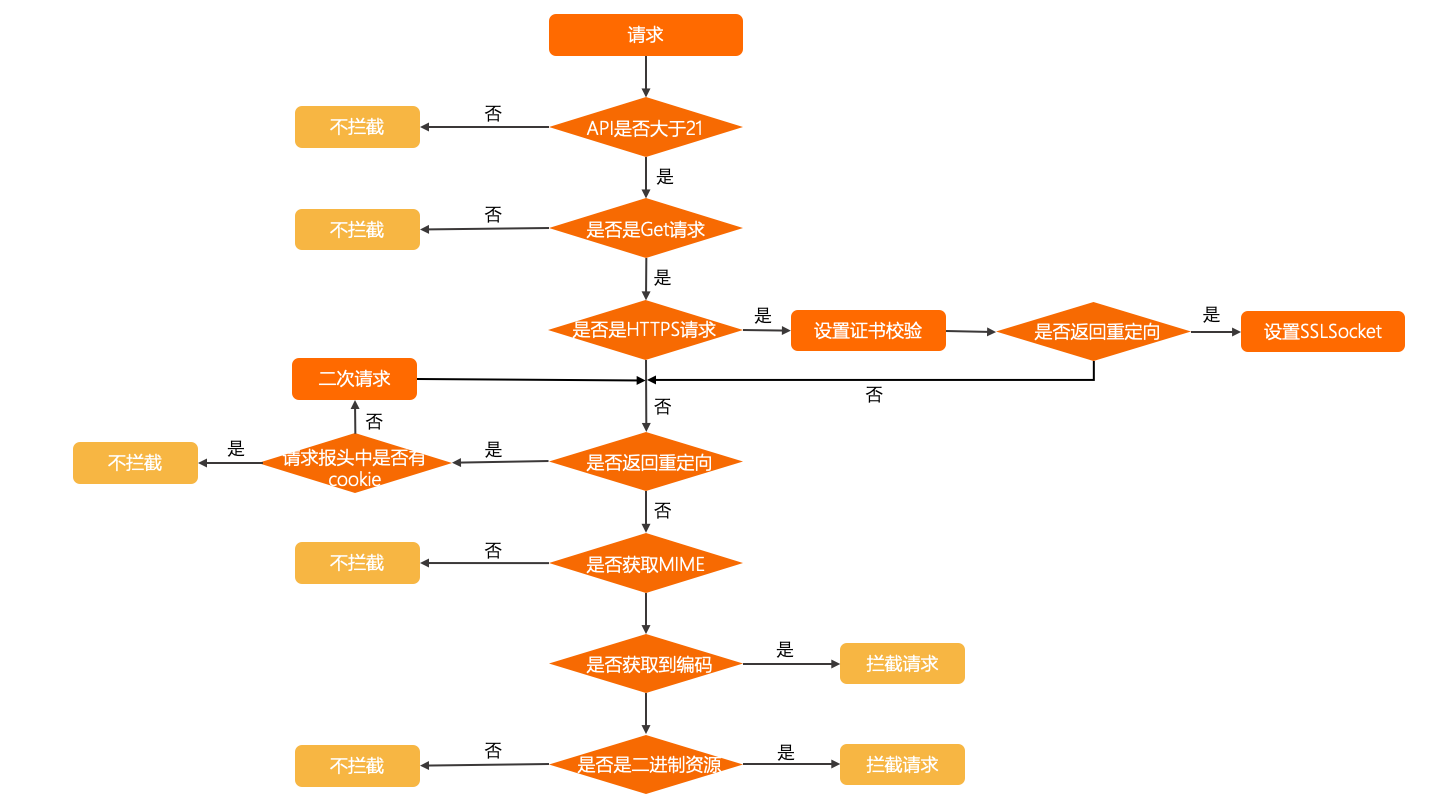
-
仅拦截GET请求
-
设置头部信息
-
HTTPS请求证书校验
-
SNI场景
-
重定向
-
MIME&Encoding
仅拦截GET请求
由于
WebResourceRequest
并没有提供请求
body
信息,所以只能拦截
GET
请求,不能拦截
POST
:
public WebResourceResponse shouldInterceptRequest(WebView view, WebResourceRequest request) {
    String scheme = request.getUrl().getScheme().trim();
    String method = request.getMethod();
    Map<String, String> headerFields = request.getRequestHeaders();
    // 无法拦截body,拦截方案只能正常处理不带body的请求;
    if ((scheme.equalsIgnoreCase("http") || scheme.equalsIgnoreCase("https"))
        && method.equalsIgnoreCase("get")) {
      ......
    } else {
        return super.shouldInterceptRequest(view, reqeust);
      }
设置头部信息
public WebResourceResponse shouldInterceptRequest(WebView view, WebResourceRequest request) {
    ......
      URL url = new URL(request.getUrl().toString());
      conn = (HttpURLConnection) url.openConnection();
      // 接口获取IP
      String ip = httpdns.getIpByHostAsync(url.getHost());
      if (ip != null) {
        // 通过HTTPDNS获取IP成功,进行URL替换和HOST头设置
        Log.d(TAG, "Get IP: " + ip + " for host: " + url.getHost() + " from HTTPDNS successfully!");
        String newUrl = path.replaceFirst(url.getHost(), ip);
        conn = (HttpURLConnection) new URL(newUrl).openConnection();
        // 添加原有头部信息
        if (headers != null) {
          for (Map.Entry<String, String> field : headers.entrySet()) {
            conn.setRequestProperty(field.getKey(), field.getValue());
        // 设置HTTP请求头Host域
        conn.setRequestProperty("Host", url.getHost());
}
HTTPS请求证书校验
如果拦截到的请求是
HTTPS
请求,需要进行证书校验:
if (conn instanceof HttpsURLConnection) {
  final HttpsURLConnection httpsURLConnection = (HttpsURLConnection)conn;
  // https场景,证书校验
  httpsURLConnection.setHostnameVerifier(new HostnameVerifier() {
    @Override
    public boolean verify(String hostname, SSLSession session) {
      String host = httpsURLConnection.getRequestProperty("Host");
      if (null == host) {
        host = httpsURLConnection.getURL().getHost();
      return HttpsURLConnection.getDefaultHostnameVerifier().verify(host, session);
}
SNI场景
如果请求涉及到SNI场景,需要自定义SSLSocket,对SNI场景不熟悉的用户可以参考 SNI :
TlsSniSocketFactory sslSocketFactory = new TlsSniSocketFactory((HttpsURLConnection) conn);
// sni场景,创建SSLScocket
((HttpsURLConnection) conn).setSSLSocketFactory(sslSocketFactory);
......
class TlsSniSocketFactory extends SSLSocketFactory {
        private final String TAG = "TlsSniSocketFactory";
        HostnameVerifier hostnameVerifier = HttpsURLConnection.getDefaultHostnameVerifier();
        private HttpsURLConnection conn;
        public TlsSniSocketFactory(HttpsURLConnection conn) {
            this.conn = conn;
          ......
        @Override
        public Socket createSocket(Socket plainSocket, String host, int port, boolean autoClose) throws IOException {
            String peerHost = this.conn.getRequestProperty("Host");
            if (peerHost == null)
                peerHost = host;
            Log.i(TAG, "customized createSocket. host: " + peerHost);
            InetAddress address = plainSocket.getInetAddress();
            if (autoClose) {
                // we don't need the plainSocket
                plainSocket.close();
            // create and connect SSL socket, but don't do hostname/certificate verification yet
            SSLCertificateSocketFactory sslSocketFactory = (SSLCertificateSocketFactory) SSLCertificateSocketFactory.getDefault(0);
            SSLSocket ssl = (SSLSocket) sslSocketFactory.createSocket(address, port);
            // enable TLSv1.1/1.2 if available
            ssl.setEnabledProtocols(ssl.getSupportedProtocols());
            // set up SNI before the handshake
            if (Build.VERSION.SDK_INT >= Build.VERSION_CODES.JELLY_BEAN_MR1) {
                Log.i(TAG, "Setting SNI hostname");
                sslSocketFactory.setHostname(ssl, peerHost);
            } else {
                Log.d(TAG, "No documented SNI support on Android <4.2, trying with reflection");
                try {
                    java.lang.reflect.Method setHostnameMethod = ssl.getClass().getMethod("setHostname", String.class);
                    setHostnameMethod.invoke(ssl, peerHost);
                } catch (Exception e) {
                    Log.w(TAG, "SNI not useable", e);
            // verify hostname and certificate
            SSLSession session = ssl.getSession();
            if (!hostnameVerifier.verify(peerHost, session))
                throw new SSLPeerUnverifiedException("Cannot verify hostname: " + peerHost);
            Log.i(TAG, "Established " + session.getProtocol() + " connection with " + session.getPeerHost() +
                    " using " + session.getCipherSuite());
            return ssl;
    }
重定向
如果服务端返回重定向,此时需要判断原有请求中是否含有cookie:
-
如果原有请求报头含有cookie,因为cookie是以域名为粒度进行存储的,重定向后cookie会改变,且无法获取到新请求URL下的cookie,所以放弃拦截。
-
如果不含cookie,重新发起二次请求。
int code = conn.getResponseCode();
if (code >= 300 && code < 400) {
  if (请求报头中含有cookie) {
      // 不拦截
    return super.shouldInterceptRequest(view, request);
  //临时重定向和永久重定向location的大小写有区分
  String location = conn.getHeaderField("Location");
  if (location == null) {
    location = conn.getHeaderField("location");
  if (!(location.startsWith("http://") || location
        .startsWith("https://"))) {
    //某些时候会省略host,只返回后面的path,所以需要补全url
    URL originalUrl = new URL(path);
    location = originalUrl.getProtocol() + "://"
      + originalUrl.getHost() + location;
  Log.e(TAG, "code:" + code + "; location:" + location + ";path" + path);
  //发起二次请求
} else {
  // redirect finish.
  Log.e(TAG, "redirect finish");
  ......
}
MIME&Encoding
如果拦截网络请求,需要返回一个
WebResourceResponse
:
public WebResourceResponse(String mimeType, String encoding, InputStream data) ;
创建
WebResourceResponse
对象需要提供:
-
请求的MIME类型
-
请求的编码
-
请求的输入流
其中请求输入流可以通过
URLConnection.getInputStream()
获取到,而
MIME
类型和
encoding
可以通过请求的
ContentType
获取到,即通过
URLConnection.getContentType()
,如:
text/html;charset=utf-8
但并不是所有的请求都能得到完整的
contentType
信息,此时可以参考如下策略:
String contentType = conn.getContentType();
String mime = getMime(contentType);
String charset = getCharset(contentType);
// 无MIME类型的请求不拦截
if (TextUtils.isEmpty(mime)) {
  return super.shouldInterceptRequest(view, request);
} else {
  if (!TextUtils.isEmpty(charset)) {
    // 如果同时获取到MIME和charset可以直接拦截
    return new WebResourceResponse(mime, charset, connection.getInputStream());
  } else {
    //获取不到编码信息
    // 二进制资源无需编码信息,可以进行拦截
    if (isBinaryRes(mime)) {
      Log.e(TAG, "binary resource for " + mime);
      return new WebResourceResponse(mime, charset, connection.getInputStream());
    } else {
      // 非二进制资源需要编码信息,不拦截
      Log.e(TAG, "non binary resource for " + mime);
      return super.shouldInterceptRequest(view, request);
private boolean isBinaryRes(String mime) {
  // 可进行扩展
  if (mime.startsWith("image")
      || mime.startsWith("audio")
      || mime.startsWith("video")) {
    return true;
  } else {
    return false;
}
总结
|
场景 |
总结 |
|
不可用场景 |
|
|
可用场景 |
前提条件:
可用场景:
|