


将excal批量数据插入到postgresql数据库(一)

前一段时间一直在忙其他的事情,一直没空写,现在有点空闲时间,正好把前二天用了的技术写下来。
需求:在差不多10张表中插入百来条真实数据。
解决方案:打算将数据存放在excal中,读取excal的数据插入到数据库中。如果以后可能还会插入数据到其他表中,打算就写一个接口。2个参数,一个是表的名字,一个是excal的路径。传入之后会自动读取到数据插入到表中。
开始想法:获取到数据之后通过mybatis插入到数据库中,遇到的问题是:开始打算用mybatis中foreach标签循环插入数据,因为只打算写一个接口,map的key不确定,在网上找资料也没有找到动态的key的获取。 放弃该方法,之后仔细想了想,用jdbc可以实现。因为jdbc可以用字符串拼接插入多条数据。不需要知道字段的名字,只要excal的第一行字段和数据库的字段对应就可以插入。
准备阶段:excal表格一份,获取excal数据的 jar包

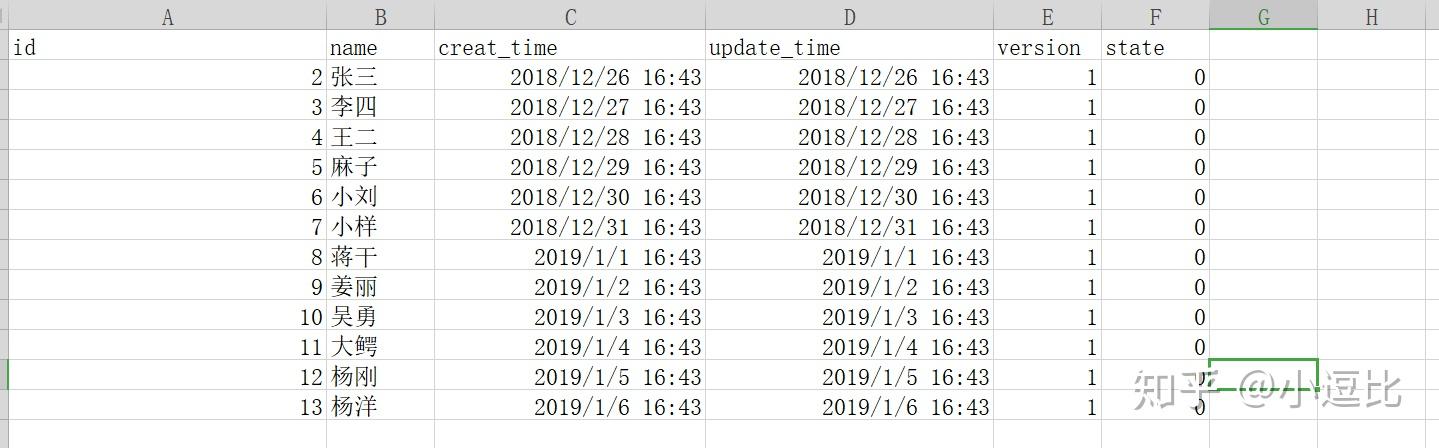
获取excal数据需要的 jar包:
		<dependency>
			<groupId>org.apache.poi</groupId>
			<artifactId>poi</artifactId>
			<version>3.17</version>
		</dependency>
		<!-- https://mvnrepository.com/artifact/org.apache.poi/poi-ooxml -->
		<dependency>
			<groupId>org.apache.poi</groupId>
			<artifactId>poi-ooxml</artifactId>
			<version>3.17</version>
		</dependency>
开发环境:idea
public static void main(String[] args) {
        String columns[] = null;
        Workbook wb =null;
        Sheet sheet = null;
        Row row = null;
        List<Map<String,String>> list = null;
        String cellData = null;
        String filePath = "C:\\Users\\38147\\Desktop\\user_test.xls";  //这里是excal的路径
        wb = readExcel(filePath);
        if(wb != null){
            //用来存放表中数据
            list = new ArrayList<>();
            //获取第一个sheet
            sheet = wb.getSheetAt(0);
            //获取最大行数
            int rownum = sheet.getPhysicalNumberOfRows();
            //获取第一行
            row = sheet.getRow(0);
            //获取最大列数
            int colnum = row.getPhysicalNumberOfCells();
            for (int i = 0; i<rownum; i++) {
                if (i == 0 ) {
                    row = sheet.getRow(i);
                    columns = new String[colnum];
                    if (row != null) {
                        for (int j = 0; j < colnum; j++) {
                           columns[j] = String.valueOf(row.getCell(j));
                }else {
                    Map<String, String> map = new LinkedHashMap<>();
                    row = sheet.getRow(i);
                    if (row != null && (!row.equals(""))) {
                        for (int j = 0; j < colnum; j++) {
                                cellData = (String) getCellFormatValue(row.getCell(j));
                                map.put(columns[j], cellData);
                        list.add(map);
                    } else {
                        break;
        for (Map map:list) {
            System.out.println(map.keySet() + ""+ map.values());
    //读取excel
    public static Workbook readExcel(String filePath){
        Workbook wb = null;
        if(filePath==null){
            return null;
        String extString = filePath.substring(filePath.lastIndexOf("."));
        InputStream is = null;
        try {
            is = new FileInputStream(filePath);
            if(".xls".equals(extString)){
                return wb = new HSSFWorkbook(is);
            }else if(".xlsx".equals(extString)){
                return wb = new XSSFWorkbook(is);
            }else{
                return wb = null;
        } catch (FileNotFoundException e) {
            e.printStackTrace();
        } catch (IOException e) {
            e.printStackTrace();
        return wb;
    public static Object getCellFormatValue(org.apache.poi.ss.usermodel.Cell cell){
        Object cellValue = null;
        if(cell!=null){
            //判断cell类型
            switch(cell.getCellType()){
                case org.apache.poi.ss.usermodel.Cell.CELL_TYPE_NUMERIC:{
                    if(HSSFDateUtil.isCellDateFormatted(cell)){
                        SimpleDateFormat sdf = new SimpleDateFormat("yyyy-MM-dd HH:mm:ss");
                        Date date = HSSFDateUtil.getJavaDate(cell.getNumericCellValue());
                        return sdf.format(date).toString();
                    cellValue = String.valueOf(cell.getNumericCellValue());
                    break;
                case org.apache.poi.ss.usermodel.Cell.CELL_TYPE_FORMULA:{
                    if(HSSFDateUtil.isCellDateFormatted(cell)){
                        SimpleDateFormat sdf = new SimpleDateFormat("yyyy-MM-dd HH:mm:ss");
                        Date date = HSSFDateUtil.getJavaDate(cell.getNumericCellValue());
                        return sdf.format(date).toString();
                    cellValue = String.valueOf(cell.getNumericCellValue());
                    break;
                case org.apache.poi.ss.usermodel.Cell.CELL_TYPE_STRING:{
                    cellValue = cell.getRichStringCellValue().getString();
                    break;
                default:
                    cellValue = "";
        }else{