toolbar
:
[
[
'style'
,
[
'bold'
,
'italic'
,
'underline'
,
'clear'
]
]
,
[
'font'
,
[
'strikethrough'
,
'superscript'
,
'subscript'
]
]
,
[
'fontsize'
,
[
'fontsize'
]
]
,
[
'color'
,
[
'color'
]
]
,
[
'para'
,
[
'ul'
,
'ol'
,
'paragraph'
]
]
,
[
'height'
,
[
'height'
]
]
}
)
;
这是一个工具栏,字体样式。
<div class="custom-toolbar"></div>
<script>
$(function() {
$('.custom-toolbar').summernote({
toolbar: [
['style', ['bold', 'italic', 'underline', 'clear']],
['font', ['strikethrough', 'superscript', 'subscript']],
['fontsize', ['fontsize']],
['color', ['color']],
['para', ['ul', 'ol', 'paragraph']],
['height', ['height']]
placeholder: 'Toolbar for font style...'
});
});
</script>
你可以用pre-shipped组成一个工具栏按钮。
picture: 打开图片对话框link: 打开链接对话框video: 打开视频对话框table: 插入一个表hr: 插入水平线
字体样式
fontname: 设置字体fontsize: 设置字体大小fontsizeunit: 设置字体大小单位color: 设置前景色和背景色forecolor: 设置前景色backcolor: 设置背景色bold: 切换字体粗细italic: 切换斜体underline:切换下划线strikethrough: 切换删除线superscript: 切换上标subscript: 切换下标clear: 清晰的字体样式
段落样式
style: 格式选择的块ol: 切换有序列表ul: 切换无序列表paragraph: 段落对齐下拉height: 设置行高
Misc
fullscreen: 切换全屏编辑模式codeview: 所见即所得和html编辑模式切换undo: 撤销redo: 重做help: 打开帮助对话框
以下设置是工具栏按钮的默认选项。
toolbar: [
['style', ['style']],
['font', ['bold', 'underline', 'clear']],
['fontname', ['fontname']],
['color', ['color']],
['para', ['ul', 'ol', 'paragraph']],
['table', ['table']],
['insert', ['link', 'picture', 'video']],
['view', ['fullscreen', 'codeview', 'help']],
Air-mode有自己的弹窗,没有工具栏。你可以定制它 popover.air选择。
$('#summernote').summernote({
popover: {
air: [
['color', ['color']],
['font', ['bold', 'underline', 'clear']]
});
你也可以设置按钮弹窗以同样的方式。下面设置默认选项弹窗。
popover: {
image: [
['image', ['resizeFull', 'resizeHalf', 'resizeQuarter', 'resizeNone']],
['float', ['floatLeft', 'floatRight', 'floatNone']],
['remove', ['removeMedia']]
link: [
['link', ['linkDialogShow', 'unlink']]
table: [
['add', ['addRowDown', 'addRowUp', 'addColLeft', 'addColRight']],
['delete', ['deleteRow', 'deleteCol', 'deleteTable']],
air: [
['color', ['color']],
['font', ['bold', 'underline', 'clear']],
['para', ['ul', 'paragraph']],
['table',
['table']],
['insert', ['link', 'picture']]
您可以使用blockquoteBreakingLevel 选项设置大段引用间断级别 .
每个可配置的间断级别表示:
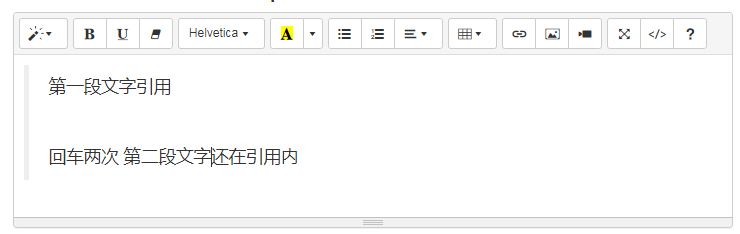
- 0 - 不间断,新段落保留在引用内。
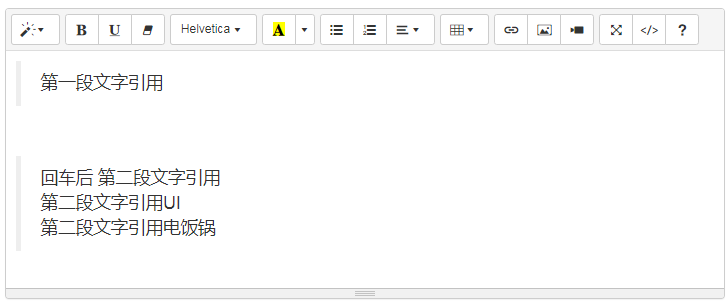
- 1 - 间断祖先列表中的第一个blockquote.
- 2 - 间断所有引用,以便不引用新段落。(default)
级别0
级别1
$('#summernote').summernote({
blockquoteBreakingLevel: 2
});
您可以使用styleTags选项设置自己的样式选择。
$('#summernote').summernote({
styleTags: [
'p',
{ title: 'Blockquote', tag: 'blockquote', className: 'blockquote', value: 'blockquote' },
'pre', 'h1', 'h2', 'h3', 'h4', 'h5', 'h6'
});
可以仅通过标签名称来指定标签(与上面的p或pre或h1-h6一样)。 也可以通过提供如下所示的对象,可以更详细地自定义样式:
tag : 'tag name ',
title : 'dropdown item title',
style : 'dropdown item style',
className : 'applyed element class name and dropdown item className',
value : 'Value to apply when clicked'
您可以使用fontNames选项定义字体
$('#summernote').summernote({
fontNames: ['Arial', 'Arial Black', 'Comic Sans MS', 'Courier New']
});
Summernote在将fontNames中的字体添加到下拉列表之前对其进行测试。 使用网络字体时,这是一个问题。 选择一个好的时间来检查网络字体的可用性并非易事。 您可以使用fontNamesIgnoreCheck定义要忽略的网络字体列表。
$('#summernote').summernote({
fontNames: ['Arial', 'Arial Black', 'Comic Sans MS', 'Courier New', 'Merriweather'],
fontNamesIgnoreCheck: ['Merriweather']
});
您可以使用fontSizeUnits选项设置可用的字体大小单位。
$('#summernote').summernote({
fontSizeUnits: ['px', 'pt']
});
您可以覆盖默认列表并指定一个自定义列表。
$('#summernote').summernote({
lineHeights: ['0.2', '0.3', '0.4', '0.5', '0.6', '0.8', '1.0', '1.2', '1.4', '1.5', '2.0', '3.0']
});
您可以定义占位符 placeholder选择。
$('#summernote').summernote({
placeholder: 'write here...'
});
对话框可以放置在 body中,而不是在Summernote中。 如果您在模态对话框中使用Summernote,请将此选项设置为 true。
$('#summernote').summernote({
dialogsInBody: true
});
默认情况下,显示和隐藏对话框时不会产生退出效果。 但是您可以通过dialogsFade将其打开。
$('#summernote').summernote({
dialogsFade: true
});
你可以禁用拖拽 disableDragAndDrop选择。
$('#summernote').summernote({
disableDragAndDrop: true
});
你可以禁用自定义快捷键shortcuts选择
$('#summernote').summernote({
shortcuts: false
});
您可以使用 tabDisable 选项禁用TAB/Shift+Tab交互。
这将允许在表单中的字段之间进行tabbing。
$('#summernote').summernote({
tabDisable: false
});
Summernote为CodeView提供了XSS保护。 它由iframe的过滤标签和白名单组成。
白名单过滤器默认情况下处于启用状态,但过滤标签未启用。 您可以通过以下选项打开和关闭它们。
$('#summernote').summernote({
codeviewFilter: false,
codeviewIframeFilter: true
});
并且,您还可以添加自己的白名单域并使用自定义标签过滤器。 在进行自定义之前,请检查默认过滤器。
$('#summernote').summernote({
codeviewFilterRegex: 'custom-regex',
codeviewIframeWhitelistSrc: ['my-own-domainname']
});
但是您必须记住,此保护仅在前端侧起作用–为了彻底防止攻击,您必须在后端侧再次进行检查。
你可以初始化summernote summernote.
$('#summernote').summernote();
然后您可以使用编辑器API通过 summernote方法。这是一个示例代码插入文本“hello world”。
$('#summernote').summernote('editor.insertText', 'hello world'));
它调用编辑模块的insertText方法与“hello world”。第一个参数是一个字符串类型代表模块及其方法。其余的都是方法的参数。
如果您调用API没有模块名称, editor.methodName将被调用。
$('#summernote').summernote('insertText'
, 'hello world');
一个模块命名 editor支持编辑器的几种方法的基本行为
您可以通过API切换editable/codable视图。
$('#summernote').summernote('codeview.toggle');
为当前用户创建一个范围对象的选择。
var range = $('#summernote').summernote('createRange');
您可以通过API禁用编辑器。
$('#summernote').summernote('disable');
如果要再次启用编辑器,请使用“ enable”调用API。
$('#summernote').summernote('enable');
您可以使用spellCheck选项在Editing区域中禁用拼写检查。
$('#summernote').summernote({
spellCheck: true
});
您可以使用disableGrammar选项来禁用语法浏览器插件(当前正在研究其他语法插件的禁用选项)。
$('#summernote').summernote({
disableGrammar: false
});
在当前summernote设定一个焦点
$('#summernote').summernote('focus');
您可以通过API切换全屏视图。
$('#summernote').summernote('fullscreen.toggle');
您可以使用isFullscreen来以编程方式确定Summernote是否处于全屏模式,这将返回true或false。
$('#summernote').summernote('fullscreen.isFullscreen');
您可以通过编程找到正在使用的Summernote。
这将返回三个值之一:bs3,bs4或lite。
$.summernote.interface;
返回是否内容是空的。
编辑区域的需求 <p><br></p>焦点,即使内容是空的。所以summernote支持这个方法帮助检查内容是空的。
if ($('#summernote').summernote('isEmpty')) {
alert('editor content is empty');
清除编辑器内容并删除所有存储的历史记录。
$('#summernote').summernote('reset');
saveRange在内部保存当前用户选择。
$('#summernote').summernote('saveRange');
restoreRange恢复当前保存的范围
$('#summernote').summernote('saveRange');
$('#summernote').summernote('restoreRange');
撤销和重做最后一个命令
$('#summernote').summernote('undo');
$('#summernote').summernote('redo');
背景和前景颜色设置
$('#summernote').summernote('backColor', 'red');
$('#summernote').summernote('foreColor', 'blue');
设置字体样式。
$('#summernote').summernote('bold');
$('#summernote').summernote('italic');
$('#summernote').summernote('underline');
$('#summernote').summernote('strikethrough');
$('#summernote').summernote('fontName', 'Arial');
设置字体大小
$('#summernote').summernote('fontSize', 20);
设置字体大小单位。
$('#summernote').summernote('fontSizeUnit', 'pt');
清除一个样式
$('#summernote').summernote('removeFormat');
设置上标或下标
$('#summernote'
).summernote('superscript');
$('#summernote').summernote('subscript');
将当前段落更改为<h1>〜<h6>。
$('#summernote').summernote('formatH2');
$('#summernote').summernote('formatH6');
改变当前段落作为<p>。
$('#summernote').summernote('formatPara');
在当前段落上缩进或减少缩进。
$('#summernote').summernote('indent');
$('#summernote').summernote('outdent');
切换有序列表和无序列表
$('#summernote').summernote('insertOrderedList');
$('#summernote').summernote('insertUnorderedList');
$('#summernote').summernote('insertParagraph');
设置段落的对齐方式。
$('#summernote').summernote('justifyLeft');
$('#summernote').summernote('justifyRight');
$('#summernote').summernote('justifyCenter');
$('#summernote').summernote('justifyFull');
设置行高。
$('#summernote').summernote('lineHeight', 20);
创建链接并取消链接
$('#summernote').summernote('createLink', {
text: "This is the Summernote's Official Site",
url: 'http://summernote.org',
isNewWindow: true
});
$('#summernote').summernote('unlink');
插入图像。
$('#summernote').summernote('insertImage', url, filename);
您可以通过传递回调作为第二个参数来修改图像。
$('#summernote').summernote('insertImage', url, function ($image) {
$image.css('width', $image.width() / 3);
$image.attr('data-filename', 'retriever');
});
插入一个元素或textnode。
var node = document.createElement('div');
$('#summernote').summernote('insertNode', node);
插入文字。
$('#summernote').summernote('insertText', 'Hello, world');
粘贴HTML字符串。
var HTMLstring = '<div><p>Hello, world</p><p>Summernote can insert HTML string</p></div>';
$('#summernote').summernote('pasteHTML', HTMLstring);
参考上面 saveRange
参考上面 restorerange
summernote正在将范围对象(WrappedRange)保存在当前光标处。
const rng = $('#summernote').summernote('editor.getLastRange');
- keydown
- keyup
- focus
- mouseup
- paste
editor.insertImage -> Imageeditor.insertNode -> Nodeeditor.insertText -> TextNodeeditor.pasteHTML -> last Node of contentseditor.insertHorizontalRule -> next sibling node of hr nodeeditor.createLink -> link node
您可以在summernote可编辑元素的节点中定义自定义范围。
const range = $.summernote.range;
$('#summernote').summernote('editor.setLastRange', range.
createFromNodeAfter(node).select());
const range = $.summernote.range;
range工具创建WrappedRange类的实例
从参数或浏览器选择创建WrappedRange对象
const rng = range.create(startContainer, startOffset, endContainer, endOffset)
const rng = range.create()
从节点创建WrappedRange对象
const rng = range.createFromNode(node)
在位置之前从节点创建WrappedRange
const rng = range.createFromNodeBefore(node)
在位置之后从节点创建WrappedRange
const rng = range.createFromNodeAfter(node)
从选择位置创建WrappedRange对象
const rng = range.createFromSelection(node)
选择更新可见范围
rng.select()
const newRng = rng.collapse(true);
const newRng = rng.collapse();
在范围上splitText
const textRng = rng.splitText()
在范围上删除内容
const newRng = rng.deleteContents()
返回range是否折叠
const isCollapsed = rng.isCollapsed()
用段落包装内联节点
const newRng = rng.wrapBodyInlineWithPara()
在当前光标处插入节点
const node = rng.insertNode(document.createElement('div'))
在当前光标处插入html
const nodes = rng.pasteHTML(`<div>summernote</div>`)
返回范围内的文本
返回光标之前(或之后)的单词范围
returns range for word before(or after) cursor
const newRng = rng.getWordRange();
const newRng = rng.getWordRange(true);
返回光标前与正则表达式匹配的单词的范围
const rng = range.create()
const newRng = rng.getWordsMatchRange(/@[a-z ]+/i)
console.log(newRng.toString())
返回DOMRect对象的列表,这些对象代表该范围所占据的屏幕区域。
https://developer.mozilla.org/en-US/docs/Web/API/Range/getClientRects
Summernote支持初始化回调函数和jquery的自定义事件回调风格。
在v0.7.0之后,每个回调都应由callbacks对象包装。
小写字符串已用于基本事件名称(例如: oninit, onenter, onfocus, onblur, onkeyup, onkeydown, onpaste)。 相反,高级功能的回调名称已与驼峰式大小写字符串一起使用。 这是不一致的,并且使用起来很混乱。 因此,我们将所有小写回调都重命名为驼峰式字符串。
工作在进行中
- IE9-10:
DOMCharacterDataModified, DOMSubtreeModified, DOMNodeInserted - Chrome, FF:
input
$('#summernote').summernote({
callbacks: {
onChange: function(contents, $editable) {
console.log('onChange:', contents, $editable);
});
$('#summernote').on('summernote.change', function(we, contents, $editable) {
console.log('summernote\'s content is changed.');
});
工作在进行中
工作在进行中
$('#summernote').summernote({
callbacks: {
onEnter: function() {
console.log('Enter/Return key pressed');
});
$('#summernote').on('summernote.enter', function() {
console.log('Enter/Return key pressed');
});
$('#summernote').summernote({
callbacks: {
onFocus: function() {
console.log('Editable area is focused');
});
$('#summernote').on('summernote.focus', function() {
console.log('Editable area is focused');
});
$('#summernote').summernote({
callbacks: {
onBlur: function() {
console.log('Editable area loses focus');
});
$('#summernote').on('summernote.blur', function() {
console.log('Editable area loses focus');
});
$('#summernote').summernote({
callbacks: {
onBlurCodeview: function() {
console.log('Codeview area loses focus');
});
$('#summernote').on('summernote.blur.codeview', function() {
console.log('Codeview area loses focus');
});
通过url覆盖图片插入
$('#summernote').summernote({
callbacks: {
onImageLinkInsert: function(url) {
$img = $('<img>').attr({ src: url })
$summernote.summernote('insertNode', $img[0]);
});
$('#summernote').on('summernote.image.link.insert', function(we, url) {
$img = $('<img>').attr({ src: url })
$summernote.summernote('insertNode', $img[0]);
});
覆盖图片上传处理程序(默认:IMG标签上的base64 dataURL)。
您可以将图像上传到服务器或AWS S3。
$('#summernote').summernote({
callbacks: {
onImageUpload: function(files) {
$summernote.summernote('insertNode', imgNode);
});
$('#summernote').on('summernote.image.upload', function(we, files) {
$summernote.summernote('insertNode', imgNode);
});
工作在进行中
$('#summernote').summernote({
callbacks: {
onInit: function() {
console.log('Summernote is launched');
});
$('#summernote').on('summernote.init', function() {
console.log('Summernote is launched');
});
$('#summernote').summernote({
callbacks: {
onKeyup: function(e) {
console.log('Key is released:', e.keyCode);
});
$('#summernote').on('summernote.keyup', function(we, e) {
console.log('Key is released:', e.keyCode);
});
$('#summernote').summernote(
{
callbacks: {
onKeydown: function(e) {
console.log('Key is downed:', e.keyCode);
});
$('#summernote').on('summernote.keydown', function(we, e) {
console.log('Key is downed:', e.keyCode);
});
$('#summernote').summernote({callbacks:{onKeyup:function(e){console.log('Key is released:',e.keyCode);}}});
$('#summernote').on('summernote.keyup',function(we,e){console.log('Key is released:',e.keyCode);});
$('#summernote').summernote({callbacks:{onKeydown:function(e){console.log('Key is downed:',e.keyCode);}}});
$('#summernote').on('summernote.keydown',function(we,e){console.log('Key is downed:',e.keyCode);});
$('#summernote').summernote({
callbacks: {
onPaste: function(e) {
console.log('Called event paste');
});
$('#summernote').on('summernote.paste', function(e) {
console.log('Called event paste');
});
工作在进行中
Summernote还支持自定义按钮。 如果要创建自己的按钮,则可以简单地定义options并与之配合使用。
您可以使用$.summernote.ui创建一个按钮对象。 此按钮对象具有以下属性。
contents: 要在按钮上显示的内容tooltip: 鼠标悬停时的提示文本click: 单击鼠标时要调用的回调函数
下面的代码是有关用于插入文本hello的简单按钮的。
var HelloButton = function (context) {
var ui = $.summernote.ui;
var button = ui.button({
contents: '<i class="fa fa-child"/> Hello',
tooltip: 'hello',
click: function () {
context.invoke('editor.insertText', 'hello');
});
return button.render();
您可以看到render() ,它返回jquery对象作为按钮。
让我们学习如何使用工具栏上的按钮。
首先,您可以使用名为buttons的选项定义按钮,该选项是一组键值。 您可以在工具栏选项上定义自定义按钮。
$('.summernote').summernote({
toolbar: [
['mybutton', ['hello']]
buttons: {
hello: HelloButton
});
您也可以以同样的方式在popover上使用自定义按钮。
为了支持可扩展功能,summernote由模块系统组装而成。 该模块系统是受spring框架启发而构建的。
- Module: 模块是一个组件。
- Context: 上下文是一种容器。 它具有模块和编辑器状态。
- Renderer: 渲染器是用于创建元素的函数。
- UI:
UI是一组用于构建ui元素的渲染器。
模块是用于实现功能的组件,并且具有生命周期。 模块还具有辅助方法或与生命周期相关的方法。
这种方法将编辑器初始化时调用$('..').summernote();。你可以附加事件和创建元素编辑元素(如可编辑,…)。
this.initialize = function () {
var button = ui.button({
className: 'note-btn-bold',
contents: '<i class="fa fa-bold">',
click: function (e) {
context.invoke('editor.bold');
});
this.$button = button.render();
$toolbar.append(this.$button);
当$('..').summernote('destroy');销毁编辑器时,将调用此方法。 你应该分离事件并删除initialize上的元素。
this.destroy = function () {
this.$button.remove();
this.$button = null;
此方法用于确定是否将初始化模块。
this.shouldInitialize = function () {
return options.airMode && !list.isEmpty(options.popover.air);
以下是AutoLink模块的完整代码。
var AutoLink = function (context) {
var layoutInfo = context.layoutInfo;
var $editor = layoutInfo.editor;
var $editable = layoutInfo.editable;
var $toolbar = layoutInfo.toolbar;
var ui = $.summernote.ui;
this.initialize = function () {
var button = ui.button({
className: 'note-btn-bold',
contents: '<i class="fa fa-bold">',
click: function (e) {
context.invoke('editor.bold');
});
this.$button = button.render();
$toolbar.append(this.$button);
this.destroy = function () {
this.$button.remove();
this.$button = null;
更多模块的例子:模块
您可以使用options定义自定义模块。
$(".summernote").summernote({
modules: {
myModule: MyModule
});
您可以使用外部API调用模块的方法。
$(".summernote").summernote("myModule.method", 'hello');
插件是一种外部模块。 您也可以使用插件定义自己的模块。
$.extend($.summernote.plugins, {
myModule: function (context) {
});
下面的链接是外部模块的示例。
旧插件很难控制编辑器状态(例如范围,布局等)。 v0.7.0之后,新模块系统将重新设计插件。与模块完全相同,除了周边的模块模式。
Summernote允许添加带有上下文着色的通知以指示通知的类型,或将该区域用于信息目的。
在正常模式下使用时,该区域显示在Summernote的底部,而在Air Mode下使用时,该区域显示在编辑区域的顶部。
使用Notifcation区域很简单,并且可以通过使用类名.note-status-output来定位该区域来使用。
通知元素可以使用任何标记,但是我们已经按照Bootstrap的Alerts添加了一些样式。 例如 要产生错误或危险警报,可以使用<div class="alert alert-danger">This is an error</div>。 您还可以使用alert-info, alert-warning, alert-success和 alert-danger。
您可以使用jQuery或其他Javascript方法通过将输出元素定位为目标来添加上述消息,例如(使用jQuery):
$('.note-status-output').html(
'<div class="alert alert-danger">' +
'This is an error using a Bootstrap alert that has been restyled to fit here.' +
'</div>'
如果只想显示信息性文本,也可以根据需要添加不带警报的文本。
$('.note-status-output').html(
'Text Information'
您也可以通过将Text放置在诸如div, span或small 之类的元素中并包括类.pull-right来将文本放置在右侧。
您还可以使用 text-muted, text-primary,text-success, text-info, text-warning 和text-danger类为文本使用上下文颜色。
原文链接:https://blog.csdn.net/WuLex
Summernote扩展名:附加文本标签
扩展,添加了Bootstrap 3和Bootstrap 4已提供样式的其他文本级语义元素(html标记)。在单独的分支中提供了较旧的Summernote版本(0.6.16)的反向端口。
<mark>突出显示的文本
<small>精美印刷
<ins>指示添加到文档中的文本
<delete>指示从文档中删除的文本
<code>用于内联代码段
<samp>样品<samp>用于样品输出
<kbd>用于指示用户输入。
<var>用于指示变量。
包括js和CSS
将add-text-tags到style或font组中的工具栏:
$('#summernote').summernote({
toolbar: [
['style', ['bold', 'italic', 'under
js部分:
/*! Summernote v0.8.2 | (c) 2013-2015 Alan Hong and other contributors | MIT license */
!function(a){"function"==typeof define&amp;&amp;define.amd?define(["jquery"],a):"object"==t
summernote富文本编辑器的基本使用(一)
本文主要是跟官网的一些翻译,也锻炼下英语水平。原英文网址http://summernote.org/getting-started/
基础API
初始化 summernote
$('#summernote').summernote();
初始化并配置summernote
高度和焦点设置
如果对summernote设置了focus项,在...
3.创建summernote,并且将上传的图片保存到本地,然后再返回到编辑器中,如果直接复制图片不去保存,图片的地址会是原来的地址,并不是本地的地址。所以我们需要将图片保存到本地,然后就可以将文章获取存入数据库了。2.创建一个summernote的容器。1.首先需要从官网(
我想在summernote工具栏中添加2个自定义按钮,1只是简单地添加一个换行符,另一个插入一些小样式的文本。当我使用按钮时,它会清除html,并且不执行所需的结果(换行符或插入小文本)。我怎样才能从工具栏选择插入HTML并让它不被更改?在summernote中自定义工具栏按钮上插入html的问题这里是按钮呈现的jQuery:var BR_Button = function (context) {...
summernote比较突出的优点就是能保持复制过来的东西的原有样式,并且比较流畅。
官方文档地址:https://summernote.org/getting-started
我是用到cdn引入
<!-- 插件引入 -->
<link href="http://cdnjs.cloudflare.com/ajax/libs/summernote...
<!--summernote-->
<link href="~/Content/summernote/summernote.css" rel="stylesheet" />
这次项目中需要用到编辑器插件,于是上网查了一下。由于需要的编辑器功能比较简单,不需要太多复杂功能,所以选择了一款特别轻量的summernote插件,而且后台操作也很简单。官网:http://summernote.org/github地址:https://github.com/summernote...
先来看一下官网的截图
麻雀虽小五脏...
概述 jQuery 是继 prototype 之后又一个优秀的 Javascript 框架。其宗旨是—写更少的代码,做更多的事情。它是轻量级的 js 库(压缩后只有21k) ,这是其它的 js 库所不及的,它兼容 CSS3,还兼容各种浏览器(IE 6.0+, FF 1.5+, Safari 2.0+, Opera 9.0+)。 jQuery 是一个快速的,简洁的 javaScript 库,使用户能...
使用了一段时间的Tipask,这是一个非常好的建站程序,现在为Tipask共享一些功能 Tipask使用Summernote编辑器,使用中发现没有图片居中的功能,而对于一般的网页正文部分,图片居中排版会美观一些,所以本次通过修改Summernote,添加图片居中功能。
使用了一段时间的Tipask,这是一个非常好的建站程序,现在为Tipask贡献一些功能
Tipask使用Summerno...


