



Introduction
In order to guarantee ordered message delivery with the Kafka messaging broker, messages can be produced with a key. Messages with the same key are written to the same topic partition, and as consumers read messages in order from each partition, their ordering is preserved.
A Spring Boot application that demonstrates writing messages with keys and the impact on ordering accompanies this article. The full source code is available here .
Topic Partitions
Each Kafka topic is divided into one or more partitions. This means that when a producer is writing a message to a topic, it will write it to one of the partitions in the topic. Likewise a single consumer in a consumer group that is subscribed to the topic will consume from all the partitions.
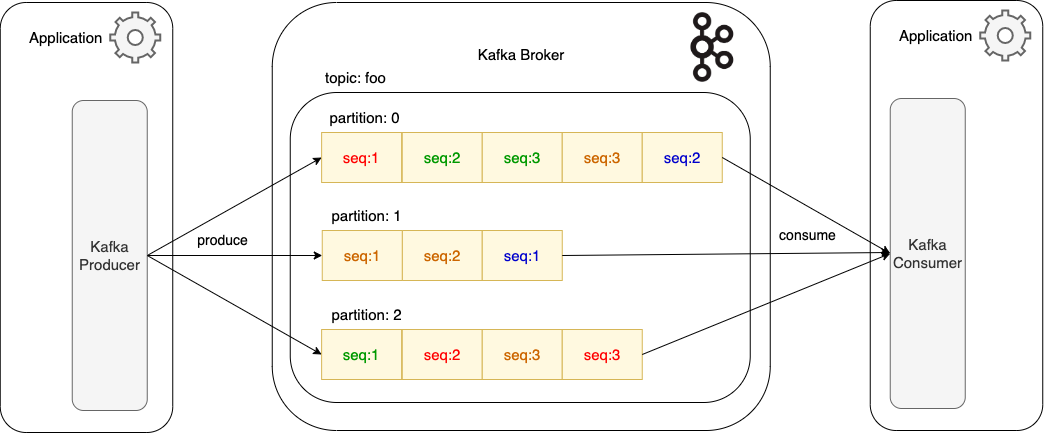
In this example, messages are being produced without a message key, so there is no guarantee as to which topic partition they will be written to. Related messages have been colour coded, and we see that messages relating to the red entity have been written to partition 0 and 2 . As a result, the consumer polling for batches of records from the partitions will receive these related messages in an unknown order. In this case, it may receive later red messages written to partition 2 before it receives the first red message written to partition 0 .
Scalability
Topic partitions are a core aspect of the high scalability that the Kafka messaging broker provides. By increasing the number of partitions in a topic in line with the number of consumer instances in the same consumer group that are subscribed to this topic, throughput is increased. Whereas in figure 1 there is a single consumer reading from all three topic partitions, in figure 2 there are now multiple consumer instances reading from the topic. The topic partitions are divided up between the consumer instances, so the throughput has increased.
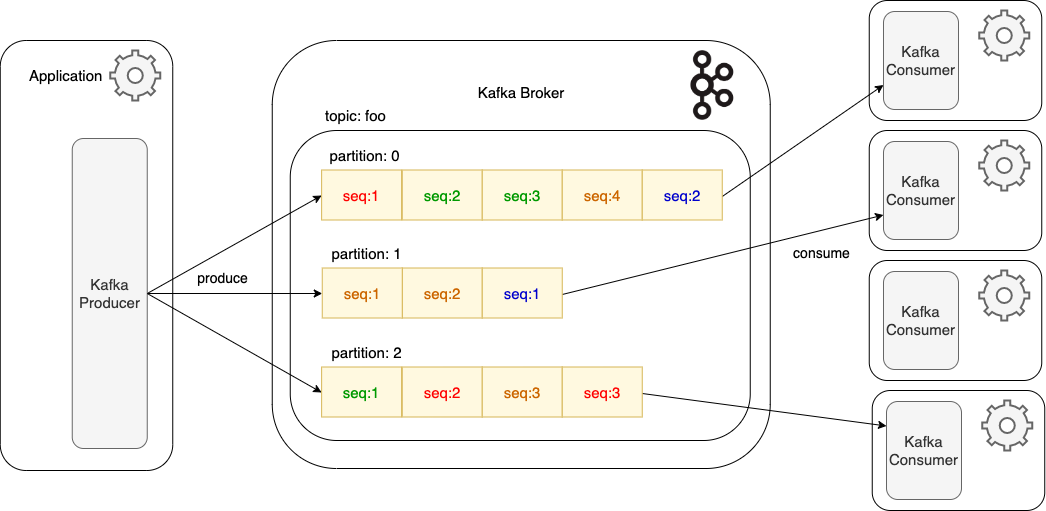
This diagram highlights the fact that related messages written across different partitions will be consumed and processed in an unknown order. Messages for the red entity will be consumed by two different consumer instances, those assigned to partition 0 and partition 2 , so it is unknown which messages will be processed first.
In figure 2 there are four consumers, but with only three topic partitions it means that the fourth consumer instance is idle as it has no free partition to be assigned to. This could be deemed a waste of resources as the consumer instance is still using CPU and memory. On the other hand it means that if one of the other consumer instances fails, the spare consumer would be available on the resulting consumer group rebalance, minimising the impact of the failed consumer.
While one consideration might be to increase the topic partition count to four to mean that all available consumer instances would be assigned partitions, this is not a recommended practice. Topic partition counts should be carefully sized in advance to cater for current and expected data volumes. Increasing the number of partitions once a topic is in Production can result in a loss of order, and the number of partitions can not be reduced, as data would be lost.
Message Keys
In order to guarantee message ordering, related messages that should be ordered must be written to the same topic partition. This is achieved by writing the message with a header key. There is a less common alternative to using a message key which is for the producer itself to stipulate which partition to write a message to.
As with the message body, the key can be typed as required, such as a String, Integer or a JSON object. Likewise, as with the body, the key can have an Avro schema defined. The key is hashed by the producer, and this hash is used to determine which partition to write the message to. If no message with this hashed key has yet been written to a partition, (or indeed no key has been included) then a new partition will be selected, with Kafka typically attempting to spread load evenly across the partitions.
Message Ordering
Returning to the above example, in the following diagram four different keys each representing four different entities have been written to a topic with three partitions.

This time all messages with the same key are written to the same partition. Of course any one partition will still hold messages for different keyed messages, as we see with messages for the red and blue entities both being written to partition 0. Now however when a consumer receives messages from a partition those messages relating to each entity will be in a guaranteed order.
Concurrent Consumers
Spring Kafka makes it straightforward to instantiate multiple instances of an application’s Kafka consumer from within the single application deployment. Each of these consumer instances are treated as separate consumers in the consumer group, so the topic partitions will be assigned between them, as with any other consumers in the same consumer group. They operate concurrently, so if memory and CPU allow this is another good option for increasing throughput.
In the accompanying Spring Boot application an example consumer KafkaDemoConsumer consumes messages from the topic demo-inbound-topic . The consumer is created using Spring’s KafkaListenerContainerFactory , and this Spring bean is defined in KafkaDemoConfiguration . The ConcurrentKafkaListenerContainerFactory implementation can be configured to create multiple concurrent instances of each consumer it creates. In the example the concurrency has been configured to 3 :
         ConcurrentKafkaListenerContainerFactory factory = new ConcurrentKafkaListenerContainerFactory<>();


         factory.setConcurrency(3);
The upshot is that when the application is started then three instances of the KafkaDemoConsumer are started. The assignment of the instances across the topic partitions can be viewed using the Kafka command line tools, specifically using the kafka-consumer-groups tool to describe the consumer group. The consumer group is named demo-consumer-group as configured on the @KafkaListener annotation on the KafkaDemoConsumer .
kafka-consumer-groups --bootstrap-server localhost:9092 --describe --group demo-consumer-group

In this example there are 10 topic partitions for the demo-inbound-topic , and a single instance of the demo Spring Boot application has been started. The partitions can be seen to have been assigned across the three concurrent consumer instances within the one consumer group. So long as related messages are written to the topic with the same key they will be produced to the same partition, and hence consumed in order by the assigned consumer instance.
Producer Retries
It is common practice to configure a producer to retry writes that fail due to transient errors, such as network connection failures. By default retries are set to the maximum integer value. However retrying can impact message ordering guarantees, depending on other producer configuration values.
The configuration parameters of interest are the following: