



VS Code 1.30 支持多行查找了!

我是从 Sublime Text 转到 VS Code 的,对我来说,VS Code 有一个令我难以忍受的问题:不能直接进行多行查找。
以前,VS Code 的查找和替换框的高度是固定的,只有一行:

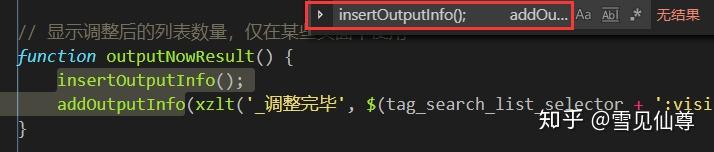
当你复制了多行文本时,粘贴到查找框里,你会发现查找框里强行把文本“变成”了一行,而且查找不到结果。
在以前,VS Code 用户只能把复制的文本转换为表达式来匹配,如:

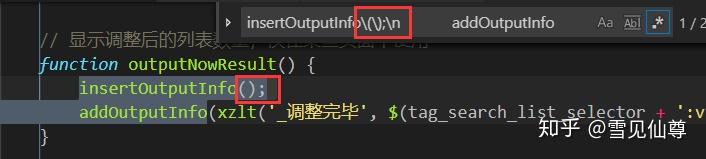
甚至有开发者编写了一个 VS Code 扩展来实现这个功能(将选中内容复制为正则表达式)。
在上一次的更新里,官方加入了类似的功能,但还是要通过正则表达式,望天……
今天 VS Code 更新了 1.30,我欣喜的在更新日志中看到了多行搜索功能的完善:
Multiline search input
Last month, we added support for multiline search. This month we improved the search UX to make it easier to use. Now, you can search with multiline text without having to write a regular expression. TypeShift+Enterin the search box to insert a newline, and the search box will grow to show your full multiline query. You can also copy and paste a multiline selection from the editor into the search box.
现在我们终于可以脱离正则表达式的束缚了。把多行文本粘贴到左侧的搜索框里直接搜索即可。

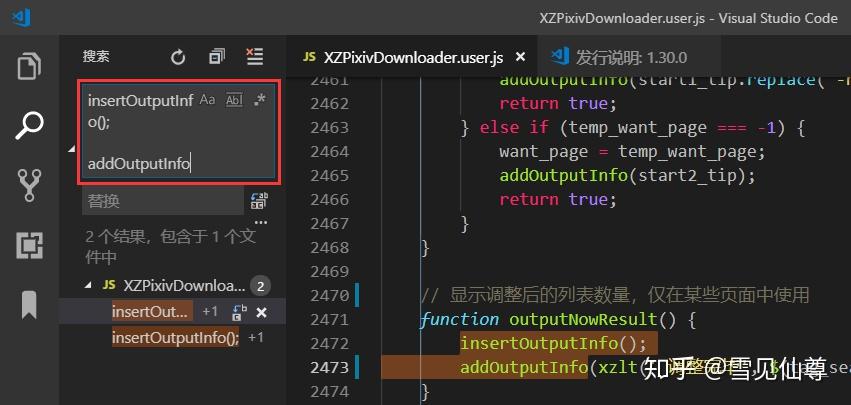
在查找和替换框里,我们还可以按 Shift + Enter 来手动增加新行。不过现在只有左侧的搜索框(Ctrl + Shift +F)支持这个功能,右上角的独立搜索框(Ctrl + F)仍然还是老样子。希望以后能都支持。
附:
吐槽一下,这个 Issuse 是两年前提的了,我也去掺了一脚,前些时候我又看到了,心想都两年了,VS Code 是铁了心不做这个功能了吗?还好现在实现了,开心~