raise ZeroDivisionError('Enter a non-zero integer')
return x/y
The above
file calc.py
contains a Calculator class with five instance methods to be tested and a coverage report generated. The
validate_input()
method validates arguments before any arithmetic operation.
Other methods,
add(), minus(), multiply()
, and
divide()
, are used to carry out addition, subtraction, multiplication, and division respectively on validated arguments.
A fixture function
calculator_object()
is contained in the
conftest.py file
. The fixture function yields an object of the calculator class.
Filename: tests/test_calculator.py
from calc import Calculator
def test_add(calculator_object):
    assert calculator_object.add(4, 3) == 7, 'Expected result should be 7'
def test_minus(calculator_object):
    assert calculator_object.minus(10, 5) == 5, 'Expected result should be 5'
def test_multiply(calculator_object):
    assert calculator_object.multiply(4, 6) == 24, 'Expected result should be 24'
def test_divide(calculator_object):
    assert calculator_object.divide(12, 2) == 6, 'Expected result should be 6'
The
test_calculator.py
file holds functions that test the functionality of the Calculator class in the
calc.py file
.
Note
: All files are placed in the project’s root directory.
Create Pytest Code Coverage Report
There are two ways to create a pytest coverage report:
Using the coverage.py library
Using pytest-cov plugin
Method 1: Using the coverage.py library
Here’s how you can use coverage.py library
1.
Run the test suite with the following command:
coverage run -m pytest tests/test_calculator.py
2.
To display the
coverage report in the terminal
, run the command:
coverage report -m
3.
To create a
coverage report in HTML
, do this:
coverage html
4.
The report can be found in HTML format in the path
htmlcov/index.html
.
Method 2: Using the pytest-cov plugin
Another way to generate a coverage report in pytest is by using the
pytest-cov plugin
. The process is quite similar to how it’s done with
coverage.py
.
1.
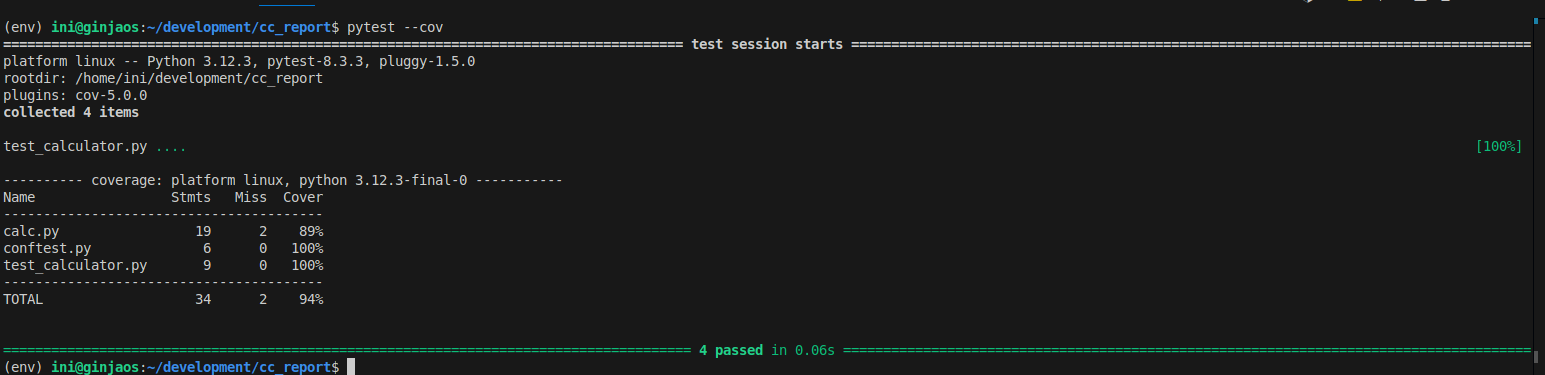
Run the command below to create report in the terminal:
pytest --cov
2.
To generate a report in HTML, use this command:
pytest --cov --cov-report=html:calc_cov
3.
The additional command
–cov-report=html:calc_cov
specifies that the coverage report should be in HTML format and saved in a directory,
calc_cov
.
4.
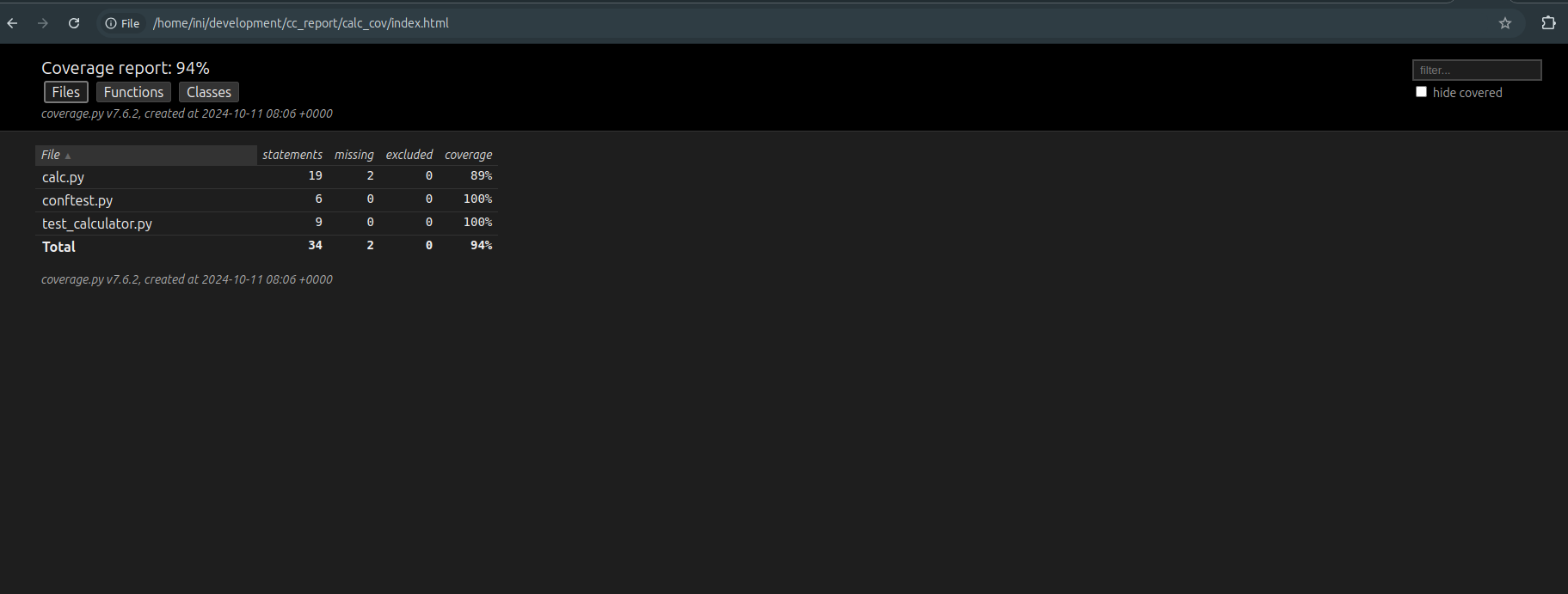
The report from the
calc_cov/index.html
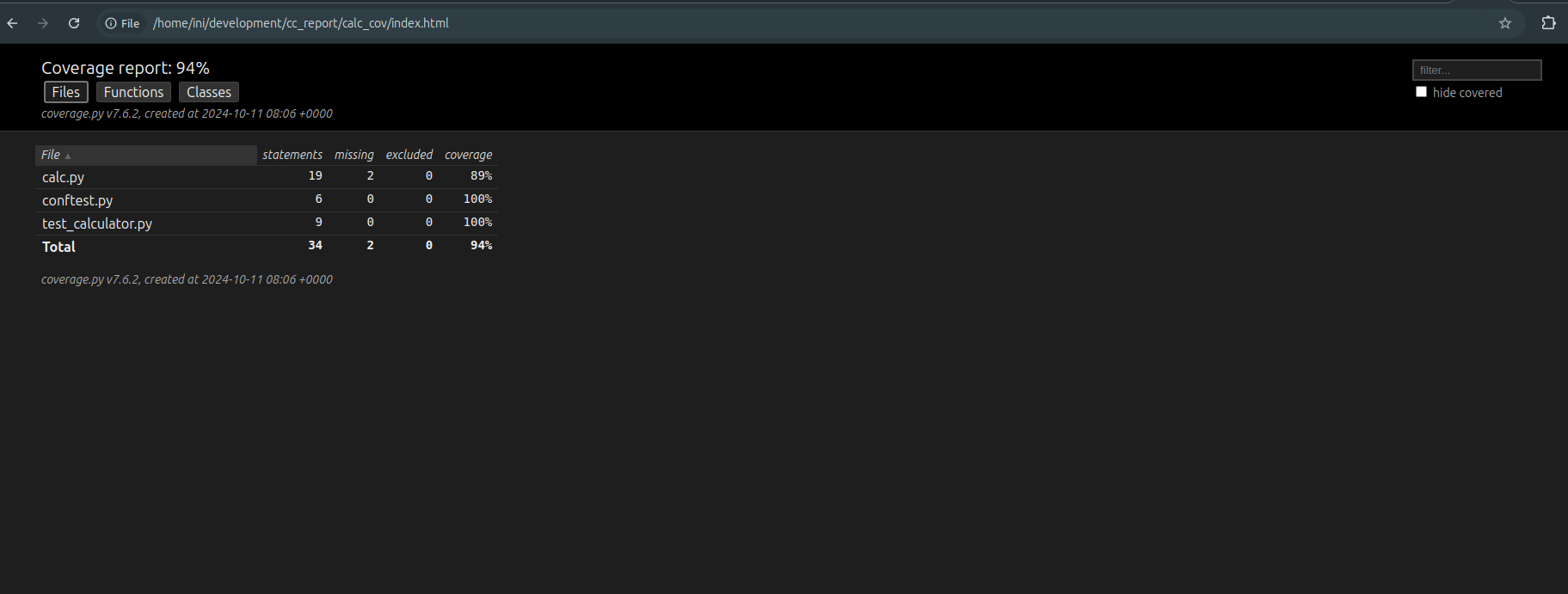
all files except
calc.py
have 100% code coverage. Take a look at the
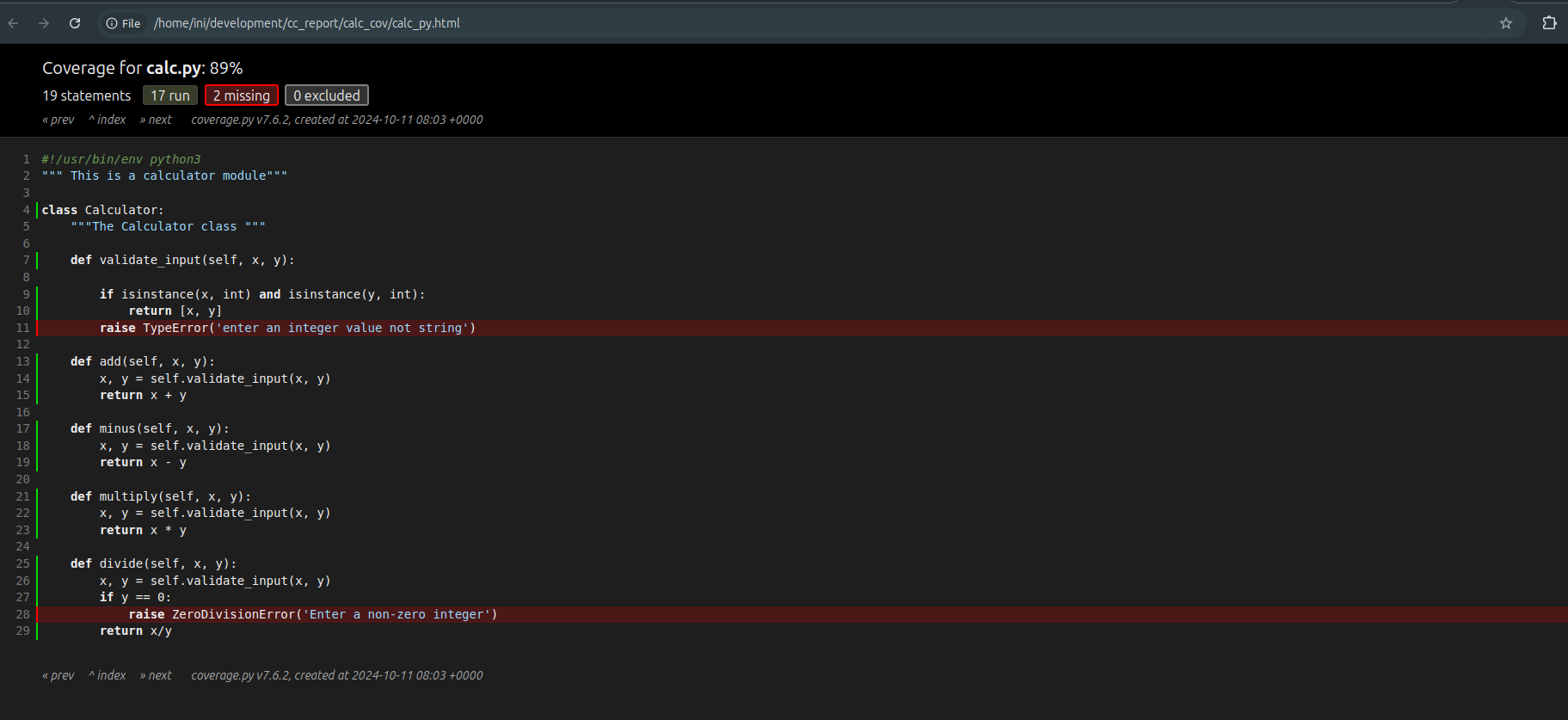
calc_cov/calc_py.html
file for details on the code coverage.
The result shows that two lines of code have been skipped during the test hence the coverage score of 89%. To ensure we have 100% code coverage more test cases should be written to test the codes in lines 11 and 28.
None of the previously written test cases checks if a
TypeError
and
ZeroDivisionError
are raised by the Calculator class methods.
Challenges in Creating and Maintaining the Pytest Coverage Report
Although creating code coverage reports is a good software engineering practice, there are also challenges this may pose.
Take a look at some of these challenges.
As a codebase grows with the addition of more features, it slowly becomes difficult to maintain high code coverage report scores.
A high code coverage score shows that thorough testing has been done. However, this does not completely rule out bugs in your application.
Maintaining a high coverage threshold for a codebase across various teams can be very difficult with varying opinions on what a good threshold should be.
Implementing code coverage for legacy code and optimizing for high scores can slow down overall development time.
Miscellaneous or boilerplate code can affect the overall metrics of your code coverage report.
Executing coverage for all parts of a large enterprise codebase can be a waste of time and seemingly unrealistic.
Pytest Code Coverage Tools
Pytest
code coverage tools
make the generation of coverage reports easier. Mentioned below are some local tools for generating pytest code coverage reports:
1. Pytest-cov:
The pytest-cov is a plugin for creating code coverage reports with pytest. It is bundled with support for Pytest and has command-line capabilities.
It is similar to coverage.py, but it offers more functionalities like subprocess support, xdist support, and consistent behavior with repeated use.
It can generate coverage reports on the terminal and other formats like HTML, XML, and JSON.
2. Coverage.py:
This is a popular Python library for outputting code coverage metrics for Python programs. It analyses the codebase to determine the lines of code that have been tested and those untested.
It is executed using a command line syntax and outputs reports on the terminal by default or in HTML if specified.
Use BrowserStack Test Reporting and Analytics for Pytest Coverage Report
So far, the pytest code coverage report has only been executed on our local machine. You can also run these tests on a cloud platform such as
BrowserStack Test Reporting and Analytics
for more efficiency.
Here’s how you can use the BrowserStack Test Reporting and Analytics feature to create a coverage report.
After executing the above commands, a
browserstack.yml file
will be created in the root of your project directory.
Step 3
: Modify your
browserstack.yml config file
. Open your browserstack.yml file and modify the code below as necessary:
userName: YOUR_USERNAME
accessKey: YOUR_ACCESS_KEY
buildName: "Your static build/job name goes here"
projectName: "Your static project name goes here"
CUSTOM_TAG_1: "You can set a custom Build Tag here"
# Use CUSTOM_TAG_<N> and set more build tags as you need.