Can anybody please tell me how to convert a Json file to a proper table with same filed names are unpivoted and in different rows (Converting multidimensional array to two dimensional) rather than having same field names as a duplicate and in same row.
Please let me know if my problem is not understood or need more details.
Thanks.
Your question lacks a bit of context, but I think I had something similar when trying out the JSON to Table node.
Instead of the Json to Table, have you tried the JSON to XML node? In there, you can define which type of data you need to retrieve from your JSON.
Could you please try it and keep me updated on this matter please?
Thi issue makes the JSON to table node almost pointless. It's not a table if it has 1 row. I have tried so many settings in the node and couldnt get it to give me a table with a basic JSON input of 5 fields. it converts everything to columns instead.
Here is an example of the data structure, I want this to yield 3 rows:
I just stumbled across this entry and maybe I can help since I had a similar problem recently. The point is that in order to import a JSON file you have to
Hi Scott,
I was searching to understand how to generate a table from an XML data file and came across this post. Is there a way/node in Knime to automatically detect the XML code and generate a data table? I tried the converting to Json and then JSON to Table nodes method and it is not working. probably my data is too big to handle (Increased the memory space, but still showing java heap memory issue). My data has around 120 columns and they vary each time depending on the url I use to pull the report. So, defining them each time isn’t time efficient. Any suggestions to automatically detect the column names based on the XML tags? Any help is appreciated.
Thank you.
Instead of converting to JSON, have you tried using the XPath nodes? There are several example workflows on our Hub demonstrating their use:
There are also some threads here on the forum where folks have implemented XPath in their workflows.
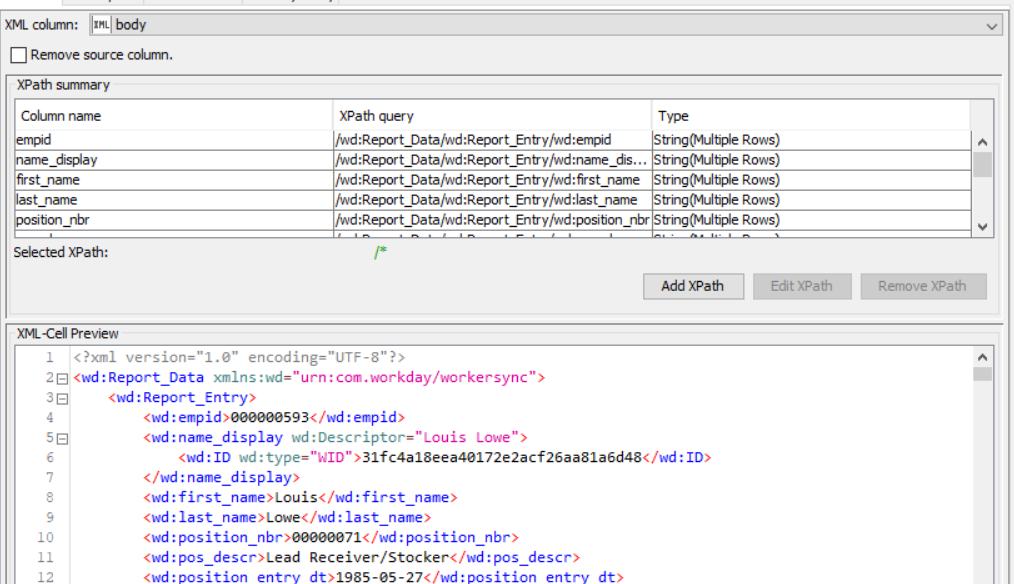
Yes. I used XPath and it is retrieving the data without any issues if I define the attribute paths (uploaded the screenshot of the Xpath. With more than 100 attributes in each file, I have to define the Xpath for each variable manually. I am wondering whether there is a way to fasten the process and make it more time efficient? Some process or Node that can detect the main XML attributes in the file automatically and converts into table format. Does that makes sense?
Someone with more XPath experience than I have might be able to chime in here, but my impression is that this type of automated detection will be difficult until KNIME supports XPath 2.0 (see here:
Creating column names with XPATH Node
). A ticket has been filed about that issue, but I don’t have an ETA on when the XPath nodes might receive an upgrade.
Hi Scott,
I am trying to automatically convert the json format data into table using ‘Json to table’ node. I don’t want to use the JSON Path node as I have to manually define the paths. ‘Json to table’ node is doing a very good job in identifying the attributes and retrieving the data. But, the issue is, it is pulling everything in a single row as shown below by duplicating the attribute names for each entry/row. What can be the best practice to put the data shown in the screenshot into two rows and 4 columns? Thank you.
I have played around with it and build a workflow example providing both solution when you have defined number of columns and unknown number of columns. Sort of
You must then ungroup this array into single JSON Rows. And at the end the ‘JSON To Table’ node to extract the data.
Andrew
Thank you Andrew. Appreciate your quick response. The concept is working and I am able to generate a table with multiple rows from Json code with the syntax, only if I remove the additional prefix text in the JSON code I pulled from the URL. That is ‘{Report Entry:’ at the starting of the code and ‘}’ at the end of the json code need to be removed. The additional text is messing the format. I removed it manually and tried to test the flow and it worked. I am trying to modify the code in Knime using JSON transformer. But, I am not sure whether there is an easy way to select the text from ‘[’ to ‘]’ (including the square brackets) in the code?
{ Report Entry: [ {
“firstName” : “Test”,
“lastName” : “D”,
“Company” : “XYZ, Inc.”,
“Employee_ID” : “012234560”
“firstName” : “Amy”,
“lastName” : “Duke”,
“Company” : “XYZ, Inc.”,
“Employee_ID” : “00123467”
Thanks,
Hi siri,
sorry for my late response. I hope the Report Entry stands in quotation marks
Then change the JSONPath into
$['Report Entry'][*]
and it works fine.
If you read your JSON Data from JSON file this entry in
JSON Reader
node works also. In this case you need no
Ungroup
node
Andrew
No problem at all Andrew. Appreciate your response on this. You are correct about the quotation marks. I slightly modified the syntax in order to capture the data.
$[‘Report Entry’].[*]
That’s probably because of the way the JSON code is structured.
Thanks a lot for your help.
Hi Guys and Ladies!
I saw all the information posted here. I’m using knime 4.6 and could solve my problem with part of the solution here.
First i used the json path to map the information, then use Ungroup to split in rows the array in multiples rows.
On my example, I’m trying to get some information about dns server with multiples domains. The response on json were huge… so i used this process.
image
891×141 22.9 KB
I made a rest request, then filtered by a field that I know (dmarc). after that, I mapped the response with path like that with “Json Path”:
image
975×826 103 KB
The array were set as list group, other fields as string or number… as you wish…
after that, used “Ungroup”, selecting the group fields:
image
960×672 68.2 KB
That were the result:
image
1882×899 326 KB
It work´s very fine to me!!!
Thanks all for the suggestions… I hope this works fine to you too!!