Pheatmap热图的绘制及如何调整图片
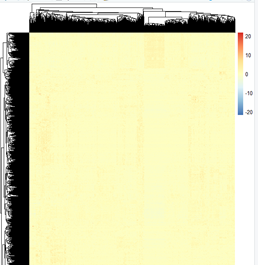
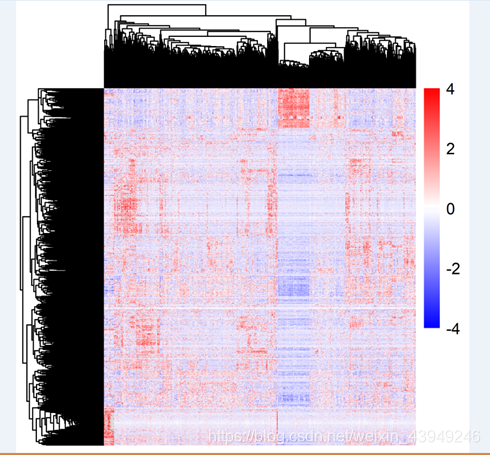
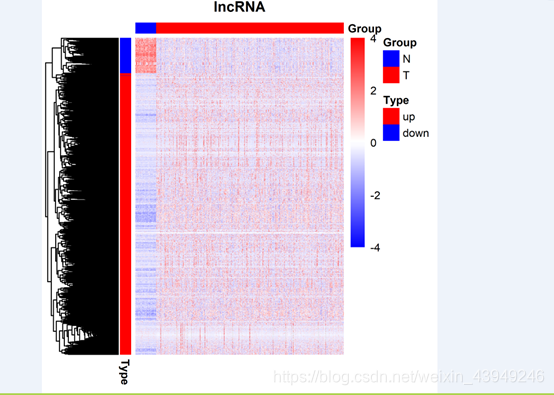
Pheatmap包是R语言绘制热图比较强大的软件包,当然现在也有很多资料介绍这个包的使用,但是今天我写的重点不是如何使用这个包绘制热图,而是如何绘制出更好看的热图。(我使用的矩阵是1663x594),下面的左图和右图来源于同一个数据。明显可以看出左图更加直观和美观。那么绘制左图的步骤主要分下面三步:
第一步,绘制成普通热图:
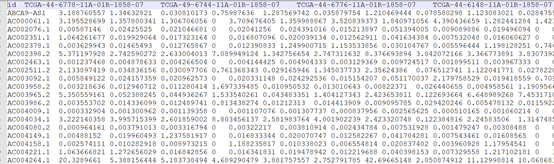
#读取数据
rt=read.table("diffmRNAExp.txt",sep="\t",header=T,check.names=F)
#第一列为行名
rownames(rt) = rt[,1]
#去掉行名,将表达量取均值
rt = rt[,-1]
rt=log10(rt+1)
#加载R包
library(ggplot2) library(pheatmap)
#绘制热图
pheatmap(rt,scale = "row",cluster_row =T,cluster_col =F,show_rownames=F,
color = colorRampPalette(colors = ("blue","white","red"))(102))
第二步,右边的颜色尺度范围默认是(-20,20),通过设置自行调整,比如说调整成(-4,4)。
bk <- c(seq(-4,-0.1,by=0.01),seq(0,4,by=0.01))
pheatmap(rt,scale = "row",cluster_row =T,cluster_col =F,show_rownames=F,
color=c(colorRampPalette(colors=c("blue","white"))(length(bk)/2),colorRampPalette(color=c("white","red"))(length(bk)/2)),fontsize=8,fontsize_row=4,legend_breaks=seq(-4,4,2),breaks=bk)
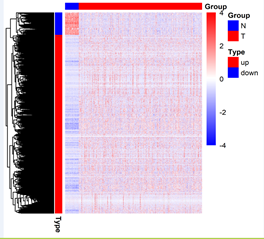
第三,添加分组,这里我们分别对行和列分别添加分组为例,如样本为T和N,而基因分为上调和下调。
annotation_row=read.table("group.txt",sep="\t",header=T)
annotation_col=read.table("group1.txt",sep="\t",header=T)
row_anno=data.frame(Type=annotation_row$type,row.names=annotation_row$gene)
col_anno=data.frame(Group=annotation_col$mm,row.names=colnames(rt))
的格式文件如下:
pheatmap(rt,scale = "row",cluster_row =T,cluster_col =F,show_rownames=F,annotation_row=row_anno,annotation_col=col_anno,
color = c(colorRampPalette(colors = c("blue","white"))(length(bk)/2),colorRampPalette(colors = c("white","red"))(length(bk)/2)),
fontsize=8,fontsize_row=4,legend_breaks=seq(-4,4,2),breaks=bk)
看到这里可能有的人说,里面分组的颜色太丑了,想换掉行不行?当然是可以的
ann_colors = list(Type=c("up"="red","down"="blue"),Group=c("N"="blue","T"="red"))
tiff(file="heatmap-1.tiff",width = 10,height =10,units ="cm",compression="lzw",bg="white",res=500)
pheatmap(rt,scale = "row",cluster_row =T,cluster_col =F,show_rownames=F,annotation_row=row_anno,annotation_col=col_anno,
clustering_column_method = "complete",show_colnames=F,main="lncRNA",annotation_colors =ann_colors,
color = c(colorRampPalette(colors = c("blue","white"))(length(bk)/2),colorRampPalette(colors = c("white","red"))(length(bk)/2)),
fontsize=8,fontsize_row=4,legend_breaks=seq(-4,4,2),breaks=bk)
这里我只是以红色和蓝色为例,大家可以换成自己想要的颜色!
图片:
普通的热图
我们想要绘制的形式
数据格式
修改右边的标尺
添加分组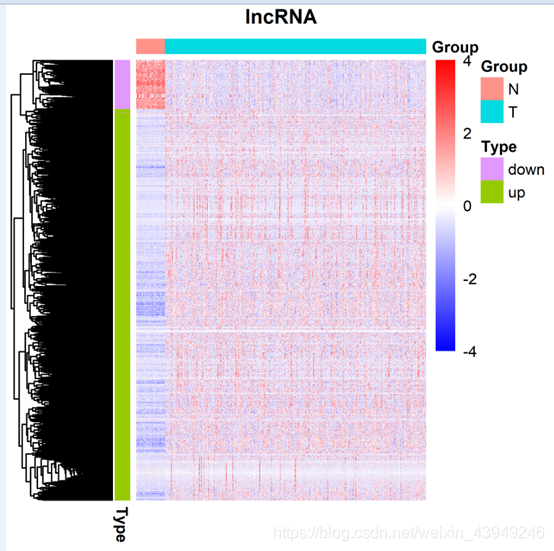
Pheatmap热图的绘制及如何调整图片Pheatmap包是R语言绘制热图比较强大的软件包,当然现在也有很多资料介绍这个包的使用,但是今天我写的重点不是如何使用这个包绘制热图,而是如何绘制出更好看的热图。(我使用的矩阵是1663x594),下面的左图和右图来源于同一个数据。明显可以看出左图更加直观和美观。那么绘制左图的步骤主要分下面三步:第一步,绘制成普通热图:数据格式#读取数据rt=r...
#使用pheatmap绘制热力图(heatmap,进行数据归一化,行规一化、列归一化)
#使用pheatmap绘制热力图(heatmap,数据聚类,行聚类、列聚类)
test = matrix(rnorm(200), 20, 10)
test[1:10, seq(1, 10, 2)] = test[1:10, seq(1, 10, 2)] + 3
test[11:20, seq(2, 10, 2)] = test[11:20, seq(2, 10, 2)] + 2
test[15:20, seq(2, 10, 2)] = test[15:20, seq(2,
R语言绘制热图实践 (一)pheatmap前言pheatmap包pheatmap简介常用参数介绍使用安装绘制样本间相关系数图(简单使用)差异表达基因热图(进阶使用)pheatmap总结corrplot包参考资料
在生信分析中,我们常常需要计算一个样本的几次实验结果或者不同样本实验结果的相关系数(样本间相关系数)以判断几个数据集之间相关的程度。
在本篇中及之后的内容中,为了用R得到相关系数热图...
A function to draw clustered heatmaps where one has better control over some graphical parameters such as cell size, etc.
pheatmap 这个包可以认为是heatmap的加强版,基本可以一包走天下了。
一、参数解析
Usage
pheatmap(mat, c.
Error in `geom_path()`:
! Problem while computing aesthetics.
ℹ Error occurred in the 2nd layer.
Caused by error in `FUN()`:
! 找不到对象'PCA1'
Run `rlang::last_error()` to see where the error occurred.
单细胞10x的数据读取不进去怎么办?
wby7788:
pathview包绘制富集的kegg图
m0_73712149:


