最近在学习git的使用,在git clone之后向上git push的时候出现了
error: Failed connect to github.com:443; Connection refused while accessing
解决办法
打开/etc/hosts文件,将github.com对应的行屏蔽掉就可以了
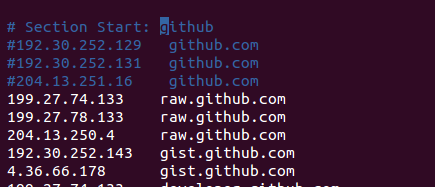
如图显示,屏蔽前三行
现在再去git push就会发现问题解决了
最近在学习git的使用,在git clone之后向上git push的时候出现了error: Failed connect to github.com:443; Connection refused while accessing 解决办法打开/etc/hosts文件,将github.com对应的行屏蔽掉就可以了如图显示,屏蔽前三行现在再去git push就会发现问题解决了...
npm ERR! Error while executing:
npm ERR! /usr/bin/git ls-remote -h -t https://github.com/nhn/raphael.git
npm ERR!
npm ERR! fatal: unable to access 'https://github.com/nhn/raphael.git/': Failed connect to github.com:443; Connection timed out
而且,一番倒腾后,报错信息还发生变化了
# 原始报错
unable to access 'https://github.com/apache/orc.git/': LibreSSL SSL_connect: SSL_ERROR_SYSCALL in connection to github.com:443
# 一番折腾后的报错
Failed to connect to github.


