
|
|
相关文章推荐

|
气势凌人的开水瓶 · 如何清除iframe的缓存或强制它重新加载?· 2 年前 · |
|
|
鬼畜的帽子 · Python ...· 3 年前 · |
|
|
眉毛粗的木瓜 · IMS error in logs: ...· 3 年前 · |
|
|
冷冷的牛肉面 · 树莓派ffmpeg直播推送,nginx视频流 ...· 3 年前 · |
|
|
从容的香蕉 · 加密算法概念简介--MD5、SHA、DES、 ...· 3 年前 · |

原文:
asp.net学习之ado.net(连接模式访问)
1. 连接模式的数据访问

 Code
Code
namespace DawnDataObject
{
public class Movies // 数据实体对象
{
public static readonly string _connectionString; // 连接数据库字符串为静态成员,每个实例共享。
static Movies(){
_connectionString = WebConfigurationManager.ConnectionStrings[ " DawnEnterpriseDBConnectionString " ].
ConnectionString;
}
private string _title;
private string _director;
// Movies类中包括的属性有Title、Director
public string Title{
get { return _title; }
set { _title = value; }
}
public string Director {
get { return _director; }
set { _director = value; }
}
// Movies类中的GetAll方法返回一个List对象,该对象可以被GridView等控件做为数据源绑定
public List < Movies > GetAll()
{
List < Movies > result = new List < Movies > ();
SqlConnection conn = new SqlConnection(_connectionString);
SqlCommand comm = new SqlCommand( " select Title,Director from Movies " , conn);
using (conn){ // using关键字指定了conn一旦离开这个代码段,自动调用其Dispose函数
conn.Open();
SqlDataReader reader = comm.ExecuteReader();
while (reader.Read()){
Movies newmovie = new Movies();
newmovie._title = ( string )reader[ " Title " ];
newmovie._director = ( string )reader[ " Director " ];
result.Add(newmovie);
}
return result;
}
}
}
}
ado.net框架支持两种模式的数据访问: 连接模式(Connected)和非连接模式(disconnected)。这一节介绍如何使用连接模式访问数据库中的数据,利用ADO.NET中的Connection,Command,DataReader来获取和修改数据库中的数据
1. 连接模式的数据访问
连接模式要使用到的三个核心类:
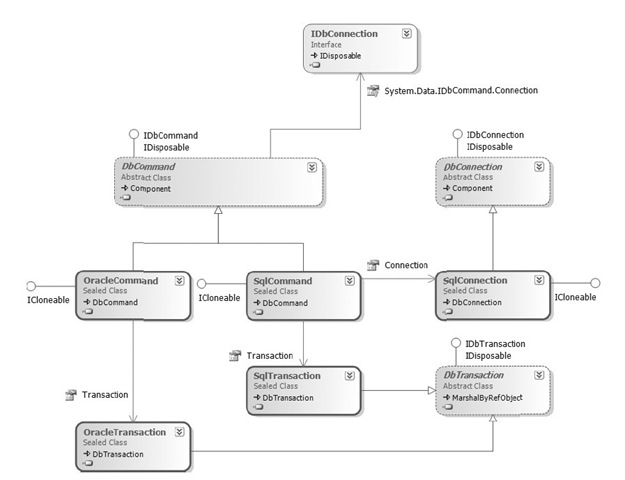
● IDBConnection : 表示数据源的连接,所有Connection类的基类
SqlConnection实现了IDBConnection接口,用来与SQL Server数据源进行连接
● DBCommand : 表示所有Command类的基类
SqlCommand实现了IDBCommand接口,与来对SQL Server数据库执行的一个 Transact-SQL 语句或存储过程
● DataReader : 所有DataReader类的基类
SqlDataReader实现了IDataReader接口,提供一种从 SQL Server 数据库读取行的只进流的方式。
如果要连接到微软SQL Server数据库,尽量使用SqlClient命名空间中的SqlConnection,SqlCommand,SqlDataReader类,如果与Oracle数据库通信,应该使用OracleClient命名空间的类;与其它数据库进行通信,就应该使用OleDB或ODBC命名空间的类。
图1: DbConnection与DbCommand的关系图如下所示:
例1: 一个简单的连接数据库查询的例子
=== App_Code\DawnDataObject.cs ===
Code
namespace DawnDataObject
{
public class Movies // 数据实体对象
{
public static readonly string _connectionString; // 连接数据库字符串为静态成员,每个实例共享。
static Movies(){
_connectionString = WebConfigurationManager.ConnectionStrings[ " DawnEnterpriseDBConnectionString " ].
ConnectionString;
}
private string _title;
private string _director;
// Movies类中包括的属性有Title、Director
public string Title{
get { return _title; }
set { _title = value; }
}
public string Director {
get { return _director; }
set { _director = value; }
}
// Movies类中的GetAll方法返回一个List对象,该对象可以被GridView等控件做为数据源绑定
public List < Movies > GetAll()
{
List < Movies > result = new List < Movies > ();
SqlConnection conn = new SqlConnection(_connectionString);
SqlCommand comm = new SqlCommand( " select Title,Director from Movies " , conn);
using (conn){ // using关键字指定了conn一旦离开这个代码段,自动调用其Dispose函数
conn.Open();
SqlDataReader reader = comm.ExecuteReader();
while (reader.Read()){
Movies newmovie = new Movies();
newmovie._title = ( string )reader[ " Title " ];
newmovie._director = ( string )reader[ " Director " ];
result.Add(newmovie);
}
return result;
}
}
}
}
=== Movies.aspx ===
<
asp:GridView
ID
="GridView1"
runat
="server"
DataSourceID
="ObjectDataSource1"
/>
< asp:ObjectDataSource ID ="ObjectDataSource1" TypeName ="DawnDataObject.Movies" SelectMethod ="GetAll" runat ="server" />
2. 使用Connection对象
Code
// Movies类中的GetAll方法返回一个List对象,该对象可以被GridView等控件做为数据源绑定
namespace DawnDataObject
{
public class Movies
{
public static readonly string _connectionString; // 连接数据库字符串为静态成员,每个实例共享。
static Movies(){
_connectionString = WebConfigurationManager.ConnectionStrings[ " DawnEnterpriseDBConnectionString " ].
ConnectionString;
}
private string _title;
private string _director;
// Movies类中包括的属性有Title、Director
public string Title{
get { return _title; }
set { _title = value; }
}
public string Director {
get { return _director; }
set { _director = value; }
}
// Movies类中的GetAll方法返回一个List对象,该对象可以被GridView等控件做为数据源绑定
public List < Movies > GetAll( out long executeTime) // executeTime作为out参数
{
List < Movies > result = new List < Movies > ();
SqlConnection conn = new SqlConnection(_connectionString);
SqlCommand comm = new SqlCommand( " WAITFOR DELAY '0:0:03';select Title,Director from Movies " , conn);
conn.StatisticsEnabled = true ; // 开启获取统计信息的功能
using (conn){ // using关键字指定了conn一旦离开这个代码段,自动调用其Dispose函数
conn.Open();
SqlDataReader reader = comm.ExecuteReader();
while (reader.Read()){
Movies newmovie = new Movies();
newmovie._title = ( string )reader[ " Title " ];
newmovie._director = ( string )reader[ " Director " ];
result.Add(newmovie);
}
IDictionary stats = conn.RetrieveStatistics();
executeTime = ( long )stats[ " ExecutionTime " ];
return result;
}
}
}
}
Code
< script runat =”server” >
protected void ObjectDataSource1_Selected(object sender, ObjectDataSourceStatusEventArgs e)
{
Label1.Text = e.OutputParameters[ " executeTime " ].ToString(); // 取得返回参数值
}
</ script >
< asp:GridView ID ="GridView1" runat ="server" AutoGenerateColumns ="false" DataSourceID ="ObjectDataSource1" >
< asp:ObjectDataSource ID ="ObjectDataSource1" TypeName ="DawnDataObject.Movies"
SelectMethod ="GetAll" runat ="server" onselected ="ObjectDataSource1_Selected" >
< SelectParameters >
< asp:Parameter Name ="executeTime" DbType ="Int64" Direction ="Output" /> <!-- 获得GetAll的返回参数 -->
</ SelectParameters >
</ asp:ObjectDataSource >
< asp:Label ID ="Label1" runat ="server" Text ="Label" ></ asp:Label >
Code
namespace DawnDataObject
{
public class Movies
{
public static readonly string _connectionString; // 连接数据库字符串为静态成员,每个实例共享。
static Movies(){
_connectionString = WebConfigurationManager.ConnectionStrings[ " DawnEnterpriseDBConnectionString " ].
ConnectionString;
}
private string _title;
private string _director;
private Int32 _id;
// Movies类中包括的属性有Title、Director
public string Title{
get { return _title; }
set { _title = value; }
}
public string Director {
get { return _director; }
set { _director = value; }
}
public Int32 Id {
get { return _id; }
}
// Movies类中的GetAll方法返回一个List对象,该对象可以被GridView等控件做为数据源绑定
public List < Movies > GetAll( out long executeTime) // executeTime作为out参数
{
List < Movies > result = new List < Movies > ();
SqlConnection conn = new SqlConnection(_connectionString);
SqlCommand comm = new SqlCommand( " select Id,Title,Director from Movies " , conn);
conn.StatisticsEnabled = true ;
using (conn){ // using关键字指定了conn一旦离开这个代码段,自动调用其Dispose函数
conn.Open();
SqlDataReader reader = comm.ExecuteReader();
while (reader.Read()){
Movies newmovie = new Movies();
newmovie._title = ( string )reader[ " Title " ];
newmovie._director = ( string )reader[ " Director " ];
newmovie._id = (Int32)reader[ " Id " ];
result.Add(newmovie);
}
IDictionary stats = conn.RetrieveStatistics();
executeTime = ( long )stats[ " ExecutionTime " ];
return result;
}
}
// 对Movies表进行更新的方法
public void UpdateMovie( int id, string title, string director)
{
SqlConnection conn = new SqlConnection(_connectionString);
SqlCommand command = conn.CreateCommand(); // 使用SqlConnection.CreateCommand获得SqlCommand对象
command.CommandText = " Update Movies set Title=@title,Director=@director where Id=@id " ;
command.Parameters.AddWithValue( " @id " , id);
command.Parameters.AddWithValue( " @title " , title);
command.Parameters.AddWithValue( " @director " , director);
using (conn){
conn.Open();
command.ExecuteNonQuery();
}
}
// 对Movies表进行删除的方法
public void DeleteMovie( int id)
{
SqlConnection conn = new SqlConnection(_connectionString);
// 使用new SqlCommand获得SqlCommand对象
SqlCommand command = new SqlCommand( " delete from Movies where Id=@id " ,conn);
command.Parameters.AddWithValue( " @id " , id);
using (conn)
{
conn.Open();
command.ExecuteNonQuery();
}
}
}
}
Code
< asp:GridView ID ="GridView1" runat ="server" DataKeyNames ="Id"
AutoGenerateColumns ="False" DataSourceID ="ObjectDataSource1"
onrowcommand ="GridView1_RowCommand" onrowdeleting ="GridView1_RowDeleting"
AllowPaging ="True" >
< Columns >
< asp:BoundField HeaderText ="Id" DataField ="Id" Visible ="false" />
< asp:BoundField HeaderText ="Title" DataField ="Title" />
< asp:BoundField HeaderText ="Director" DataField ="Director" />
< asp:CommandField ShowEditButton ="True" />
< asp:CommandField ShowDeleteButton ="True" />
</ Columns >
</ asp:GridView >
< asp:ObjectDataSource ID ="ObjectDataSource1" TypeName ="DawnDataObject.Movies"
SelectMethod ="GetAll" UpdateMethod ="UpdateMovie" DeleteMethod ="DeleteMovie" runat ="server" onselected ="ObjectDataSource1_Selected" >
< SelectParameters >
< asp:Parameter Name ="executeTime" DbType ="Int64" Direction ="Output" />
</ SelectParameters >
< UpdateParameters >
< asp:Parameter Name ="Id" DbType ="Int32" />
< asp:Parameter Name ="Title" DbType ="String" />
< asp:Parameter Name ="Director" DbType ="String" />
</ UpdateParameters >
< DeleteParameters >
< asp:Parameter Name ="Id" DbType ="Int32" />
</ DeleteParameters >
</ asp:ObjectDataSource >
Code
// 只要变更例4中的UpdateMovie函数,其它代码不变
public void UpdateMovie( int id, string title, string director)
{
SqlConnection conn = new SqlConnection(_connectionString);
SqlCommand command = conn.CreateCommand(); // 使用SqlConnection.CreateCommand获得SqlCommand对象
// 与例4相比,只要变更下面两句
command.CommandText = " UpdateMovie " ;
command.CommandType = CommandType.StoredProcedure;
command.Parameters.AddWithValue( " @id " , id);
command.Parameters.AddWithValue( " @title " , title);
command.Parameters.AddWithValue( " @director " , director);
using (conn){
conn.Open();
command.ExecuteNonQuery();
}
}
Code
< script runat ="server" >
void Page_Load()
{
lblMovieCount.Text = GetMovieCount().ToString();
}
private int GetMovieCount()
{
int result = 0 ;
string connectionString = WebConfigurationManager.connectionString[ " Movies " ].ConnectionString;
SqlConnection con = new SqlConnection(connectionString);
SqlCommand cmd = new SqlCommand( " GetMovieCount " , con);
cmd.CommandType = CommandType.StoredProcedure;
cmd.Parameters.Add( " @ReturnVal " , SqlDbType.Int).Direction = ParameterDirection.ReturnValue; // 设定返回值参数
using (con)
{
con.Open();
cmd.ExecuteNonQuery(); // 好像一定要使用ExecuteNonQuery,如果使用ExecuteReader,则相应的返回值就取不出来。
result = ( int )cmd.Parameters[ " @ReturnVal " ].Value; // 取得返回值参数值
}
return result;
}
</ script >
例7: 从存储过程中取得OUTPUT值
=== 存储过程创建 ===
Code
< script runat =server >
public List < Movie5 > GetBoxOffice(out decimal SumBoxOfficeTotals)
{
List < Movie5 > results = new List < Movie5 > ();
SqlConnection con = new SqlConnection(_connectionString);
SqlCommand cmd = new SqlCommand( " GetBoxOfficeTotals " , con);
cmd.CommandType = CommandType.StoredProcedure;
cmd.Parameters.Add( " @SumBoxOfficeTotals " , SqlDbType.Money).Direction = ParameterDirection.Output;
using (con)
{
con.Open();
SqlDataReader reader = cmd.ExecuteReader(); // 使用OUTPUT参数,可以使用ExecuteReader。与ReturnValue不同。
while (reader.Read())
{
Movie5 newMovie = new Movie5();
newMovie.Title = (string)reader[ " Title " ];
newMovie.BoxOfficeTotals = (decimal)reader[ " BoxOfficeTotals " ];
results.Add(newMovie);
}
reader.Close();
SumBoxOfficeTotals = (decimal)cmd.Parameters[ " @SumBoxOfficeTotals " ].
Value;
}
return results;
}
</ script >
Code
namespace DawnDataObject
{
public class Movies
{
public SqlDataReader GetDataReader()
{
SqlConnection conn = new SqlConnection(_connectionString);
SqlCommand command = new SqlCommand( " SelectMovies " , conn);
command.CommandType = CommandType.StoredProcedure;
conn.Open();
return command.ExecuteReader(CommandBehavior.CloseConnection); // 直接返回DataReader作为数据源
}
public void UpdateMovies() {…}
public void DeleteMovies() {…}
}
}
Code
<!-- 因为DataReader的原因,这里的GridView不支持分页,排序 -->
< asp:GridView ID ="GridView1" runat ="server" DataKeyNames ="Id"
AutoGenerateColumns ="False" DataSourceID ="ObjectDataSource1"
onrowcommand ="GridView1_RowCommand" onrowdeleting ="GridView1_RowDeleting" >
< Columns >
< asp:BoundField HeaderText ="Id" DataField ="Id" Visible ="false" />
< asp:BoundField HeaderText ="Title" DataField ="Title" />
< asp:BoundField HeaderText ="Director" DataField ="Director" />
< asp:CommandField ShowEditButton ="True" />
< asp:CommandField ShowDeleteButton ="True" />
</ Columns >
< asp:ObjectDataSource ID ="ObjectDataSource1" TypeName ="DawnDataObject.Movies"
SelectMethod ="GetDataReader" UpdateMethod ="UpdateMovie" DeleteMethod ="DeleteMovie" runat ="server" >
< UpdateParameters >
< asp:Parameter Name ="Id" DbType ="Int32" />
< asp:Parameter Name ="Title" DbType ="String" />
< asp:Parameter Name ="Director" DbType ="String" />
</ UpdateParameters >
< DeleteParameters >
< asp:Parameter Name ="Id" DbType ="Int32" />
</ DeleteParameters >
</ asp:ObjectDataSource >
Code
namespace mulitResults
{
public class DataLayer1
{
private static readonly string _connectionString;
public class MovieCategory // 表示电影种类实体,注意是嵌套类
{
private int _id;
private string _name;
public int Id
{
get { return _id; }
set { _id = value; }
}
public string Name
{
get { return _name; }
set { _name = value; }
}
}
public class Movie // 表示电影实体,注意是嵌套类
{
private string _title;
private int _categoryId;
public string Title
{
get { return _title; }
set { _title = value; }
}
public int CategoryId
{
get { return _categoryId; }
set { _categoryId = value; }
}
}
// 不像刚才实体列表作为返回值反回,现在作为参数返回
public static void GetMovieData(List < DataLayer1.MovieCategory > movieCategories,List < DataLayer1.Movie > movies)
{
string commandText = " SELECT Id,Name FROM MovieCategories;SELECT Title,CategoryId FROM Movies " ;
SqlConnection con = new SqlConnection(_connectionString);
SqlCommand cmd = new SqlCommand(commandText, con);
using (con)
{
// Execute command
con.Open();
SqlDataReader reader = cmd.ExecuteReader();
// Create movie categories
while (reader.Read())
{
DataLayer1.MovieCategory newCategory = new DataLayer1.
MovieCategory();
newCategory.Id = ( int )reader[ " Id " ];
newCategory.Name = ( string )reader[ " Name " ];
movieCategories.Add(newCategory);
}
// Move to next result set
reader.NextResult();
// Create movies
while (reader.Read())
{
DataLayer1.Movie newMovie = new DataLayer1.Movie();
newMovie.Title = ( string )reader[ " Title " ];
newMovie.CategoryId = ( int )reader[ " CategoryID " ];
movies.Add(newMovie);
}
}
}
static DataLayer1()
{
_connectionString = WebConfigurationManager.ConnectionStrings[ " Movies " ].ConnectionString;
}
}
}
Code
< script runat ="server" >
void Page_Load()
{
// Get database data
List < DataLayer1.MovieCategory > categories = new List < DataLayer1.MovieCategory > ();
List < DataLayer1.Movie > movies = new List < DataLayer1.Movie > ();
DataLayer1.GetMovieData(categories, movies);
// Bind the data
grdCategories.DataSource = categories;
grdCategories.DataBind();
grdMovies.DataSource = movies;
grdMovies.DataBind();
}
</ script >
< h1 > Movie Categories </ h1 >
< asp:GridView id ="grdCategories" Runat ="server" />
< h1 > Movies </ h1 >
< asp:GridView id ="grdMovies" Runat ="server" />
Code
< script runat =”server” >
void BuildTree()
{
// Create MARS connection
SqlConnection con = new SqlConnection(_connectionString);
// Create Movie Categories command
string cmdCategoriesText = " SELECT Id,Name FROM MovieCategories " ;
SqlCommand cmdCategories = new SqlCommand(cmdCategoriesText, con);
// Create Movie command
string cmdMoviesText = " SELECT Title FROM Movies " + " WHERE CategoryId=@CategoryID " ;
SqlCommand cmdMovies = new SqlCommand(cmdMoviesText, con);
cmdMovies.Parameters.Add( " @CategoryId " , SqlDbType.Int);
using (con)
{
con.Open();
// 打开一个结果集,表示电影目录
SqlDataReader categories = cmdCategories.ExecuteReader();
while (categories.Read())
{
// Add category node
int id = categories.GetInt32( 0 );
string name = categories.GetString( 1 );
TreeNode catNode = new TreeNode(name);
TreeView1.Nodes.Add(catNode);
// Iterate through matching movies
cmdMovies.Parameters[ " @CategoryId " ].Value = id;
SqlDataReader movies = cmdMovies.ExecuteReader(); // 打开另一个结果集.注:上一个结果集还没有被关闭.
while (movies.Read())
{
// Add movie node
string title = movies.GetString( 0 );
TreeNode movieNode = new TreeNode(title);
catNode.ChildNodes.Add(movieNode);
}
movies.Close();
}
}
void Page_Load()
{
if ( ! Page.IsPostBack)
BuildTree();
}
</ script >
< asp:TreeView id =”TreeView1” Runat =”server” /> ASP.NET Core on K8S深入学习(14)Ingress灰度发布
< asp:ObjectDataSource ID ="ObjectDataSource1" TypeName ="DawnDataObject.Movies" SelectMethod ="GetAll" runat ="server" />
2. 使用Connection对象
Connection对象表示数据源的连接,实例化Connection对象时,需要向构造函数传递一个连接字符串。连接字符串包含了连接到数据源所需要的位置和安全认证信息
Connection对象也提供了相应的方法对数据库进行打开和关闭操作;提供了相应的属性确认数据库的状态。
2.1 连接字符串
一个最普通的连接字符串如下所示:
string
_connectionString
=
"
Data Source=(LOCAL);Initial Catalog=DawnEnterpriseDB;User ID=sa;Password=*****
"
;
SqlConnection conn = new SqlConnection(_connectionSring); // 可以在建立SqlConnection对象时把连接字符串传递给构造参数
SqlConnection conn = new SqlConnection(_connectionSring); // 可以在建立SqlConnection对象时把连接字符串传递给构造参数
也可以使用Connection对象的ConnectionString属性来获取或设置用于打开 SQL Server 数据库的字符串
string
connString
=
conn.ConnectionString;
conn.ConnectionString = " Persist Security Info=False;Integrated Security=true;Initial Catalog=Northwind;server=(local) " ;
conn.ConnectionString = " Persist Security Info=False;Integrated Security=true;Initial Catalog=Northwind;server=(local) " ;
ado.net提供了相应的DbConnectionStringBuilder类来管理数据库连接字符串。相对应的,sqlClient命名空间中就包含了一个SqlConnectionStringBuilder类。
例2:使用SqlConnectionStringBuilder类管理数据库连接字符串
SqlConnectionStringBuilder connstrBuilder
=
new
SqlConnectionStringBuilder();
connstrBuilder.DataSource = " (local) " ;
connstrBuilder.InitialCatalog = " Test " ;
connstrBuilder.IntegratedSecurity = true ;
using (SqlConnection testConn = new SqlConnection(connstrBuilder.toString()))
{
testConn.open();
if (testConnection.State == ConnectionState.Open) {
Console.WriteLine( " Connection successfully opened " );
}
}
connstrBuilder.DataSource = " (local) " ;
connstrBuilder.InitialCatalog = " Test " ;
connstrBuilder.IntegratedSecurity = true ;
using (SqlConnection testConn = new SqlConnection(connstrBuilder.toString()))
{
testConn.open();
if (testConnection.State == ConnectionState.Open) {
Console.WriteLine( " Connection successfully opened " );
}
}
可以把ConnectionString保存在Web.config文件中,然后在程序中使用WebConfigurationManager类进行读取
<
configuration
>
< add connectionString ="Data Source=.;Initial Catalog=DawnEnterpriseDB;User ID=sa;Password=******" name ="DawnEnterpriseDBConnectionString" providerName ="System.Data.SqlClient" />
</ configuration >
< add connectionString ="Data Source=.;Initial Catalog=DawnEnterpriseDB;User ID=sa;Password=******" name ="DawnEnterpriseDBConnectionString" providerName ="System.Data.SqlClient" />
</ configuration >
如何读取其中连接字符串的话在例1中有示例
2.2 IDbConnection的共通行为与属性
因为相关的SqlConnection,OracleConnection,OleDBConnection与ODBCConnection都要实现IDBConnection接口,该接口规定了Connection类必须实现的一些行为和属性
2.2.1: 相关方法
● BeginTransaction() : 开始数据库事务。
● ChangeDatabase(string database) : 更改当前数据库。
● Open() : 打开一个数据库连接,其设置由提供程序特定的 Connection 对象的 ConnectionString 属性指定
● Close() : 关闭数据库连接
● Dispose() : 法关闭或释放由实现此接口的类的实例保持的文件、流和句柄等非托管资源。
● CreateCommand(): 创建并返回一个与该连接相关联的 Command 对象。
2.2.2: 相关属性
● 包括ConnectionString、ConnectionTimeout、Database、Sate属性
以上,state属性返回的是一个ConnectionState枚举对象,其中比较常用的的状态值ConnectionState.Closed与ConnectionState.Open
2.3 SqlConnection的一些其它特性
2.3.1 使用RetrieveStatistics()方法获得数据命令执行时的统计信息,例如,可以获取总命令执行时间的统计信息。
统计信息有以下常用属性可以获得:
● BytesReceived : 查询中接收到的字节数
● BytesSend : 发送出数据的字节数
● ConnectionTime : 当前连接被开启的总时间
● ExecutionTime : 返回以毫秒为单位的连接执行时间
● IduCount: 用于返回被执行Insert、Update、Delete命令的次数
● IduRows : 用于返回被执行Insert、Update、Delete命令的行数
● SelectCount: 用于返回Select命令执行的次数
● SelectRows : 用于返回Select命令执行的行数
● …
例3: 取得数据库查询的执行时间
=== App_Code\DawnDataObject.cs ===
Code
// Movies类中的GetAll方法返回一个List对象,该对象可以被GridView等控件做为数据源绑定
namespace DawnDataObject
{
public class Movies
{
public static readonly string _connectionString; // 连接数据库字符串为静态成员,每个实例共享。
static Movies(){
_connectionString = WebConfigurationManager.ConnectionStrings[ " DawnEnterpriseDBConnectionString " ].
ConnectionString;
}
private string _title;
private string _director;
// Movies类中包括的属性有Title、Director
public string Title{
get { return _title; }
set { _title = value; }
}
public string Director {
get { return _director; }
set { _director = value; }
}
// Movies类中的GetAll方法返回一个List对象,该对象可以被GridView等控件做为数据源绑定
public List < Movies > GetAll( out long executeTime) // executeTime作为out参数
{
List < Movies > result = new List < Movies > ();
SqlConnection conn = new SqlConnection(_connectionString);
SqlCommand comm = new SqlCommand( " WAITFOR DELAY '0:0:03';select Title,Director from Movies " , conn);
conn.StatisticsEnabled = true ; // 开启获取统计信息的功能
using (conn){ // using关键字指定了conn一旦离开这个代码段,自动调用其Dispose函数
conn.Open();
SqlDataReader reader = comm.ExecuteReader();
while (reader.Read()){
Movies newmovie = new Movies();
newmovie._title = ( string )reader[ " Title " ];
newmovie._director = ( string )reader[ " Director " ];
result.Add(newmovie);
}
IDictionary stats = conn.RetrieveStatistics();
executeTime = ( long )stats[ " ExecutionTime " ];
return result;
}
}
}
}
=== Movies.aspx ===
Code
< script runat =”server” >
protected void ObjectDataSource1_Selected(object sender, ObjectDataSourceStatusEventArgs e)
{
Label1.Text = e.OutputParameters[ " executeTime " ].ToString(); // 取得返回参数值
}
</ script >
< asp:GridView ID ="GridView1" runat ="server" AutoGenerateColumns ="false" DataSourceID ="ObjectDataSource1" >
< asp:ObjectDataSource ID ="ObjectDataSource1" TypeName ="DawnDataObject.Movies"
SelectMethod ="GetAll" runat ="server" onselected ="ObjectDataSource1_Selected" >
< SelectParameters >
< asp:Parameter Name ="executeTime" DbType ="Int64" Direction ="Output" /> <!-- 获得GetAll的返回参数 -->
</ SelectParameters >
</ asp:ObjectDataSource >
< asp:Label ID ="Label1" runat ="server" Text ="Label" ></ asp:Label >
2.3.2 使用连接池
数据库连接是非常昂贵的资源,如果希望ASP.NET应用程序处理大量用户请求的能力,使用连接池将会获得更好的效率
因为打开数据库是一件很耗时的操作,每次使用数据库时去建立连接效率将会很低,更好的办法是创建一个缓存池存放被重复使用的数据库连接。
当使用SqlConnection时,连接时是默认开启的,可以在连接字符串中使用Pooling=false将连接池关闭。
关于连接池,必须注意二件事情:1.利用连接池时,调用SqlConnection.Close()方法关闭连接仍然非常重要。不显示关闭,当前正在使用的连接就不会被放入连接池中。2.系统会跟据连接字符串的不同(使用字符串逐字比较方法),分别创建不同的连接池。因此,将连接字符串存放在站点配置文件中,尽量不要在组件代码中硬编码连接字符串。
● 清空连接池
ClearAllPools() : 用于清空系统中所有连接池中的数据库连接
ClearPool() : 清空第统中指定连接池里的数据库连接
● 设置连接字符串中连接池的属性 [以上这些属性的键/值对是在ConnectionString中指定的]
Connection Timeout : 用于指定为秒为单位的连接生存最大值(默认为0,永不失效)
Connection Reset : 是否自动 重置来自连接池中的连接(默认为true)
Max Pool Size : 保存在连接池中的最大连接数(默认为100)
Min Pool Size : 保存在连接池中的最小连接数
Pooling : 是否开始连接池
2.4 关闭连接 Close()与Dispose()
以上两个函数都可以关闭连接,但是它们有什么不同的。以下摘录的就是它们不同的地方:
• Calling Close on a connection object enables the underlying connection to be pooled.
• Calling Dispose on a connection object alleviates the need for you to call Close on it explicitly. It not only ensures that
the underlying connection can be pooled, but it also makes sure that allocated resources can now be garbage collected.
• Not calling either Close or Dispose will effectively kill your application performance by increasing the connection pool to a maximum limit,
and then everyone will have to wait for the next available connection object. Not only that, but even when the open connections fall out of scope,
they won’t be garbage collected for a relatively long time because the connection object itself doesn’t occupy that much memory—and the lack of memory
is the sole criterion for the garbage collector to kick in and do its work.
In short, Dispose is the best option as it helps garbage collection and connection pooling, Close is second best option as it helps only connection pooling,
and not calling either Close or Dispose is so bad that you shouldn’t even go there.
• Calling Dispose on a connection object alleviates the need for you to call Close on it explicitly. It not only ensures that
the underlying connection can be pooled, but it also makes sure that allocated resources can now be garbage collected.
• Not calling either Close or Dispose will effectively kill your application performance by increasing the connection pool to a maximum limit,
and then everyone will have to wait for the next available connection object. Not only that, but even when the open connections fall out of scope,
they won’t be garbage collected for a relatively long time because the connection object itself doesn’t occupy that much memory—and the lack of memory
is the sole criterion for the garbage collector to kick in and do its work.
In short, Dispose is the best option as it helps garbage collection and connection pooling, Close is second best option as it helps only connection pooling,
and not calling either Close or Dispose is so bad that you shouldn’t even go there.
3. Command对象
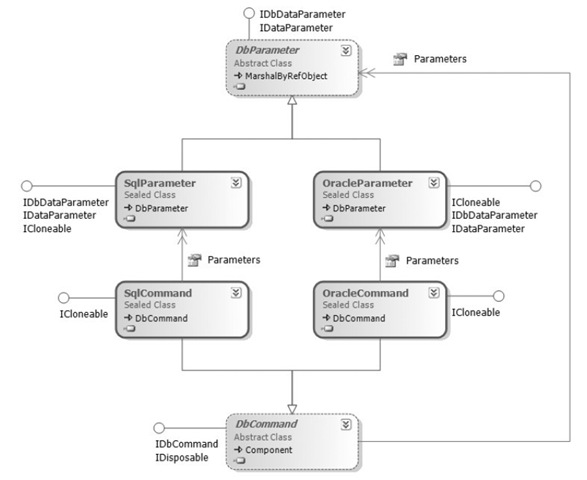
Command对象表示一个可以对数据源执行的命令。在这里主要介绍的是SqlCommand对象,SqlCommand继承自Command对象的公共基类DBCommand。
3.1 SQL或存储过程 命令的执行
可以通过SqlCommand.ExecuteNonQuery方法来执行一个SQL命令,该方法不会返回任何一个结果集。这个方法通常用来执行SQL语句中的Update、Insert、Delete命令。
当然也可以用来执行如Create Table,Drop DataBase命令等
例4: 使用SqlCommand更新和删除电影记录的方法UpdateMovie和DeleteMovie()
=== App_Code\DawnDataObject.cs ===
Code
namespace DawnDataObject
{
public class Movies
{
public static readonly string _connectionString; // 连接数据库字符串为静态成员,每个实例共享。
static Movies(){
_connectionString = WebConfigurationManager.ConnectionStrings[ " DawnEnterpriseDBConnectionString " ].
ConnectionString;
}
private string _title;
private string _director;
private Int32 _id;
// Movies类中包括的属性有Title、Director
public string Title{
get { return _title; }
set { _title = value; }
}
public string Director {
get { return _director; }
set { _director = value; }
}
public Int32 Id {
get { return _id; }
}
// Movies类中的GetAll方法返回一个List对象,该对象可以被GridView等控件做为数据源绑定
public List < Movies > GetAll( out long executeTime) // executeTime作为out参数
{
List < Movies > result = new List < Movies > ();
SqlConnection conn = new SqlConnection(_connectionString);
SqlCommand comm = new SqlCommand( " select Id,Title,Director from Movies " , conn);
conn.StatisticsEnabled = true ;
using (conn){ // using关键字指定了conn一旦离开这个代码段,自动调用其Dispose函数
conn.Open();
SqlDataReader reader = comm.ExecuteReader();
while (reader.Read()){
Movies newmovie = new Movies();
newmovie._title = ( string )reader[ " Title " ];
newmovie._director = ( string )reader[ " Director " ];
newmovie._id = (Int32)reader[ " Id " ];
result.Add(newmovie);
}
IDictionary stats = conn.RetrieveStatistics();
executeTime = ( long )stats[ " ExecutionTime " ];
return result;
}
}
// 对Movies表进行更新的方法
public void UpdateMovie( int id, string title, string director)
{
SqlConnection conn = new SqlConnection(_connectionString);
SqlCommand command = conn.CreateCommand(); // 使用SqlConnection.CreateCommand获得SqlCommand对象
command.CommandText = " Update Movies set Title=@title,Director=@director where Id=@id " ;
command.Parameters.AddWithValue( " @id " , id);
command.Parameters.AddWithValue( " @title " , title);
command.Parameters.AddWithValue( " @director " , director);
using (conn){
conn.Open();
command.ExecuteNonQuery();
}
}
// 对Movies表进行删除的方法
public void DeleteMovie( int id)
{
SqlConnection conn = new SqlConnection(_connectionString);
// 使用new SqlCommand获得SqlCommand对象
SqlCommand command = new SqlCommand( " delete from Movies where Id=@id " ,conn);
command.Parameters.AddWithValue( " @id " , id);
using (conn)
{
conn.Open();
command.ExecuteNonQuery();
}
}
}
}
=== Movies.aspx ===
Code
< asp:GridView ID ="GridView1" runat ="server" DataKeyNames ="Id"
AutoGenerateColumns ="False" DataSourceID ="ObjectDataSource1"
onrowcommand ="GridView1_RowCommand" onrowdeleting ="GridView1_RowDeleting"
AllowPaging ="True" >
< Columns >
< asp:BoundField HeaderText ="Id" DataField ="Id" Visible ="false" />
< asp:BoundField HeaderText ="Title" DataField ="Title" />
< asp:BoundField HeaderText ="Director" DataField ="Director" />
< asp:CommandField ShowEditButton ="True" />
< asp:CommandField ShowDeleteButton ="True" />
</ Columns >
</ asp:GridView >
< asp:ObjectDataSource ID ="ObjectDataSource1" TypeName ="DawnDataObject.Movies"
SelectMethod ="GetAll" UpdateMethod ="UpdateMovie" DeleteMethod ="DeleteMovie" runat ="server" onselected ="ObjectDataSource1_Selected" >
< SelectParameters >
< asp:Parameter Name ="executeTime" DbType ="Int64" Direction ="Output" />
</ SelectParameters >
< UpdateParameters >
< asp:Parameter Name ="Id" DbType ="Int32" />
< asp:Parameter Name ="Title" DbType ="String" />
< asp:Parameter Name ="Director" DbType ="String" />
</ UpdateParameters >
< DeleteParameters >
< asp:Parameter Name ="Id" DbType ="Int32" />
</ DeleteParameters >
</ asp:ObjectDataSource >
3.2 执行带参数的命令
大多数SQL命令都带有参数,比如在执行对数据库记录更新时,就要提供参数表示数据记录项的新值
最好不要通过手工串接+=操作来构建SQL命令参数,因为这样很容易遭受SQL注入攻击。
而使用SqlParameter对象来表示参数有很多种构建方式,最简单的就像下面一样来调用 SqlCommand.AddWithValue()方法
SqlCommand cmd
=
new
SqlCommand(
"
Insert Title(Title) values(@title)
"
,conn);
//
注意,@title就算为字符串类型也不需要用''括起来
cmd.Parameters.AddWithValue( " @title " ,”ASP.NET 2.0 " );
cmd.Parameters.AddWithValue( " @title " ,”ASP.NET 2.0 " );
当使用AddWithValue()方法时,SqlCommand自动识别并推测参数的类型和大小。该方法会假设字符串值类型为NVarChar, 整数值类型为Int,十进行数值类型为Decimal,以此类推。
另一种构建参数的方法是直接创建SqlParameter对象,并加入到SqlCommand对象中。这样做的好处是:可以显式指定参数名称,大小,精度,刻度和传递方向。
SqlCommand cmd
=
new
SqlCommand(
"
Insert Title(Title) values(@title)
"
,conn);
SqlParameter paramTitle = new SqlParameter();
paramTitle.ParameterName = " @Title " ;
paramTitle.SqlDbType = SqlDbType.NVarChar;
paramTitle.Size = 50 ;
paramTitle.Value = " ASP.NET " ;
cmd.Parameters.Add(paramTitle);
SqlParameter paramTitle = new SqlParameter();
paramTitle.ParameterName = " @Title " ;
paramTitle.SqlDbType = SqlDbType.NVarChar;
paramTitle.Size = 50 ;
paramTitle.Value = " ASP.NET " ;
cmd.Parameters.Add(paramTitle);
第三种方法,直接使用Add的一个重载方法来创建新的SqlParameter对象
SqlCommand cmd
=
new
SqlCommand(
"
Insert Title(Title) values(@title)
"
,conn);
cmd.Parameters.Add( " @Title " ,SqlDbType.NVarChar, 50 ).Value = " ASP.NET " ;
cmd.Parameters.Add( " @Title " ,SqlDbType.NVarChar, 50 ).Value = " ASP.NET " ;
以上,使用第一种方法比较简便,直观。
图2: Command与Parameters的关系图如下所示:
3.3 执行存储过程
SqlCommand对象可以用来执行存储过程 ,执行存储过程如下所示:
SqlCommand cmd = new SqlCommand("GetTitles",conn);
cmd.CommandType = CommandType.StoredProcedure;
在SqlCommand的第一个参数中,不要把参数放到里面去,只要放存储过程名就行了,参数在SqlCommand的SqlParameters对象中添加
例5: 使用存储过程而非SQL语句更新电影信息记录
=== 存储过程创建 ===
create
procedure
UpdateMovie
(
@id int ,
@title varchar ( 255 ),
@director varchar ( 255 )
)
as
update movies set title = @title ,director = @director where id = @id
(
@id int ,
@title varchar ( 255 ),
@director varchar ( 255 )
)
as
update movies set title = @title ,director = @director where id = @id
=== App_Code\DawnDataObject.cs ===
Code
// 只要变更例4中的UpdateMovie函数,其它代码不变
public void UpdateMovie( int id, string title, string director)
{
SqlConnection conn = new SqlConnection(_connectionString);
SqlCommand command = conn.CreateCommand(); // 使用SqlConnection.CreateCommand获得SqlCommand对象
// 与例4相比,只要变更下面两句
command.CommandText = " UpdateMovie " ;
command.CommandType = CommandType.StoredProcedure;
command.Parameters.AddWithValue( " @id " , id);
command.Parameters.AddWithValue( " @title " , title);
command.Parameters.AddWithValue( " @director " , director);
using (conn){
conn.Open();
command.ExecuteNonQuery();
}
}
存储过程可以有返回值(returnvalue),也可以有输出参数(output),那么,作为程序,如何调用存储过程后,取得相应的返回值呢。
例6: 从存储过程中取得返回值
=== SelectMovies存储过程 ===
CREATE
PROCEDURE
dbo.GetMovieCount
AS
RETURN ( SELECT COUNT ( * ) FROM Movies)
AS
RETURN ( SELECT COUNT ( * ) FROM Movies)
=== movies.aspx ===
Code
< script runat ="server" >
void Page_Load()
{
lblMovieCount.Text = GetMovieCount().ToString();
}
private int GetMovieCount()
{
int result = 0 ;
string connectionString = WebConfigurationManager.connectionString[ " Movies " ].ConnectionString;
SqlConnection con = new SqlConnection(connectionString);
SqlCommand cmd = new SqlCommand( " GetMovieCount " , con);
cmd.CommandType = CommandType.StoredProcedure;
cmd.Parameters.Add( " @ReturnVal " , SqlDbType.Int).Direction = ParameterDirection.ReturnValue; // 设定返回值参数
using (con)
{
con.Open();
cmd.ExecuteNonQuery(); // 好像一定要使用ExecuteNonQuery,如果使用ExecuteReader,则相应的返回值就取不出来。
result = ( int )cmd.Parameters[ " @ReturnVal " ].Value; // 取得返回值参数值
}
return result;
}
</ script >
=== 存储过程创建 ===
CREATE
PROCEDURE
dbo.GetBoxOfficeTotals
(
@SumBoxOfficeTotals Money OUTPUT
)
AS
SELECT @SumBoxOfficeTotals = SUM (BoxOfficeTotals) FROM Movies
(
@SumBoxOfficeTotals Money OUTPUT
)
AS
SELECT @SumBoxOfficeTotals = SUM (BoxOfficeTotals) FROM Movies
=== movies.aspx ===
Code
< script runat =server >
public List < Movie5 > GetBoxOffice(out decimal SumBoxOfficeTotals)
{
List < Movie5 > results = new List < Movie5 > ();
SqlConnection con = new SqlConnection(_connectionString);
SqlCommand cmd = new SqlCommand( " GetBoxOfficeTotals " , con);
cmd.CommandType = CommandType.StoredProcedure;
cmd.Parameters.Add( " @SumBoxOfficeTotals " , SqlDbType.Money).Direction = ParameterDirection.Output;
using (con)
{
con.Open();
SqlDataReader reader = cmd.ExecuteReader(); // 使用OUTPUT参数,可以使用ExecuteReader。与ReturnValue不同。
while (reader.Read())
{
Movie5 newMovie = new Movie5();
newMovie.Title = (string)reader[ " Title " ];
newMovie.BoxOfficeTotals = (decimal)reader[ " BoxOfficeTotals " ];
results.Add(newMovie);
}
reader.Close();
SumBoxOfficeTotals = (decimal)cmd.Parameters[ " @SumBoxOfficeTotals " ].
Value;
}
return results;
}
</ script >
3.4 单一的返回值
如果需要从数据库查询中获取单一的返回值,可以使用SqlCommand.ExecuteScalar()方法。该方法总是返回查询结果集中第一行第一列的数据值。
ExecuteScalar方法返回值的类型为object,可以将它转换为想要的类型。
3.5 返回结果集
在例1、例3、例4中,利用了SqlCommand.ExecuteReader()方法,调用这个方法将返回一个SqlDataReader对象,我们使用该对象读取每一行数据,并将数据存入一个泛型集合(List<Movie>)中,
如果希望省略复制步骤,并且不把获取的记录存入集合对象中,那么这里需要向ExecuteReader方法传递一个CommandBehavior.CloseConnection参数,该参数会使数据库连接与SqlDataReader对象关联起来,当从SqlDataReader对象中
读取了所有的数据记录
后。连接将自动关闭。
默认的向ExecuteReader方法传递一个CommandBehavior.Default参数,它表示此查询
可能返回多个结果集
。执行查询可能会影响数据库状态。调用SqlCommand.ExecuteReader(CommandBehavior.Default)就相当于调用SqlCommand.ExecuteReader()
例8: 不使用泛型集合作数据源
=== App_Code\DawnDataObject.cs ===
Code
namespace DawnDataObject
{
public class Movies
{
public SqlDataReader GetDataReader()
{
SqlConnection conn = new SqlConnection(_connectionString);
SqlCommand command = new SqlCommand( " SelectMovies " , conn);
command.CommandType = CommandType.StoredProcedure;
conn.Open();
return command.ExecuteReader(CommandBehavior.CloseConnection); // 直接返回DataReader作为数据源
}
public void UpdateMovies() {…}
public void DeleteMovies() {…}
}
}
=== movies.aspx ===
Code
<!-- 因为DataReader的原因,这里的GridView不支持分页,排序 -->
< asp:GridView ID ="GridView1" runat ="server" DataKeyNames ="Id"
AutoGenerateColumns ="False" DataSourceID ="ObjectDataSource1"
onrowcommand ="GridView1_RowCommand" onrowdeleting ="GridView1_RowDeleting" >
< Columns >
< asp:BoundField HeaderText ="Id" DataField ="Id" Visible ="false" />
< asp:BoundField HeaderText ="Title" DataField ="Title" />
< asp:BoundField HeaderText ="Director" DataField ="Director" />
< asp:CommandField ShowEditButton ="True" />
< asp:CommandField ShowDeleteButton ="True" />
</ Columns >
< asp:ObjectDataSource ID ="ObjectDataSource1" TypeName ="DawnDataObject.Movies"
SelectMethod ="GetDataReader" UpdateMethod ="UpdateMovie" DeleteMethod ="DeleteMovie" runat ="server" >
< UpdateParameters >
< asp:Parameter Name ="Id" DbType ="Int32" />
< asp:Parameter Name ="Title" DbType ="String" />
< asp:Parameter Name ="Director" DbType ="String" />
</ UpdateParameters >
< DeleteParameters >
< asp:Parameter Name ="Id" DbType ="Int32" />
</ DeleteParameters >
</ asp:ObjectDataSource >
4. DataReader对象
DataReader对象可以用来表示数据库查询的结果。该对象可以通过调用Command对象的ExecuteReader()方法获得.
调用DataReader的HasRows属性或者Read()方法,可以判断DataReader对象所表示的查询结果中是否包含数据行记录
调用Reader()方法,可以将DataReader对象所表示的当前数据行向前移动一行,移动一行后,返回true,到末尾,无法向前移动,返回false.
任意时刻上,DataReader对象只表示查询结果集中的某一行记录。
图3:DataReader与Command关系如下图所示:

4
.1 获得DataReader对象中数据行的字段值
如果要获得当前行中相应的字段值,可以使用以下方法来获得:
● string title = (string)reader["title"]; // 通过字段名称返回Object类型,再转换
● string title = (string)reader[0]; // 通过字段位置返回Object类型,再转换
● string title = reader.GetString(0); // 通过字段位置返回string类型。
● string title = reader.GetSqlString(0); // 通过字段位置,返回SqlString类型。
4.2 返回多个结果集
一个简单的数据库查询可以返回多个结果集,如以下SQL语句
"select * from MovieCategories; select * from movies"
在一次命令提交中执行多个查询可以提高效率,也可以避免战胜多个数据库连接。
在返回多个结果集的情况下,可以使用SqlDataReader的MoveResult()方法切换到下一个结果集中。
例9:返回多个结果集
=== App_Code\DawnDataObject.cs ===
Code
namespace mulitResults
{
public class DataLayer1
{
private static readonly string _connectionString;
public class MovieCategory // 表示电影种类实体,注意是嵌套类
{
private int _id;
private string _name;
public int Id
{
get { return _id; }
set { _id = value; }
}
public string Name
{
get { return _name; }
set { _name = value; }
}
}
public class Movie // 表示电影实体,注意是嵌套类
{
private string _title;
private int _categoryId;
public string Title
{
get { return _title; }
set { _title = value; }
}
public int CategoryId
{
get { return _categoryId; }
set { _categoryId = value; }
}
}
// 不像刚才实体列表作为返回值反回,现在作为参数返回
public static void GetMovieData(List < DataLayer1.MovieCategory > movieCategories,List < DataLayer1.Movie > movies)
{
string commandText = " SELECT Id,Name FROM MovieCategories;SELECT Title,CategoryId FROM Movies " ;
SqlConnection con = new SqlConnection(_connectionString);
SqlCommand cmd = new SqlCommand(commandText, con);
using (con)
{
// Execute command
con.Open();
SqlDataReader reader = cmd.ExecuteReader();
// Create movie categories
while (reader.Read())
{
DataLayer1.MovieCategory newCategory = new DataLayer1.
MovieCategory();
newCategory.Id = ( int )reader[ " Id " ];
newCategory.Name = ( string )reader[ " Name " ];
movieCategories.Add(newCategory);
}
// Move to next result set
reader.NextResult();
// Create movies
while (reader.Read())
{
DataLayer1.Movie newMovie = new DataLayer1.Movie();
newMovie.Title = ( string )reader[ " Title " ];
newMovie.CategoryId = ( int )reader[ " CategoryID " ];
movies.Add(newMovie);
}
}
}
static DataLayer1()
{
_connectionString = WebConfigurationManager.ConnectionStrings[ " Movies " ].ConnectionString;
}
}
}
=== ShowMovies.aspx ===
Code
< script runat ="server" >
void Page_Load()
{
// Get database data
List < DataLayer1.MovieCategory > categories = new List < DataLayer1.MovieCategory > ();
List < DataLayer1.Movie > movies = new List < DataLayer1.Movie > ();
DataLayer1.GetMovieData(categories, movies);
// Bind the data
grdCategories.DataSource = categories;
grdCategories.DataBind();
grdMovies.DataSource = movies;
grdMovies.DataBind();
}
</ script >
< h1 > Movie Categories </ h1 >
< asp:GridView id ="grdCategories" Runat ="server" />
< h1 > Movies </ h1 >
< asp:GridView id ="grdMovies" Runat ="server" />
4.3 多活动结果集MARS (Multiple Active Resultsets)
ADO.NET 2.0提供了MARS的新特性,在以前版本的ADO.NET中,数据库连接在一个有限时间段内能且只能表示一个查询结果集。
利用MARS特性,可以使用单一的数据库连接表示多个查询结果集。
MARS在以下场景中很有价值:程序对一个结果集遍历的过程中,同时需要对当前结果集中的记录执行一些额外的数据库操作。
打开MARS功能,需要在连接字符口串中包含以下字段: MultipleActiveResultSets=True;
例10: 使用多个结果集
Code
< script runat =”server” >
void BuildTree()
{
// Create MARS connection
SqlConnection con = new SqlConnection(_connectionString);
// Create Movie Categories command
string cmdCategoriesText = " SELECT Id,Name FROM MovieCategories " ;
SqlCommand cmdCategories = new SqlCommand(cmdCategoriesText, con);
// Create Movie command
string cmdMoviesText = " SELECT Title FROM Movies " + " WHERE CategoryId=@CategoryID " ;
SqlCommand cmdMovies = new SqlCommand(cmdMoviesText, con);
cmdMovies.Parameters.Add( " @CategoryId " , SqlDbType.Int);
using (con)
{
con.Open();
// 打开一个结果集,表示电影目录
SqlDataReader categories = cmdCategories.ExecuteReader();
while (categories.Read())
{
// Add category node
int id = categories.GetInt32( 0 );
string name = categories.GetString( 1 );
TreeNode catNode = new TreeNode(name);
TreeView1.Nodes.Add(catNode);
// Iterate through matching movies
cmdMovies.Parameters[ " @CategoryId " ].Value = id;
SqlDataReader movies = cmdMovies.ExecuteReader(); // 打开另一个结果集.注:上一个结果集还没有被关闭.
while (movies.Read())
{
// Add movie node
string title = movies.GetString( 0 );
TreeNode movieNode = new TreeNode(title);
catNode.ChildNodes.Add(movieNode);
}
movies.Close();
}
}
void Page_Load()
{
if ( ! Page.IsPostBack)
BuildTree();
}
</ script >
< asp:TreeView id =”TreeView1” Runat =”server” /> ASP.NET Core on K8S深入学习(14)Ingress灰度发布
本文介绍了Nginx Ingress提供的三种灰度发布(canary)的方式,然后介绍了如何使用Nginx Ingress并进行配置实现ASP.NET Core WebAPI应用服务的灰度发布实践,最后对比三种方式的优先级及限制,希望对你有所帮助。
ASP.NET Core on K8S深入学习(12)Ingress
本文介绍了Ingress的基本概念与Nginx Ingress的安装与配置,然后通过部署两个ASP.NET Core WebAPI服务到K8s集群进行Ingress的快速验证。
推荐文章
|
|
气势凌人的开水瓶 · 如何清除iframe的缓存或强制它重新加载? 2 年前 |