DotNetCore用工具生成的代理类按下图设置用户密码访问webservice一直报用户密码验证不通过。
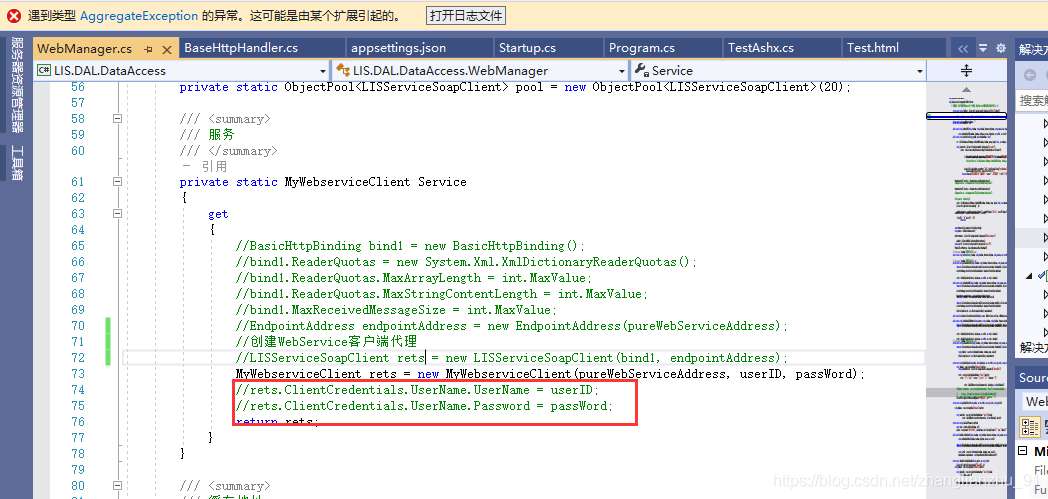
查了几天资料都无法突破。为此回到webservice的soap协议的本身来解决。soap的本质就是发布http服务接收按soap文档约定的xml串,然后按xml执行指定方法后返回xml个http调用客户端。然后就用httpclient来调用webservice就行了。
首先下载SOAPUI工具可以查看webservice请求的xml格式,还能测试调用,写代码前可以先用xml测试调用通了再写实现代码。
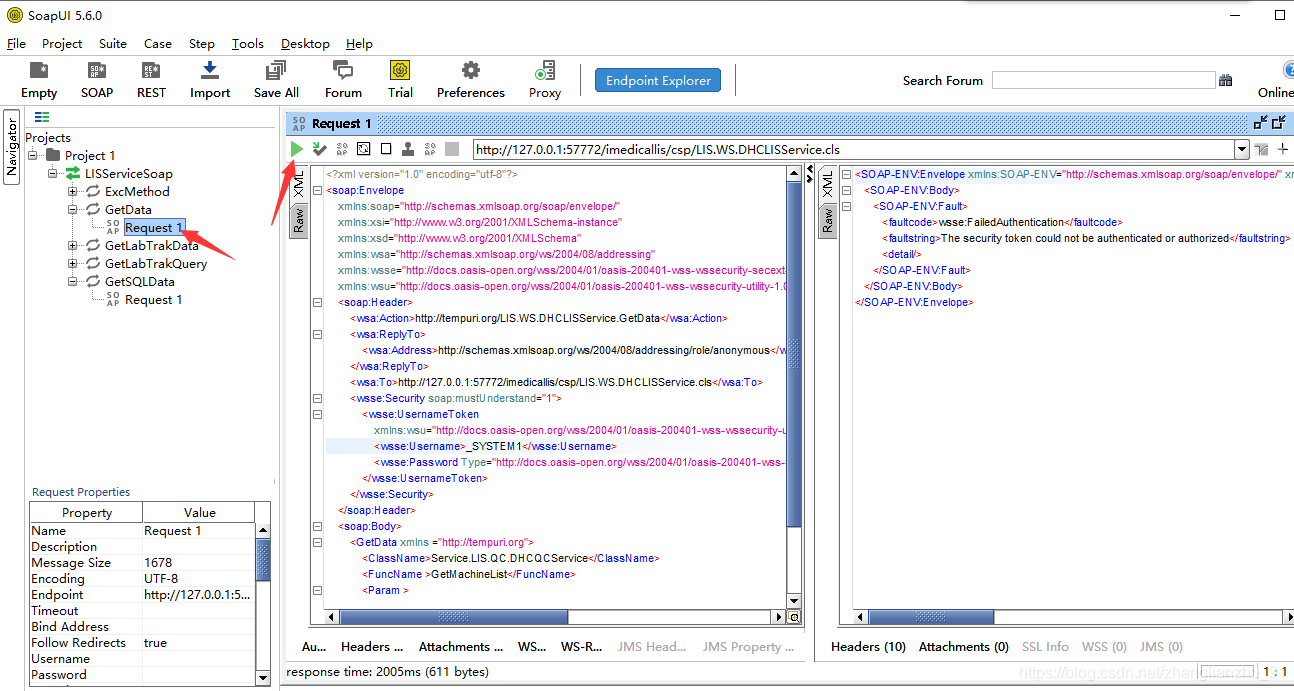
带用户密码验证的请求示例:
<?xml version="1.0" encoding="utf-8"?>
<soap:Envelope
xmlns:soap="http://schemas.xmlsoap.org/soap/envelope/"
xmlns:xsi="http://www.w3.org/2001/XMLSchema-instance"
xmlns:xsd="http://www.w3.org/2001/XMLSchema"
xmlns:wsa="http://schemas.xmlsoap.org/ws/2004/08/addressing"
xmlns:wsse="http://docs.oasis-open.org/wss/2004/01/oasis-200401-wss-wssecurity-secext-1.0.xsd"
xmlns:wsu="http://docs.oasis-open.org/wss/2004/01/oasis-200401-wss-wssecurity-utility-1.0.xsd">
<soap:Header>
<wsa:Action>http://tempuri.org/LIS.WS.DHCLISService.GetData</wsa:Action>
<wsa:ReplyTo>
<wsa:Address>http://schemas.xmlsoap.org/ws/2004/08/addressing/role/anonymous</wsa:Address>
</wsa:ReplyTo>
<wsa:To>http://127.0.0.1:57772/imedicallis/csp/LIS.WS.DHCLISService.cls</wsa:To>
<wsse:Security soap:mustUnderstand="1">
<wsse:UsernameToken
xmlns:wsu="http://docs.oasis-open.org/wss/2004/01/oasis-200401-wss-wssecurity-utility-1.0.xsd" wsu:Id="SecurityToken-29db7c92-1098-4717-b7fb-aac473632fec">
<wsse:Username>_SYSTEM1</wsse:Username>
<wsse:Password Type="http://docs.oasis-open.org/wss/2004/01/oasis-200401-wss-username-token-profile-1.0#PasswordText">SYS</wsse:Password>
</wsse:UsernameToken>
</wsse:Security>
</soap:Header>
<soap:Body>
<GetData xmlns ="http://tempuri.org">
<ClassName>Service.LIS.QC.DHCQCService</ClassName>
<FuncName >GetMachineList</FuncName>
<Param >
</Param>
<Session ></Session>
</GetData >
</soap:Body>
</soap:Envelope>
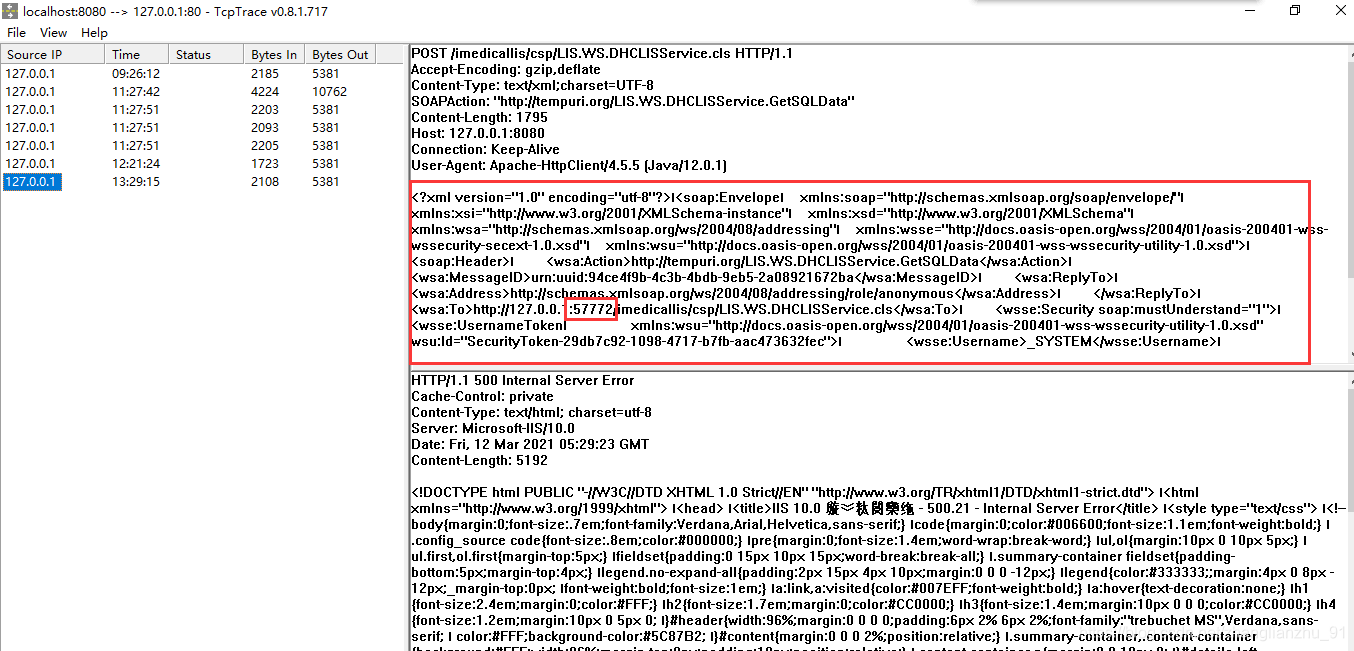
也能把调用服务的请求端口和TCPTrace工具配置的监听端口一致然后用这个工具抓包看别的程序成功请求的提交XML串。基于这个串再到SOAPUI测试直到测通。
然后就实现DotNetCore的调用代理类即可
using System;
using System.Collections.Generic;
using System.Net.Http;
using System.Net.Http.Headers;
using System.Text;
using System.Xml;
namespace LIS.DAL.DataAccess
public class MyWebserviceClient
private string Address = "";
private string UserName = "";
private string UserPass = "";
public MyWebserviceClient(string address, string userName, string userPass)
Address = address;
UserName = userName;
UserPass = userPass;
public string GetDataAsync(string ClassName, string FuncName, string Param, string Session)
string result = string.Empty;
string xml = "<?xml version=\"1.0\" encoding=\"utf-8\"?>";
xml += "<soap:Envelope xmlns:soap=\"http://schemas.xmlsoap.org/soap/envelope/\" xmlns:xsi=\"http://www.w3.org/2001/XMLSchema-instance\" xmlns:xsd=\"http://www.w3.org/2001/XMLSchema\" xmlns:wsa=\"http://schemas.xmlsoap.org/ws/2004/08/addressing\" xmlns:wsse=\"http://docs.oasis-open.org/wss/2004/01/oasis-200401-wss-wssecurity-secext-1.0.xsd\" xmlns:wsu=\"http://docs.oasis-open.org/wss/2004/01/oasis-200401-wss-wssecurity-utility-1.0.xsd\">";
xml += "<soap:Header>";
xml += "<wsa:Action>http://tempuri.org/LIS.WS.DHCLISService.GetData</wsa:Action>";
xml += "<wsa:ReplyTo>";
xml += "<wsa:Address>http://schemas.xmlsoap.org/ws/2004/08/addressing/role/anonymous</wsa:Address>";
xml += "</wsa:ReplyTo> ";
xml += "<wsa:To>" + Address + "</wsa:To>";
xml += "<wsse:Security soap:mustUnderstand=\"1\">";
xml += "<wsse:UsernameToken xmlns:wsu=\"http://docs.oasis-open.org/wss/2004/01/oasis-200401-wss-wssecurity-utility-1.0.xsd\" wsu:Id=\"SecurityToken-29db7c92-1098-4717-b7fb-aac473632fec\">";
xml += "<wsse:Username>" + UserName + "</wsse:Username>";
xml += "<wsse:Password Type=\"http://docs.oasis-open.org/wss/2004/01/oasis-200401-wss-username-token-profile-1.0#PasswordText\">" +
UserPass + "</wsse:Password>";
xml += "</wsse:UsernameToken>";
xml += "</wsse:Security>";
xml += "</soap:Header>";
xml += "<soap:Body>";
xml += "<GetData xmlns =\"http://tempuri.org\">";
xml += "<ClassName>" + ClassName + "</ClassName>";
xml += "<FuncName >" + FuncName + "</FuncName>";
xml += "<Param ><![CDATA[" + Param + "]]></Param>";
xml += "<Session >" + Session + "</Session>";
xml += "</GetData >";
xml += "</soap:Body>";
xml += "</soap:Envelope>";
HttpContent content = new StringContent(xml, Encoding.UTF8, "text/xml");
content.Headers.Add("SOAPAction", "http://tempuri.org/LIS.WS.DHCLISService.GetData");
using (HttpClient client = new HttpClient())
using (var response = client.PostAsync(Address, content))
result = response.Result.Content.ReadAsStringAsync().Result;
XmlDocument xmlDoc = new XmlDocument();
xmlDoc.LoadXml(result);
result = xmlDoc.InnerText;
if (!result.Contains("<Response>"))
result = "<Response><SQLResult><SQL><FunRet></FunRet></SQL></SQLResult><RetVal>-1</RetVal><Error>" + result + "</Error><Node></Node><RowCount>0</RowCount></Response>";
catch (Exception ex)
result = ex.Message;
return result;
public string GetSQLDataAsync(string SQLText, string Param, string Session)
string result = string.Empty;
string xml = "<?xml version=\"1.0\" encoding=\"utf-8\"?>";
xml += "<soap:Envelope xmlns:soap=\"http://schemas.xmlsoap.org/soap/envelope/\" xmlns:xsi=\"http://www.w3.org/2001/XMLSchema-instance\" xmlns:xsd=\"http://www.w3.org/2001/XMLSchema\" xmlns:wsa=\"http://schemas.xmlsoap.org/ws/2004/08/addressing\" xmlns:wsse=\"http://docs.oasis-open.org/wss/2004/01/oasis-200401-wss-wssecurity-secext-1.0.xsd\" xmlns:wsu=\"http://docs.oasis-open.org/wss/2004/01/oasis-200401-wss-wssecurity-utility-1.0.xsd\">";
xml += "<soap:Header>";
xml += "<wsa:Action>http://tempuri.org/LIS.WS.DHCLISService.GetSQLData</wsa:Action>";
xml += "<wsa:ReplyTo>";
xml += "<wsa:Address>http://schemas.xmlsoap.org/ws/2004/08/addressing/role/anonymous</wsa:Address>";
xml += "</wsa:ReplyTo> ";
xml += "<wsa:To>" + Address + "</wsa:To>";
xml += "<wsse:Security soap:mustUnderstand=\"1\">";
xml += "<wsse:UsernameToken xmlns:wsu=\"http://docs.oasis-open.org/wss/2004/01/oasis-200401-wss-wssecurity-utility-1.0.xsd\" wsu:Id=\"SecurityToken-29db7c92-1098-4717-b7fb-aac473632fec\">";
xml += "<wsse:Username>" + UserName + "</wsse:Username>";
xml += "<wsse:Password Type=\"http://docs.oasis-open.org/wss/2004/01/oasis-200401-wss-username-token-profile-1.0#PasswordText\">" + UserPass + "</wsse:Password>";
xml += "</wsse:UsernameToken>";
xml += "</wsse:Security>";
xml += "</soap:Header>";
xml += "<soap:Body>";
xml += "<GetSQLData xmlns = \"http://tempuri.org\">";
xml += "<SQLText>" + SQLText + "</SQLText>";
xml += "<Param>" + Param + "</Param >";
xml += "<Session>" + Session + "</Session>";
xml += "</GetSQLData>";
xml += "</soap:Body>";
xml += "</soap:Envelope>";
HttpContent content = new StringContent(xml, Encoding.UTF8, "text/xml");
content.Headers.Add("SOAPAction", "http://tempuri.org/LIS.WS.DHCLISService.GetSQLData");
using (HttpClient client = new HttpClient())
using (var response = client.PostAsync(Address, content))
result = response.Result.Content.ReadAsStringAsync().Result;
XmlDocument xmlDoc = new XmlDocument();
xmlDoc.LoadXml(result);
result = xmlDoc.InnerText;
if(!result.Contains("<Response>"))
result = "<Response><SQLResult><SQL><FunRet></FunRet></SQL></SQLResult><RetVal>-1</RetVal><Error>"+result+"</Error><Node></Node><RowCount>0</RowCount></Response>";
catch (Exception ex)
result = ex.Message;
return result;
这样就可以调通了额,适应所有webservice调用情况,要点就是回归soap协议,用httpclient发soapxml。结合抓包工具和soapui测试。
DotNetCore用工具生成的代理类按下图设置用户密码访问webservice一直报用户密码验证不通过。查了几天资料都无法突破。为此回到webservice的soap协议的本身来解决。soap的本质就是发布http服务接收按soap文档约定的xml串,然后按xml执行指定方法后返回xml个http调用客户端。然后就用httpclient来调用webservice就行了。首先下载SOAPUI工具可以查看webservice请求的xml格式,还能测试调用,写代码前可以先用xml测试调用通了再写实现代码。
文章目录前言一、简单的介绍一下Soap语法二、使用步骤1.修改appsettings.json配置文件2.新建SoapOptions类3.新建Soap帮助类4.新建请求参数类5.调用总结
添加服务引用的方式无法满足我请求Soap接口,所以写了个Soap帮助类,使用HttpClient的方式请求接口。
提示:以下是本篇文章正文内容,下面案例可供参考
一、简单的介绍一下Soap语法
一条 SOAP 消息就是一个普通的 XML 文档,包含下列元素:
必需的 Envelope 元素,可把此 XML 文档
1、在服务端实现一个SOAP Header类
public class CredentialSoapHeader : System.Web.Services.Protocols.SoapHeader
//验证身份的用户名
public string UserId
//验证身份的密码
[SoapDocumentService(RoutingStyle = SoapServiceRoutingStyle.RequestElement)]
2在新项目调用创建的服务
2.1在项目中右键点击你的web程序选择添加>选择服务应用>选择WCF WebSevice
2.2输入你运行WebService得到的地址点击下一步
成功后你能在项目中看到如下内容
2.3在项目中的调用
1需要在startUp中注入你添加的服务
<role rolename="saploginuser"/>
<user username="ykjt_admin" password="ykjt_123123" roles="saploginuser"/>
项目web.xml 里面配置用户验证方式
<security-constraint>
<web-resource-collection>
<http-method&g.
深度学习是一种人工智能技术,通常使用大型神经网络来处理复杂的输入数据。要深入学习 .NetCore,您可以从以下几个方面入手:
1. 学习 .NetCore 的基础知识,包括语言基础、框架原理等。
2. 学习深度学习基础知识,包括神经网络的工作原理、常用的深度学习算法等。
3. 学习使用 .NetCore 实现深度学习的方法。可以使用 .NetCore 的开发工具和库来构建神经网络模型并进行训练。
4. 练习使用 .NetCore 实现深度学习的练习题。可以在线上找到一些深度学习的练习题,并尝试使用 .NetCore 解决这些问题。
5. 阅读相关资料并查看深度学习的项目实例,以便了解如何在实际应用中使用 .NetCore 实现深度学习。


