关于SpringBoot单元测试RunWith注解没有提示,无法解析,没有导包提示的问题,笔者在此说明一下。
首先说明一下项目的环境
IDE是IDEA
创建项目使用的是Spring Initializr工具

JDK环境是1.8
SpringBoot版本是
<parent>
<groupId>org.springframework.boot</groupId>
<artifactId>spring-boot-starter-parent</artifactId>
<version>2.4.0</version>
<relativePath/>
</parent>
测试相关的依赖
<dependency>
<groupId>org.springframework.boot</groupId>
<artifactId>spring-boot-starter-test</artifactId>
<scope>test</scope>
</dependency>
笔者的测试类代码
package com.atguigu.delete;
import com.atguigu.delete.domain.Student;
import org.junit.jupiter.api.Test;
import org.springframework.beans.factory.annotation.Autowired;
import org.springframework.boot.test.context.SpringBootTest;
@SpringBootTest
public class DeleteApplicationTests {
@Autowired
private Student student;
@Test
public void contextLoads() {
System.out.println(student);
直接运行测试方法

测试完成,输出正确。
明明没有写
@RunWith(SpringRunner.class)
注解为什么依然测试通过了呢
这是因为SpringBoot的高级版本使用junit5进行单元测试,无需RunWith注解即可进行测试。
应该是2.0及以上版本都是如此,至少2.4.0是如此。以后测试是不是更简单了呢
另外说下一些小问题
首先,使用Spring Initializr创建的项目
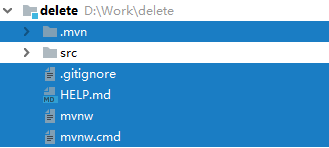
蓝色标注的文件或者文件夹可以删除,没什么用。
附上实体类和配置文件的代码
student.id=1
student.name=tomcat
student.gender=1
student.birth=2020/11/26
注意,如果没有配置日期格式化,日期的格式请按笔者的来
实体类代码
package com.atguigu.delete.domain;
import org.springframework.boot.context.properties.ConfigurationProperties;
import org.springframework.stereotype.Component;
import java.util.Date;
@ConfigurationProperties(prefix = "student")
@Component
public class Student {
private Integer id;
private String name;
private Integer gender;
private Date birth;
public Integer getId() {
return id;
public void setId(Integer id) {
this.id = id;
public String getName() {
return name;
public void setName(String name) {
this.name = name;
public Integer getGender() {
return gender;
public void setGender(Integer gender) {
this.gender = gender;
public Date getBirth() {
return birth;
public void setBirth(Date birth) {
this.birth = birth;
@Override
public String toString() {
return "Student[" +
"id=" + id +
", name=" + name +
", gender=" + gender +
", birth=" + birth +
']';
实体类代码没啥好说的,不要忘了注解
以上就是笔者对SpringBoot单元测试的说明,写的不好,请见谅
RunWith注解报错、报红、没有提示的问题,想必令很多Spring Boot初学者很头疼吧,其实博主也是初学者。下面博主简单来说一下这个问题的解决办法。 RunWith注解报错是因为缺少jar包,Spring Boot单元测试除了要导入Spring Boot本身的测试包,还需要导入junit的包,以下是博主的导入的所有依赖:<dependency> <groupId>org.springframework.boot</groupId> &...
@RunWith就是一个运行器
@RunWith(JUnit4.class)就是指用JUnit4来运行
@RunWith(SpringJUnit4ClassRunner.class),让测试运行于
Spring测试环境,以便在测试开始的时候自动创建Spring的应用上下文
–@RunWith(Suite.class)的话就是一.
一般情况下,使用@SpringBootTest后,Spring将加载所有被管理的bean,基本等同于启动了整个服务,此时便可以开始功能测试。
由于web服务是最常见的服务,且我们对于web服务的测试有一些特殊的期望,所以@SpringBootTest注解中,给出了webEnvironment参数指定了web的environment,该参数的值一共有四个可选值:
MOCK:此值为默
注:yml与yaml文件完全一样,只是叫法不同,如果properties文件与yaml文件同时存在时,首先加载properties文件
1、实体类Person
package com.dc.springboot01.bean;
import org.springframework.boot.context.properties.ConfigurationProperties;
import or...
@RunWith就是一个运行器
@RunWith(JUnit4.class)就是指用JUnit4来运行
@RunWith(SpringJUnit4ClassRunner.class),让测试运行于Spring测试环境
@RunWith(Suite.class)的话就是一套测试集合,
在使用 spring-test 的过程中,有两个 runner 可以选择,分别是 SpringRunner 和 SpringJUnit4ClassRunner。
如果是在 4.3 之前,只能选择 Sp
public ConfigurableApplicationContext run(String... args) {
StopWatch stopWatch = new StopWatch();
stopWatch.start();
ConfigurableApplicationContext context = null;
Collection<SpringBootExc...
在SpringBoot项目中要定义一个主配置类,用于管理该类的同等级包下所有的 java 文件,在主配置类中 要定义一个注解 @SpringBootApplication ,和一个 run 方法
@SpringBootApplication 属于 import org.springframework.boot.autoconfigure.SpringBootApplication;
SpringApplication.run() 属于 import org.springframework.boot.Spri
解决SpringBoot中SpringApplication没有run方法
在SpringBoot项目中要定义一个主配置类,用于管理该类的同等级包下所有的 java 文件,在主配置类中 要定义一个注解 @SpringBootApplication ,和一个 run 方法
@SpringBootApplication 属于 import org.springframework.boot.autoconfigure.SpringBootApplication;
SpringApplication.run()
SpringBoot 2.5.5
spring-boot-starter-test 2.5.5
2、该问题的起因是在测试类中使用@RunWith注解,发现找不到该类,到依赖里从父依赖到子依赖都没有找到junit ?
只找到一个相似的,junit-jupiter,初步估计是junit的替代品。到百度一查,发现确实如此。
那么就简单了,使用junit-jupiter,不再使用


