Hi! I am a new edge impulse and arduino user and I am having problems with the edge impulse cli. I’ ve just installed the latest python and node updates and when i type “npm install -g edge-impulse-cli” in the cmd I get these errors:
npm ERR! code ENOLOCK
npm ERR! audit This command requires an existing lockfile.
npm ERR! audit Try creating one first with: npm i --package-lock-only
npm ERR! audit Original error: loadVirtual requires existing shrinkwrap file
npm ERR! A complete log of this run can be found in:
npm ERR! C:\Users\Iñaki\AppData\Local\npm-cache_logs\2021-05-18T09_41_16_553Z-debug.log
I tried the suggestion ( “npm i --package-lock-only”) and this is what I get :
npm ERR! code EPERM
npm ERR! syscall open
npm ERR! path C:\Windows\System32\package-lock.json
npm ERR! errno -4048
npm ERR! Error: EPERM: operation not permitted, open ‘C:\Windows\System32\package-lock.json’
npm ERR! [Error: EPERM: operation not permitted, open ‘C:\Windows\System32\package-lock.json’] {
npm ERR! errno: -4048,
npm ERR! code: ‘EPERM’,
npm ERR! syscall: ‘open’,
npm ERR! path: ‘C:\Windows\System32\package-lock.json’
npm ERR! }
npm ERR!
npm ERR! The operation was rejected by your operating system.
npm ERR! It’s possible that the file was already in use (by a text editor or antivirus),
npm ERR! or that you lack permissions to access it.
npm ERR!
npm ERR! If you believe this might be a permissions issue, please double-check the
npm ERR! permissions of the file and its containing directories, or try running
npm ERR! the command again as root/Administrator.
npm ERR! A complete log of this run can be found in:
npm ERR! C:\Users\Iñaki\AppData\Local\npm-cache_logs\2021-05-18T09_41_25_824Z-debug.log
If anyone could help I’d really appreciate it!!
Can you try using this command:
npm install edge-impulse-cli -g --force
Let me know if it works.
Regards,
Louis
Hello
@louis
! Thanks for your answer. unfortunately I still get this:
C:\Windows\System32>npm install edge-impulse-cli -g --force
npm WARN using --force Recommended protections disabled.
npm WARN deprecated
@zeit
/dockerignore@0.0.5: “
@zeit
/dockerignore” is no longer maintained
npm WARN deprecated har-validator@5.1.5: this library is no longer supported
npm WARN deprecated request-promise@4.2.6: request-promise has been deprecated because it extends the now deprecated request package, see
https://github.com/request/request/issues/3142
npm WARN deprecated request@2.88.2: request has been deprecated, see
https://github.com/request/request/issues/3142
added 295 packages, and audited 296 packages in 24s
14 packages are looking for funding
run
npm fund
for details
5 vulnerabilities (1 low, 4 moderate)
Some issues need review, and may require choosing
a different dependency.
Run
npm audit
for details.
C:\Windows\System32>npm audit
npm ERR! code ENOLOCK
npm ERR! audit This command requires an existing lockfile.
npm ERR! audit Try creating one first with: npm i --package-lock-only
npm ERR! audit Original error: loadVirtual requires existing shrinkwrap file
npm ERR! A complete log of this run can be found in:
npm ERR! C:\Users\Iñaki\AppData\Local\npm-cache_logs\2021-05-18T18_42_13_735Z-debug.log
It seems that the logs you are showing after the
npm install edge-impulse-cli -g --force
are only warnings. I guess it should work now. Let me know
Regards,
Louis
Aren’t these (at the end of my previous message) the same errors that I was getting before?
npm ERR! code ENOLOCK
npm ERR! audit This command requires an existing lockfile.
npm ERR! audit Try creating one first with: npm i --package-lock-only
npm ERR! audit Original error: loadVirtual requires existing shrinkwrap file
I kept going with the process and the “edge-impulse-daemon” command is not recognised as such.
Thank you very much!!
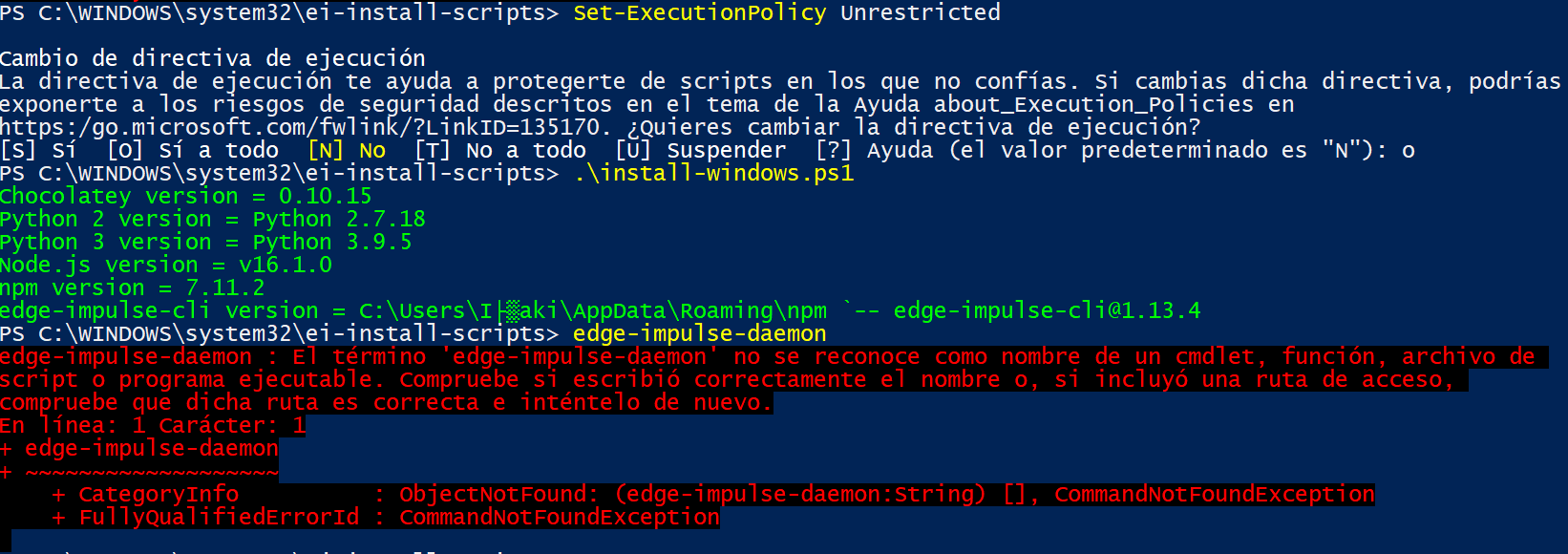
Hello there!! I’ve tried running the command prompt as an admin. It aparently works since I don’t get any more errors with de edge-impulse-cli installation. However, the “edge-impulse-daemon” command is still not recognised as such. This is my command prompt screen.
C:\WINDOWS\system32>npm install -g edge-impulse-cli --force
npm WARN using --force Recommended protections disabled.
npm WARN deprecated
@zeit
/dockerignore@0.0.5: “
@zeit
/dockerignore” is no longer maintained
npm WARN deprecated har-validator@5.1.5: this library is no longer supported
npm WARN deprecated request-promise@4.2.6: request-promise has been deprecated because it extends the now deprecated request package, see
https://github.com/request/request/issues/3142
npm WARN deprecated request@2.88.2: request has been deprecated, see
https://github.com/request/request/issues/3142
changed 295 packages, and audited 296 packages in 21s
14 packages are looking for funding
run
npm fund
for details
2 low severity vulnerabilities
Some issues need review, and may require choosing
a different dependency.
Run
npm audit
for details.
C:\WINDOWS\system32>npm audit
found 0 vulnerabilities
C:\WINDOWS\system32>edge-impulse-daemon
“edge-impulse-daemon” no se reconoce como un comando interno o externo,
programa o archivo por lotes ejecutable.
Alternatively, you can remove your npm package by doing
npm uninstall -g edge-impulse-cli
.
And then use this script for the installation:
Thanks
@louis
!! the script seems to work fine when it comes to downloading but the edge-impulse-daemon command is still not recognised in the command prompt nor the powershell (I’ve also followed the firmware and arduino-cli instructions).
Hi! I have an issue regarding the installation of Edge Impulse CLI. Hoping for a response ty.
Screenshot (404)
1920×1080 249 KB
Install [Node.js]<<install okay
Install the CLI tools via:
npm install -g edge-impulse-cli --force
<<Error happen with log:
C:\Users\500018>npm install -g edge-impulse-cli --force
npm WARN using --force Recommended protections disabled.
npm WARN deprecated har-validator@5.1.5: this library is no longer supported
npm WA…
Hello,
I have a problem to install Edge Impulse CLI tools, the prompt shows me an error saying that request for node.js is not longer available.
Also I cannot run the Impulse daemon
npm install -g --force edge-impulse-cli
npm WARN using --force I sure hope you know what you are doing.
npm WARN deprecated @zeit/dockerignore@0.0.5: “@zeit/dockerignore” is no longer maintained
npm WARN deprecated request@2.88.2: request has been deprecated, see
https://github.com/request/request/issues/3142
Hello,
I am getting errors while trying to install edge impulse cli through command prompt. Can anyone help me to resolve these errors.
Thanks.
C:\Users\Admin>npm install -g edge-impulse-cli
npm WARN deprecated @zeit/dockerignore@0.0.5: “@zeit/dockerignore” is no longer maintained
npm WARN deprecated har-validator@5.1.5: this library is no longer supported
npm WARN deprecated request-promise@4.2.4: request-promise has been deprecated because it extends the now deprecated request package, s…